Você está no 3DFinder
Buscamos em Thingiverse, MakerWorld e Printables ao mesmo tempo para te dar o melhor de cada uma.
Descrição
I love the box by MrElektro@MrElektro_32607 . I wanted to create different size boxes and also wanted a stackable version. I've not had much luck editing and scaling .step files . I'm also concerned that things like wall thickness won't scale well.
Features:
- Fully Paramteric - just tell OpenScad the Height, Width and Depth
- Option for a stacking version
- Option for Voronoi patttern
- Option for hex pattern
Using OpenSCAD
- download OpenSCAD [https://openscad.org/downloads.html](https://openscad.org/downloads.html)
- open the .scad file
- make any changes you need
- Use F5 to preview the model or via the menu Design/Preview
- Once you are happy with the model use F6 to Render the model or via the menu Design/Render
- Use F7 to Export the STL or via the menu File/Export/STL
You can find shortcuts for preview, render and STL on the menu bar
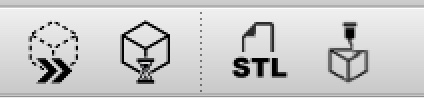
Customising the Model
- Choose either the sloted, hex or Voronoi version
- If you need to understand the OpenSCAD language start here with the Cheat Sheet
- In the OpenSCAD file find these lines and change as needed
wallthickness = 3; // Wall Thickness
box_height = 50; // Height of the Box
box_width = 140; // Width of the Box
box_depth = 80; // Depth of the Box
box_radius = 5; // Radius of the rounded corners
- Rendering ( see F6 above ) takes about 20 seconds on a Mac. Beware large Voronoi boxes can take a few miniutes to render.
- To print you export the STL from OpenSCAD and the slice it.
Voronoi version
There are options in the Voronoi version to use the same pattern on all sides or to use a random pattern. I suggest you start with the standard setup. Voronoi starts to take a long time to render when you increase the size and or number of patterns. So start simple and go from there.
Hex Version
Use the openSCAD files in the Storage Box Hex Folder
33 Pattern Version
This option is a bit more expeimental. But there some really nice patterns.
It uses a openSCAD file from [https://tecnoloxia.org/100hex](https://tecnoloxia.org/100hex) . Some of the patterns are not working ( see comments in hexpattern.scad ) . Suggest you enable fast-csg in the openSCAD Preferences.
To use
- Load both the Storage Box Patterned and hexpattern file from the Storage Box Pattern Folder
- Set the pattern number e.g. pattern = 1; in hexpattern.scad - Important save the file
- Switch to the Storage Box Patterned.scad file render and export the STL
Note if you get the error WARNING: No top level geometry to render its because you tried to render the include file hexpattern.scad . You need to render Storage Box Patterned.scad
Printing
I used
- PLA 15% infill.
- 0.20mm Speed
- Printed with the base on the build plate
- Supports - Build plate support for the stackable version otherwise no supports.
Storage box 30+ patterns - Stackable - Parametric - OpenSCAD
Publicado em 23 de dez de 2025