Você está no 3DFinder
Buscamos em Thingiverse, MakerWorld e Printables ao mesmo tempo para te dar o melhor de cada uma.
Descrição
Advantages of this Coaster - Maker:
Provides a small ring around your coaster, helping to ensure any condensation does not run off the coaster.
Customizable text and font.
Customizable size.
Stackable!
Added bonus of a storage for the coaster. The storage really just makes the stack look nicer. As shown in the gif, the coasters fit together without the storage.
To customize any part:
The text1 variable is where you input your text. If you don't want text, leave it blank. The TextSize variable is pretty self explanatory, the size of the text. Font is described below (only used if you have text). Finally, coasterRadius is the radius of your coaster in mm. It defaults to 47.5, the average radius of coasters around my house. Change any of these, it is your coaster!
Fonts:
So you want to customize the font? Easy to do! Go to the help drop down list at the top of the screen, and select Font List, shown in figure 1. Next, find the font you want. Please note OpenSCAD does not show the font preview in the font list. Next, click on the font you want, and select copy to clipboard, show in figure 2. Finally, paste your font in the font variable and delete the quotation marks around it. (Shown in fig. 3.) MAKE SURE TO RENDER YOUR COASTER AFTER THIS. There is a likely possibility your text now extends over your coaster. Easy fix, just change the size variable or the coaster size!
Coloring your Coaster:
Before coloring anything, set the base color of your coaster in the object selection menu on the left side of your screen (next to Process). To color your coaster, use the “Paint Fill” feature from the Bambu Slicer paint tool to color your text. Simply click on your text with the color you have loaded into your AMS. You will have to go letter by letter. To paint the rim, I suggest painting the top of the rim as well as both of the sides (inside and outside). Painting the chamfer is a bit more complicated. I suggest looking at the coaster from the bottom and click-dragging accross the chamfer to paint it.
How to Use the Storage:
The “storage” (better known as storage) is very simple and easy to customize. First, put your coaster's radius into the coasterRadius variable. Next, put the number of coasters you want stored in the numCoaster variable. That's it! Very simple! To use the lid, simply input the coaster radius into the coasterRadius parameter. This storage is made for the stackable coasters, but not limited to them. It also works with any previously printed coasters from my last upload. Please feel free to check it out if wanted!
Final Thoughts:
When using the cool infill patterns showing through the coaster, make sure your base is a contrasting color from the text, as well as the infill is also contrasting from the text. If you are better at OpenSCAD than me (anyone), then please feel free to remix this model and customize it however might be beneficial! Recommendations: 2 line text, images. Please feel free to comment any recommendations or constructive feedback, I will always be open to optimizing and improving the model! If you really liked this model, please like and share the page. Also, I would like to encourage you to check out my other models if you really really enjoyed this model. Thank you!
Figure 1:
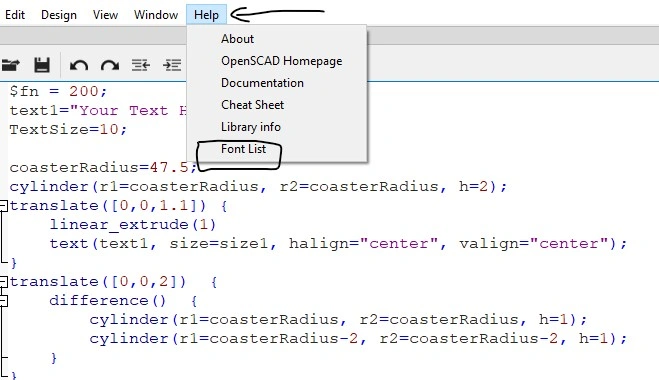
Figure 2:
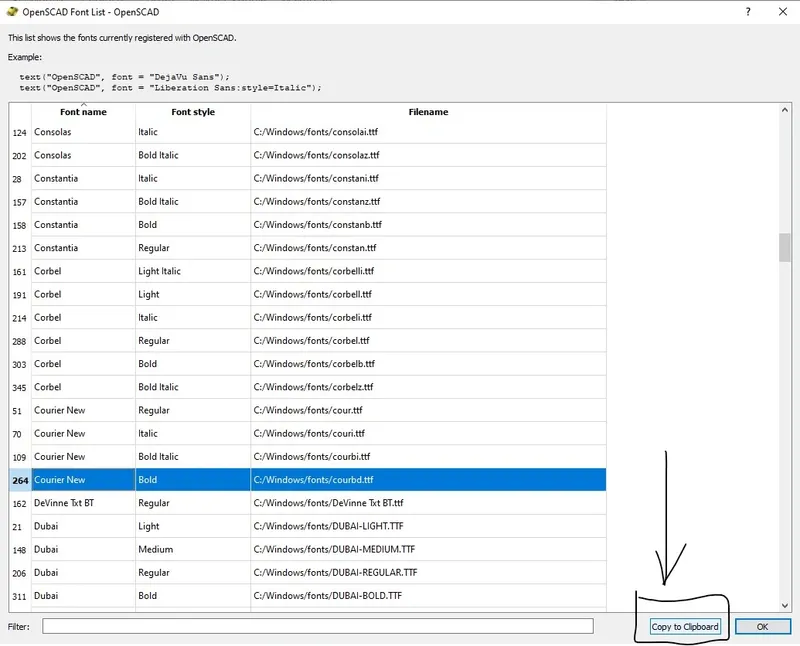
Figure 3:

Interlocking Customizable Coaster Generator (OpenSCAD)
Publicado em 12 de jul de 2024