Você está no 3DFinder
Buscamos em Thingiverse, MakerWorld e Printables ao mesmo tempo para te dar o melhor de cada uma.
Descrição
Introduction
Inspired by Alex Chappel's “Stackable Assortment Box Collection”, which you can find at alch.shop btw.
I didn't like the bump at the top of the boxes, as I wanted to have just straight walls. Also I have absolutely no need for a label, and it should fit into my IKEA ALEX drawers as perfectly as possible.
So I started to design my own variant of the system.
Btw. also have a look at my awesome handles for IKEA ALEX.
My requirements for the boxes:
- Optimal size for IKEA ALEX drawers (but it's fully customizable in Fusion 360)
- Base grid which prevents the boxes from moving around
- The boxes have to be stackable
- Bigger boxes should also be stackable on top of multiple smaller ones or perpendicular to the box(es) below (look at the photos, then you know what I mean)
The last one became (by far) the most difficult part of the design, which cost me many evenings and nights. Most difficult, because the parametrization should still work together with it, and Fusion always destroyed steps of the design if I e.g. made the box smaller and then bigger again. Let's face it, Fusion 360 can be quite a b%*&h sometimes 😁.
Support my work
For non-Prusa parts and filaments, check out 3DJake (International, UK, Germany, France).
I'll get a small cut of any order you fulfil using these links (at no additional cost for you 😉).
If you want to support my work directly, you can buy me a coffee.
If you want to order a Prusa printer and earn some Prusameters (I will also get some), you can use my referral code "@Whity" at checkout or click one of the following links
(the code only works for the first order of each printer model):
| CORE One | CORE One Kit | MK4 | MK4 Kit | MINI+ | MINI+ Kit | XL | SL1S | SL1S+CW1S |
Also check out my other models.
Printing
The easiest way to select the boxes you want to print is to use the 3mf file in PrusaSlicer, which includes all the STLs, if the grid size and height is right for you.
All STLs are hidden by default.
- Click the box you want to print to mark it
- Click the plus icon at the top (Add instance) to make a copy of it (Or press “+” on the keyboard)
- Move the copy to the print bed (it's automatically unhidden)
Before starting to print, verify that the bridging at layer 22 is at an angle of 45° if you print boxes with a size larger or equal 2x2. Normally should be correct, but sometimes it tries to do straight bridging which is less than ideal.
Parametrization
If the pre-made STLs don't fit your needs, you can download the Fusion 360 file from the files section and modify the parameters as needed to customize it.
IMPORTANT:
You can still “destroy" the design, or better, some of the steps in the history timeline, if you set a completely wrong parameter (e.g. a height which is to small). It will very likely not recover, even if you set it back to the old value. If that happens, just re-open the original version, or you can try to fix it yourselves, but that can be tricky.
1. Open the “Change Parameters” window
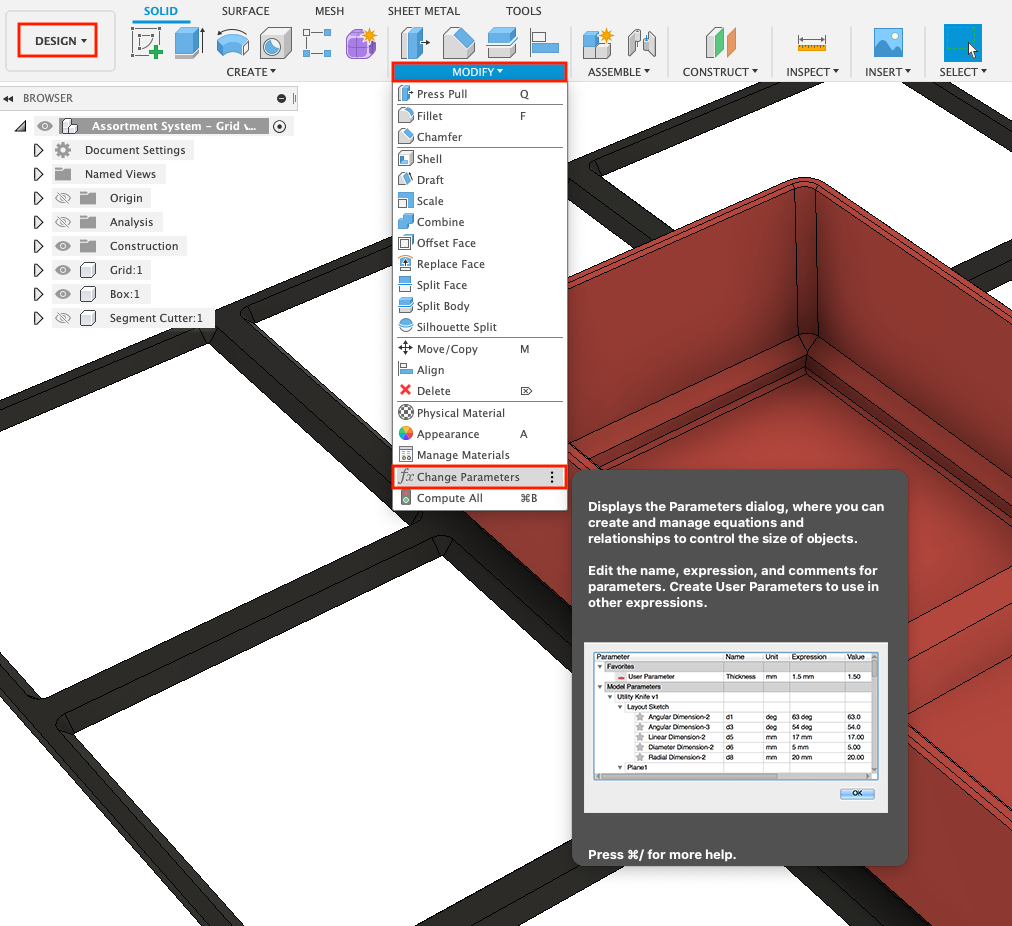
2. Modify the parameters as needed
You should only change parameters in the favorites section.
With the comments I added, they should (hopefully) be quite self-explanatory:

Notes:
1) Set the size of a single segment (SegmentSize*) and the base height first (BoxHeightBase). The base height is the box with the lowest height you want to use. Then use the units value (BoxHeightUnits) to make taller ones. This guarantees that they stack correctly, see below.
2) Because they stack inside each other, the height of a 2U box is NOT 2 * 1U.
E.g. with the default “BoxHeightBase” of 25mm, the 2U is 46.4mm in height and a 3U is 67.8mm. This guarantees that stacking three 1U or one 1U and one 2U is the same height as a 3U box.
The correct height is calculated automatically depending on the parameters you set.
3) If “BoxSegmentsX” is set to “1”, there will be one step in the history timeline which gets a warning (turns yellow). Just ignore it, that's fine (don't touch it).

4) I didn't test many different settings except of the “BoxHeight*" and “BoxSegments*” parameters, but they should work fine, at least within a certain range.
Stackable Assortment System for IKEA ALEX (Parametrized)

Publicado em 16 de fev de 2025
Gostou deste modelo? Crie uma conta grátis para salvar seus favoritos e voltar a eles depois.
Criar conta