Você está no 3DFinder
Buscamos em Thingiverse, MakerWorld e Printables ao mesmo tempo para te dar o melhor de cada uma.
Descrição
Create you own pixel art!
Each pixel is 10mm*10mm and clicks nicely onto the board. If you want you could print multiple smaller pixel boards and glue them together onto a wooden board to create a bigger picture.
Printing tips
I have provided an example pixel board at 8x8 pixel size but if you want to create your own, this is how you can in PrusaSlicer.
All prints were done with:
- 0.10mm Layer height
- 15% Infill
Pixel board
Add the Node to your slicer, create copies and arrange them the way you want. They are 10mm*10mm so they are easy to arrange.
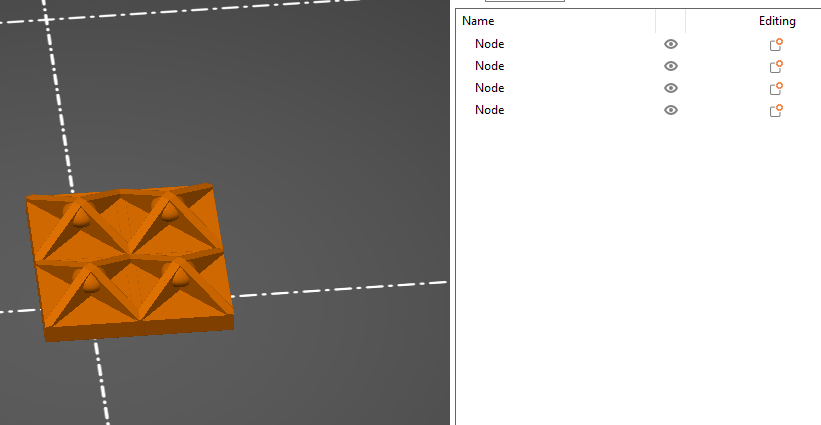
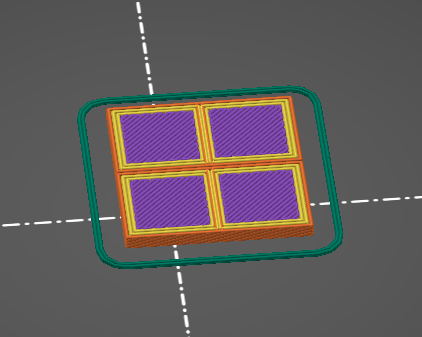
If you slice it now, the slicer will act like they are 4 different object and the result will look like this:
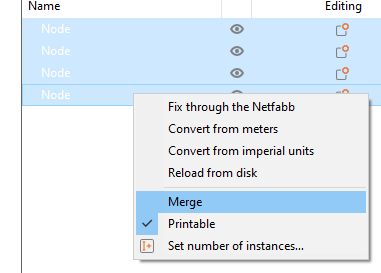
Instead you should Merge the objects in the slicer:
If you slice now it will be handled as a single object:
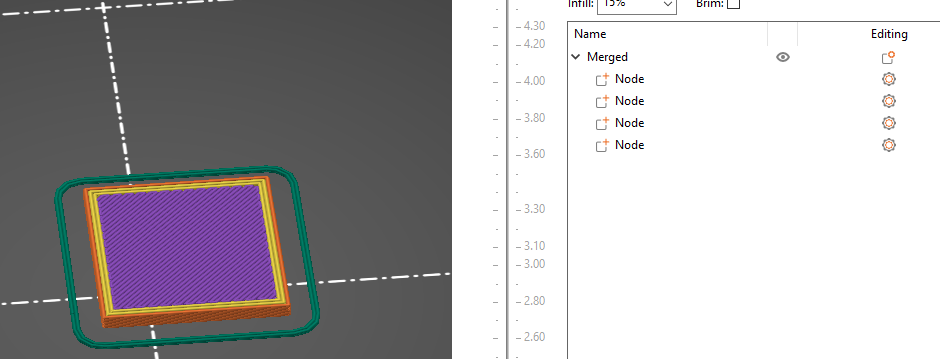
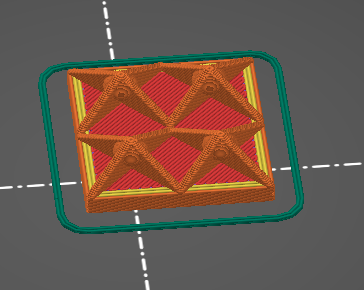
The board is quite thin so it's susceptible to warping at larger sizes, so you might want to print it with a Brim!
If you plan to glue the boards onto another surface you could try cutting 1mm from the bottom of the pixel boards the make it thinner since it wouldn't need that much structure.
Pixels
I've included pixel with 3 different attachment sizes, I recommend the Pixel_1.7 but I've included the others since they might work better for other printers.
With my mini the pixels were warping and coming of the build plate at bulk printing (around 32 pixel at a time), so you might need to use a Brim or some other tricks to keep them on the build plate (or just stick to printing 8 pixel at a time).
I've cut of the corners from the Pixel_1.7_Chamfered, hoping it would reduce the warping since all pixels started warping around the edges.
