Você está no 3DFinder
Buscamos em Thingiverse, MakerWorld e Printables ao mesmo tempo para te dar o melhor de cada uma.
Descrição
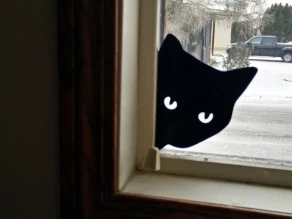
Angry Guard Cat
This is an easy-to-print flat model of an angry cat that you can put in your window to guard your house. There are two versions included: one with paws and one with the head only.
Update 2025-07-26
I added a couple versions (with paws and with head only) with the eyes filled in on the middle layers, providing the capability to print the models with colored eyes.
The model should be sliced with 0.2 mm layer height. Start your print with filament for the fur color, preferably black. Swap filament for the eye color after the 3rd layer has printed. Swap filament back to the fur color after the 5th layer has printed. I've also included versions of these models with a filament swap tower.
Dual Colors with a Single Extruder
Printing multiple colors with a single extruder is really easy with a direct drive FDM printer if each layer has only a single color, as in this model.
I printed my dual-color prints with a single extruder by pausing the printer after the fur part had completed and then swapping in a spool of yellow filament. My printer doesn't support the M600 pause command so I have to pause it manually. The printer shows me the height it's at while it's printing and as soon as it finishes the third layer I pause it using the menu on the printer control panel. I do the same to pause it after the fifth layer.
Most printers support the M600 G-code command, so you may be able to add pauses in using your slicer program. You may find the Colorprint tool useful if your printer supports the M600 command, but your slicer doesn't support adding pauses: [https://www.prusaprinters.org/color-print/](https://www.prusaprinters.org/color-print/)
After switching filament colors, the nozzle may not be primed and the first bit printed may be under-extruded, so to compensate for this, I always add in a little cylindrical tower and get the slicer to start the layers on that tower. For Cura, the settings that control this are Layer Start X and Layer Start Y, which are in the Travel section. I've included versions of the model with filled eyes that has a filament swap tower at XY = [100,37] for the model with paws and a filament swap tower at XY = [48,44] for the model with the head only.
Swapping Filaments
When changing filament, never yank the old filament out as this may cause the extruder to move and you don't want the extruder moved even the slightest when the printer is paused mid-print. Instead, cut the filament off where it enters the extruder, being very careful to not cut any wires, and then start a load filament process on the printer. After it extrudes the filament left inside the extruder, just feed in the new spool of filament following it.
Related Model
I also have a similar model that you might be interested in: the Peeking Cat model.
Remix Details
I liked Cole-zombie's Cat Guard, but I needed it without pegs so that I could put it in a window and his model looked too friendly to be an effective cat guard, so I removed the pegs and made some new eyes to make him look angry. I also wanted one in my door window and there wasn't room for the paws so I created a version with the head only.

Gostou deste modelo? Crie uma conta grátis para salvar seus favoritos e voltar a eles depois.
Criar conta