Você está no 3DFinder
Buscamos em Thingiverse, MakerWorld e Printables ao mesmo tempo para te dar o melhor de cada uma.
Descrição
This is a remix of the encoder cart in the Enraged Rabbit Carrot Feeder to act as a standalone filament motion sensor for your 3D printer.
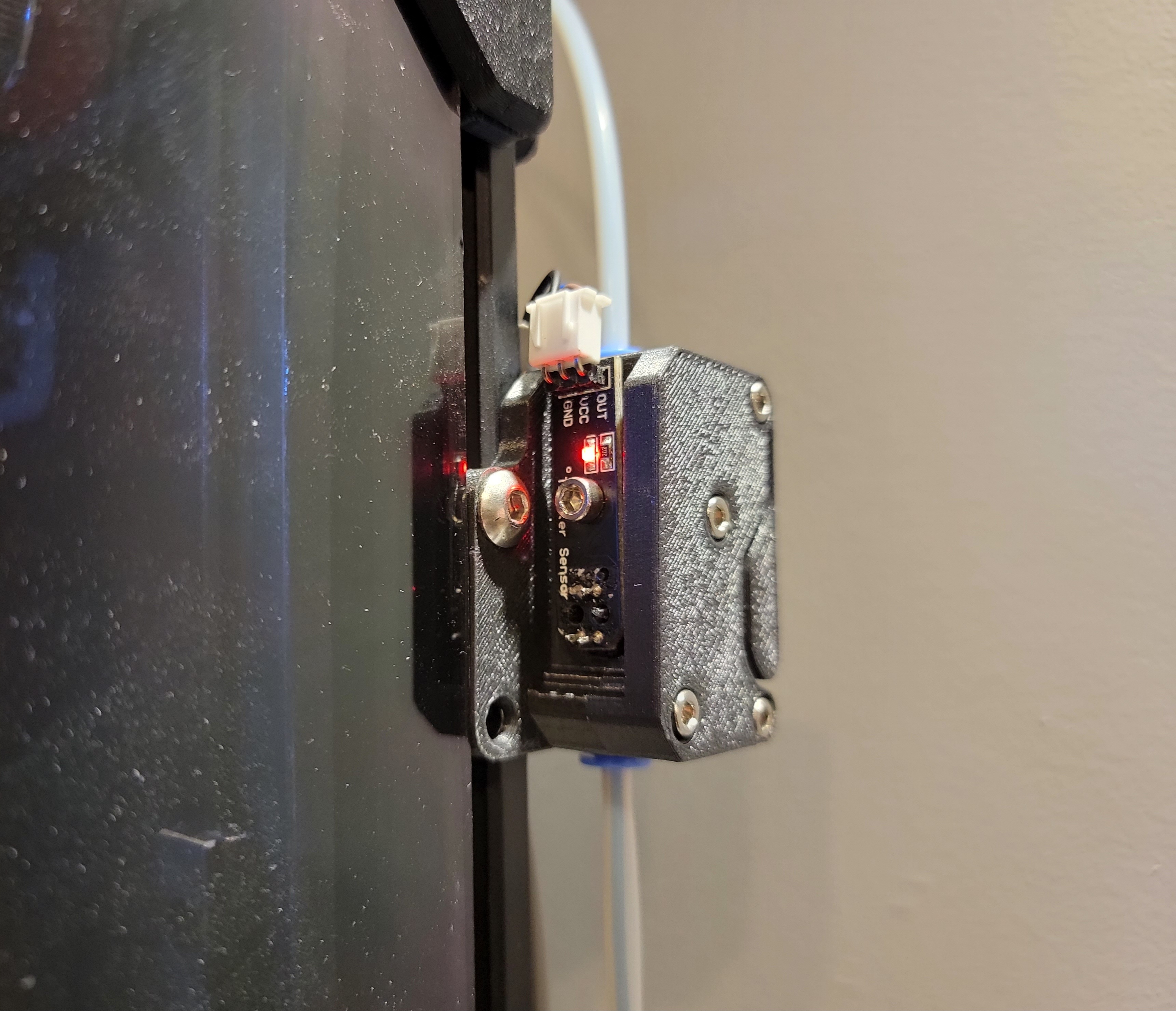
Unlike other filament motion sensors, it adds very little resistance and I have no issues with extruding filament @ 30 mm/s on my Voron 2.4 with Stealthburner/CW2.
And unlike a typical filament sensor, a filament motion sensor will also pause the printer when motion of the filament doesn't match the filament being requested by the extruder. As a result, this can also help identify issues by pausing ther printer when the extruder is skipping.
BOM:
- 1 TCRT5000 sensor PCB
- 1 MR623ZZ bearing
- 2 ECAS04 bowden fittings
- 1 Bondtech BMG idler with bearings
- 4 M3 threaded inserts
- 4 M3x20 BHCS to secure cart together
- 1 M3x6 or M3x8 BHCS or SHCS to secure encoder to cart
- 1 M3x16 BHCS or SHCS for bearing
- 1-2 M3x8 or M4x8 or M5x8 + T-Nuts for mounting to extrusion
NOTE: A lot of these parts can be found on Amazon. The BMG idler doesn't have to be top quality since it's only acting as an indicator of motion to the sensor. This cheap gear set would be more than sufficient.
Assembly:
This model is based on version 2 of the ERCF encoder cart. Unlike the previous version, the 2 (left and right) parts are the only ones required to make it work.
See ERCF manual (Pages 49-53)
- Insert 4 heat inserts into “Right” piece (page 49)
- Insert BMG idler assembly (page 49)
- Insert “Left” piece, ensure idler shaft is secured and fasten together with 4 M3x20 BHCS (page 50)
- Ensure idler spins freely (page 51)
- Secure bearing with m3x16 (page 51)
- Secure encoder sensor to top with m3x6 or m3x8 screw (similar to page 53)
- Mount to frame
- Connect cable to endstop port
Wiring:
Connect to an endstop port:
- 5V → 5V
- GND → GND
- OUT → Sensor In
Klipper:
Below is a sample config that needs to be added to your printer.cfg for an Octopus 1.x/Pro
[filament_motion_sensor filament_sensor]
switch_pin: PG10
pause_on_runout: True
detection_length: 10
extruder: extruder
runout_gcode: sensor_runout
[gcode_macro sensor_runout]
gcode:
{ action_respond_info("Filament Runout") }
If you don't want the printer to pause and just want to use the sensor for identifying extruder issues (eg. extruder skipping) you can set “pause_on_runout” to “False”. “Filament Runout” messages will be displayed in the console whenever the sensor detects a lack of motion.
Gostou deste modelo? Crie uma conta grátis para salvar seus favoritos e voltar a eles depois.
Criar conta