Você está no 3DFinder
Buscamos em Thingiverse, MakerWorld e Printables ao mesmo tempo para te dar o melhor de cada uma.
Descrição
Open PC stand/case
I wanted to have my PC on the open benchtable. The original one is really nice but costs a bit too much. Since I have 3D printer, I reckoned I can print my own. There are many models here on printables, but each of them has some flaw (in my eyes) or is too big to fit on Ender 3. So I went and designed my own open PC stand/case. If you go for ATX variant without disc drive, expect around 300-350g of filament used. I recommend using PETG (which is what I did) or ABS or ASA, definitely not PLA which will not do well with higher temperatures. I have used 3 perimeters/walls and 20% gyroid infill for printing this. PCI brackets top joint/mATX/ATX extender need supports.
What to print
There are three version based on how big your motherboard is, you can find the models under thei own folders. You can choose mITX, mATX or ATX. The only difference is how long the stand will be and on how many places you can screw down your motherboard.
Accessories
There are accessories in their own folder - these are models of PCI brackets to hold your PCI(e) cards in place and they slide in on the main stand. You can figure it out from images. There is also disc drive extension, you need to print two for each side of the drive. If you choose to add drive, it will be underneath the board.
Wait, where is the rest?
I decided not to use/support third row of screws on mATX and ATX boards. This part of the board isn't loaded by any weight that would need supporting, the most heavy things like CPU cooler and GPU (slot) are located between the first two rows of screws and those are supported. When you are inserting RAM or 24pin into the motherboard, support the board from underneath - think like eating a burger with your hands - fingers under the board and thumbs pressing the RAM/24pin in.
External material needed
Everything holds together with M4x16mm screws (you need 6 of them), only the disc drive extension is screwed into the main stand by M4x50mm screws (you need 4 of them). You also need 10mm M3 standoffs for motherboard to screw in, these will make their own threads, just force them in. mITX needs 4 standoffs, mATX and ATX need 6. You can run mATX and ATX boards on mITX stand but they will overlap and be unsupported where they overlap - In that case, you would need just 4 standoffs.
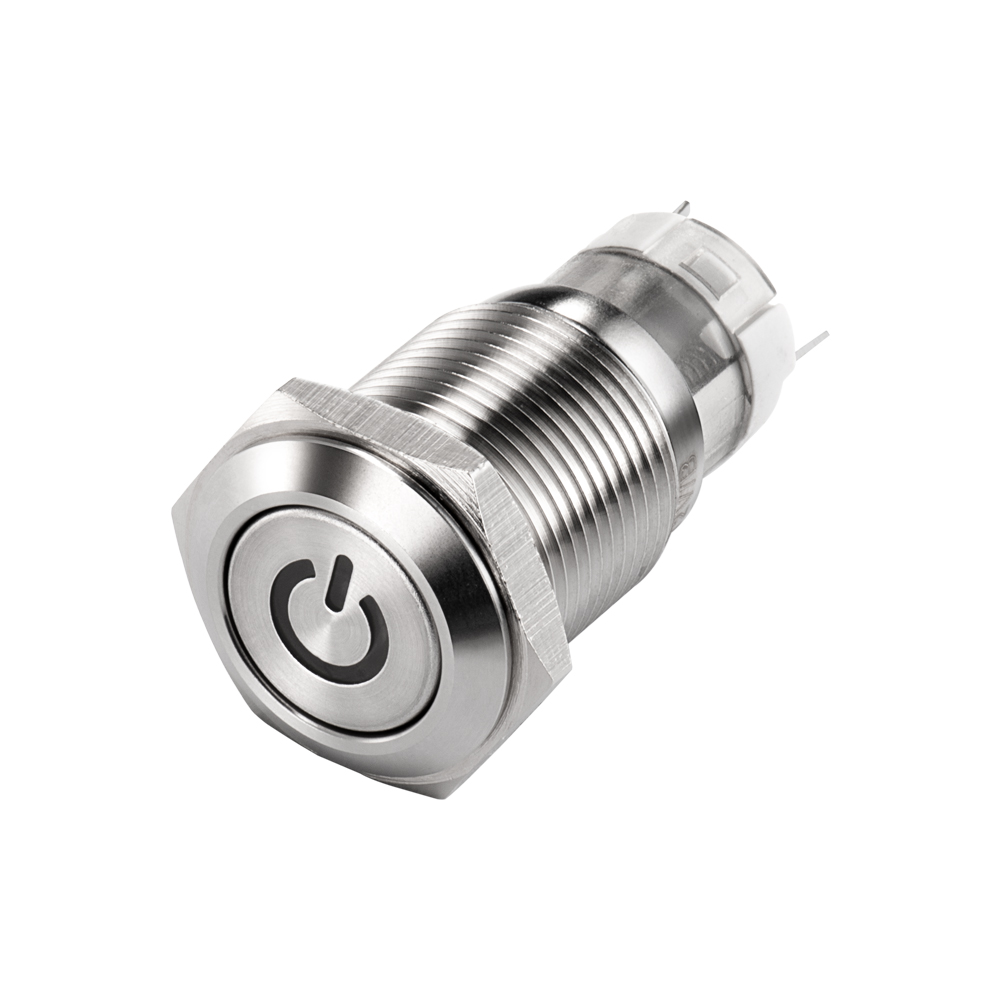
For power button I use anti-vandal stainless steel button (looks like this). It has 16mm screw diameter with 19mm nut, it fits in the “Main structure” and “Back structure” hole. I soldered wire to it, crimped connector on the end and plugged it in the board. You can do that too if you can source the button or make it however you want including starting the PC using screwdriver. I have to say that this button looks very cool, though. I have to source the one with “power on” light on it.
You may want to use zip ties, as there are a few anchor points. I used 3.5mm zip ties and 4mm should also go through, but I didn't test them. I tend to use even smaller ones. One place where to use them is for excess cables if you don't have modular power supply. Even if you do, you can tie down excessive length of cables there. See photos for guidance.
For other screws, you would use your standard PC ones. Motherboard will be the type of your standoffs (I bought M3 standoffs, so it's M3 screws into them), PCI brackets could be screwed in either by M3 or the coarser 6-32 screws (they will make their own thread), PSU is 6-32, disc drive is M3 as is 2.5" drive (SSD).
What about dust?
I have used my PC as HTPC which in the TV stand around 30cm above the ground. It was so dusty, that anything else is better. Yes, there will be dust accumulation, especially on fan blades edges and heatsinks. You could probably put filters on the fans or just live with it and clean the PC a few time a year. I run my fans in opposite direction - they suck the air throught he heatsink instead of blowing it in. This makes it so that heatsink is almost dust free all the time, while trading off a bit of performance (higher temperature, but only by a few degrees, I reckon 2-5 celsius on 95W CPU with nice big heatsink, I use Scythe Big Shuriken 4 on 84W CPU with Noctua fan sucking the air through the heatsink and temperatures are at 62 celsius under full load in 21 ambient).
What about cooling of other components?
When I touch RAM, southbridge (or how it's called nowadays), or any random pard of the board, I get perfectly fine temperatures. My motherboard doesn't even have heatinks on MOSFETs and still runs fine. I gues just having CPU cooler running and moving air around/above the board will be plenty much to cool down anything around.
What about watercooling?
No. I don't have watercooling setup so I don't have a way of designing and testing for that. There will be FCstd file with all the models, you can adapt them for some kind of watercooling yourself. Or you could go for Open PC Frame by Empiricus, which is a work of art and ready for watercooling.
What about PCIe riser and GPU oriented other way?
Just as with watercooling - I don't have this, I can't design it. Feel free to make your own holder fot the GPU and use that. Or go with other PC stand/case. Once again I recommend looking at Open PC Frame.
Possible issues
Power supply holes may not be perfect. I have two power supplies and one ATX to SFX bracket to test on - None of them has the same hole patern. You may need to angle the screw through the stand so it finds the hole in the PSU. Other was it so drill the hole in the stand a bit bigger so you can see the PSU holes clearly through.
PCI brackets may not hold heavy GPUs. I don't own really big/heavy GPU so I can't test it. The biggest one I have on hand is Radeon R9 270X which is quite hefty, but nowhere near RTX 4090. Bear this in mind, as I don't provide any warranty, you are printing and using this model on your own. I can make stronger PCI brackets for heavier GPUs, but I went for more compatibility - some motherboards have PCIe x16 as the first slot and I designed the bracket to fit these. You can contact me through comments if you have motherboard with PCIe x16 as second slot and want stronger bracket. The first slot is the one which axis go through motherboard screw, think mITX board - the slot may not even be there with new boards, there may be SSD slot instead on its place.
Thanks for ispiration
This model was inspired by a few models that already exist on Printables, to name some: ATX Open Frame PC Case Tabletop by Alexa3D, Open Frame mATX PC Case by neon.blue and PC Open Air Case Test Bench by G3ox. It was fully designed and made by me though. I would like to thank my friend WiQiX who suggested the sliding mechanism for PCI brackets. This PC stand was made through 2025 Timasomo month of Tildes.
Feel free to modify the model for your needs. One such modification could be shortening the main and back structures so it fits on Prusa Mini. This will make it unusable with current disc drive extension, but I suppose almost nobody uses them today.
I have to upload the FCstd file for this yet. I still have some naming to do there and delete some unused/discarded parts. I will upload it eventually.