Você está no 3DFinder
Buscamos em Thingiverse, MakerWorld e Printables ao mesmo tempo para te dar o melhor de cada uma.
Descrição
Motivation
I use six types of button cell batteries across various smart home sensors, toys, and other devices. Instead of wrestling with blister packs every time I need a replacement, I prefer to unpackage and store my batteries as soon as they arrive. This not only saves time later but also lets me organize them by type and charge state. I prioritize placing the freshest batteries in devices which are harder to access, while rotating partially used ones into locations that are easier to access. But I wanted a smarter way to store and manage them all.
Solution
Design and print custom storage dispensers that achieve the following objectives:
- Fully parametric providing customization of the battery count, all dimensions, and tolerances
- Auto-scale and standardize dimensions based on the battery diameter
- Avoid metal-to-metal contact by storing each battery in its own compartment
- Labels to make finding the right battery dispenser easier
- Labels to help manage new and used batteries (simply orient the positive side to the respective end)
- Slits to easily check the number of new and used batteries at a glance
- Outer shape that can sit flat and be adopted for other organization solutions (e.g., Gridfinity, Honeycomb Storage Wall, etc.)
- Minimize material usage
Customization
Given the extensive amount of customization available, I provided only a small set of .stl models in the included .3mf:
| Battery | Count | Diameter (mm) | Height (mm) |
| CR2450 | 12 | 24.55 | 4.85 |
| CR2430 | 6 | 24.50 | 3.00 |
| CR2032 | 6 | 20.00 | 3.25 |
| CR1632 | 6 | 15.95 | 3.25 |
| LR44 | 12 | 11.60 | 5.25 |
| LR41 | 6 | 8.00 | 3.90 |
Of course, they can be used if you have the same batteries, but you may want to check the dimensions since they can vary slightly between manufacturers.
The included .bgcode is for a 12 pack of CR2450 batteries just to give Printables something to display.
But, the real flexibility and advantage of this design is in customization using the Fusion file. If you cannot get Fusion to work for you, please send me a message (see below) and I will post your requested .stl files at my earliest convenience.
If you get the tolerances just right (see below), batteries with larger diameters can be secured in just a tray (or two with one on each side of a set of batteries), but a sleeve is recommended to further reduce metal-to-metal contact in storage.
A template Fusion file is included. You can customize the parameters (DESIGN | SOLID | MODIFY | Change Parameters) to properly fit your batteries. When you open the Parameters dialog, first sort by name. Pay attention to the Comments as needed. The parameters designed for customization are favorited. The non-favorited parameters should work as well but may require more tinkering to repair broken downstream features.
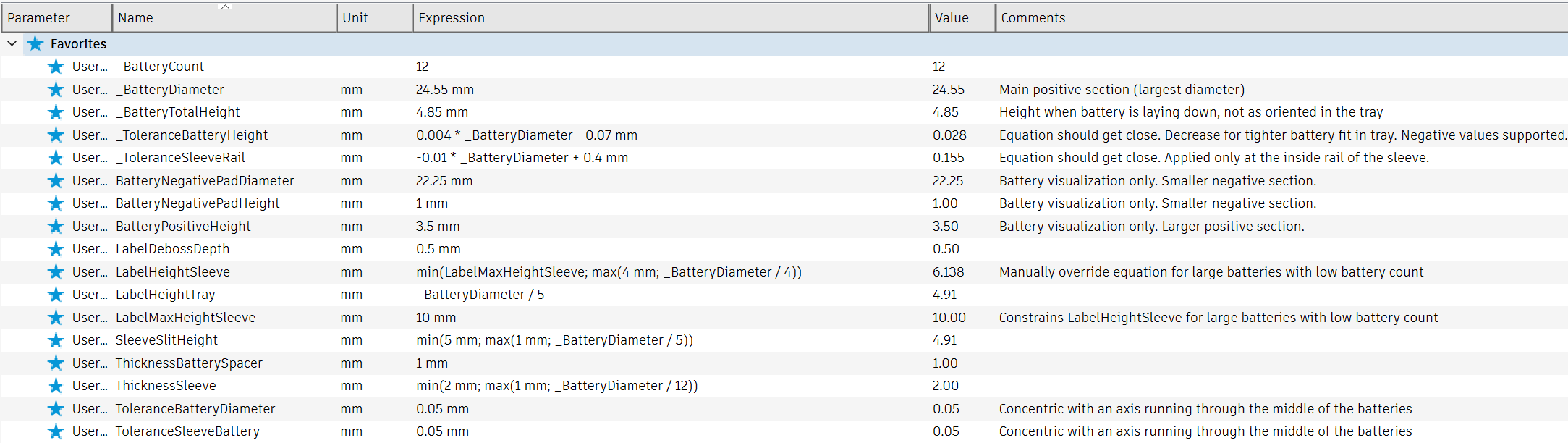
Some of the favorited parameters have the following characteristics:
- Starts with an underscore (_) – For most of you, these are the only parameters which require consideration because they drive the design
- Start with “Battery” (no underscore) – Visualization purposes only. If you hide the Batteries component, you will not notice even if these parameters are improperly configured
- Equation in the Expression column – Used to auto‑scale the necessary dimensions based on the specified _BatteryDiameter within a min/max range. As mentioned in the Comments, certain combinations of (_) parameters can result in text overruns, so manually adjust, as necessary.
- The _ToleranceBatteryHeight (tray only) and _ToleranceSleeveRail (sleeve only) parameters are the trickiest to get right. If you do not care to nail the respective fit, err on the side of a larger (more positive value) which will result in a loose fit. Alternatively, you can create smaller models to test the fit before printing models with the full battery count. The equations I provided for each of these are simply a best-fit linear equation amongst the six dispensers I customized and are a decent starting point.
Notes:
- There are two features saved as a Selection Set to help you identify where to change the sleeve label text and optionally add/remove slits.
- You may want to suppress the USED label for batteries with smaller diameters since the text starts to get hard to read. You would then know that the end with text is for new batteries.
Printing
See the attached .3mf for my settings and model orientation (no supports required).
I designed and prototyped on a Prusa MK4S.
Post-Processing
Insert the tray into the sleeve and operate it until it moves freely. This may be easier with batteries in the tray to provide more rigidity. If it is too tight or loose, adjust the _ToleranceSleeveRail parameter and reprint.
Questions
Please let me know if you have any questions (Messenger | Printables.com).
Shameless Plug
If this model helped you solve a problem, save some time, or in any way made your life a little easier then please consider clicking the Like button and posting your Makes! If it fell short after clicking on the title of the model, please let me know (Messenger | Printables.com). Either way, Thank you!
Parametric Button Cell Battery Dispenser

Publicado em 29 de out de 2025
Gostou deste modelo? Crie uma conta grátis para salvar seus favoritos e voltar a eles depois.
Criar conta