Você está no 3DFinder
Buscamos em Thingiverse, MakerWorld e Printables ao mesmo tempo para te dar o melhor de cada uma.
Descrição
This script generates customized 3D-printed buttons using OpenSCAD's built-in customizer. OpenSCAD is totally free, and its customizer makes generating buttons simple and intuitive. You can quickly and easily change the size, shape, and even the number of thread holes!
I have included some “recipes” in the photos above. Also attached are several example STL files, but I'd encourage you to make your own!
Requirements
- Download and install OpenSCAD
- Download the
button_generator.scadscript from the “Files” tab
Instructions
- Open OpenSCAD and load up the
button_generator.scadfile. - Open OpenSCAD's customizer: “Window > Customizer” (a new panel will appear on the right).
- Expand the “Parameters” section and start changing some values (see below for an explanation of each attribute). The preview render will update after changing a parameter (if it doesn't, press
F5). - Once your button looks correct, generate a high-quality render by pressing
F6. - Export your STL file (
F7) and start printing!
Parameters
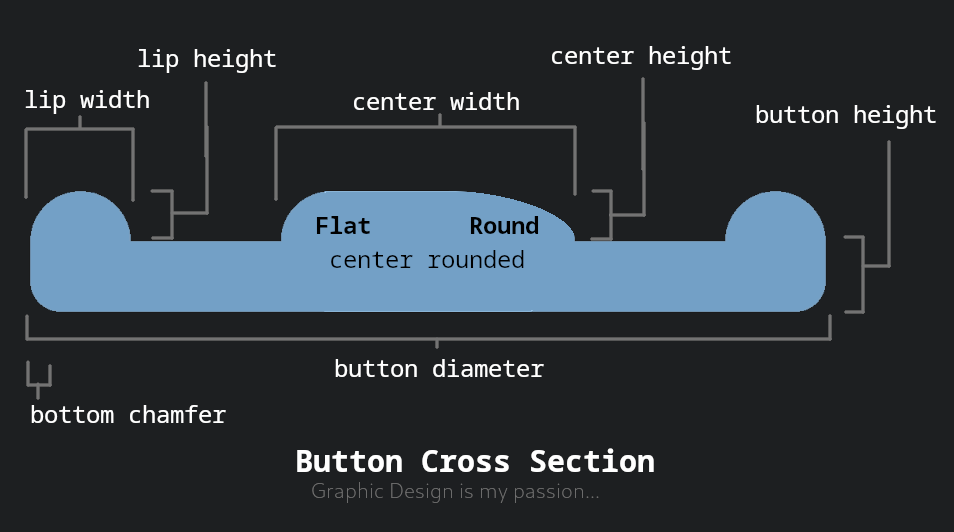
| Name | Description |
| button diameter | The size of the button |
| button height | The height of the base of button (excluding the lip and center) |
| bottom chamfer | The size of the button's rounded bottom edge |
| lip width | The width of the ring along the top outer edge of the button |
| lip height | The height of the ring along the top outer edge |
| center rounded | Should the raised center of the button be fully rounded or have a flat top |
| center width | The diameter of the raised center |
| center height | The height of the button's raised center |
| hole count | The number of thread holes in the button |
| hole diameter | The size of each hole |
| hole offset | How far should the thread holes be from the center of the button |
Tips
- In OpenSCAD's preview: blue tint = low-quality render, green tint = high-quality render
- The preview's low-quality render may show weird artifacts (missing faces, overlapping sides, etc.), but those issues won't be present on the high-quality render.
- When generating a high-quality render, it can take a minute or two, so be patient.
- The lip and center can be removed by setting the height to zero.
- The bottom chamfer helps the button slide through the fabric's button hole and can help compensate for elephant's foot.
- You can also set the values manually in the source code using the editor on the left of OpenSCAD (see lines 5 through 26).
- Don't make the thread holes too small or else they won't print well.
- Changing multiple values can be annoying while “Automatic Preview” is enabled. I prefer to uncheck it, and just tap
F5when I want to see an update. - If you generate a particularly awesome button, share the settings!
Printables
Parametric Button Generator

Publicado em 20 de jan de 2022
100
Curtidas
504
Downloads
8
Impressões
Categoria
Other Fashion Accessories
Tags
parametric
customizable
buttons
button
tools
customizer
openscad
generator
clothing
clothingaccessory
software
3dprintedbuttons
openscadcustomizer
Licença
Creative Commons — Attribution — Share Alike
Arquivos (11)
button_generator.scad
2.4 KB
simple_button.stl
2.4 MB
flat_button.stl
1.6 MB
rounded_button.stl
1.6 MB
border_button.stl
3.1 MB
cloud_button.stl
2.4 MB
ufo_button.stl
2.2 MB
donut_button.stl
2.4 MB
hat_button.stl
3.1 MB
wheel_button.stl
3.2 MB
pillow_button.stl
2.4 MB