Estás en 3DFinder
Buscamos en Thingiverse, MakerWorld y Printables al mismo tiempo para darte lo mejor de cada una.
Descripción
About the model
Need a high-quality stacking bin in any size? We got you covered!
Use this Onshape CAD model to create a stacking bin in any combination of length, width or height. Base and top edges are chamfered so that the bins stack neatly. Hexagonal cutouts save filament. Prints in place without any supports.
Prints great using PLA or PETG. Use a 0.6mm nozzle for faster print times.
Some sample models are here but the main purpose is for you to create bins in any size you need using Onshape. Read on for instructions on how to create custom bins.
How to create a custom bin
- Using the web browser on your computer, open the OnShape CAD model; no account required.
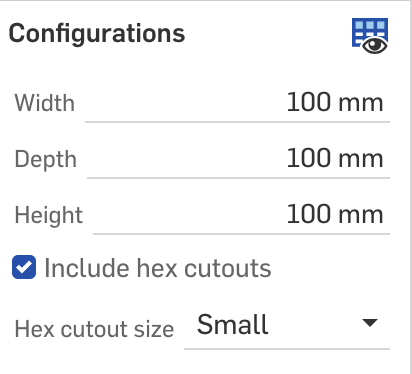
- In the Configurations area near the top left corner, edit the Width, Depth and Height. You can specify standard units such as mm or in. You can also select whether to include hexagonal cutouts and the size of these cutouts. You may need to scroll or resize this box to see all options.
- To export the model for printing, right-click on Bin under the Parts list in the bottom left corner, and select Export… Set the Format to 3MF and click the Export button.
Advanced customization
With an Onshape account, you can customize all dimensions and even create custom shapes. Onshape variables control the model parameters. These parameters are organized into 3 subfolders:
- Bin size: The width, depth and height of the bin
- Edge: The thickness of the side walls, as well as rounding of the edges
- Hex cutouts: Size, separation and border for the hexagonal cutouts on the sides
Note: The bin size dimensions are the external size; the internal size will be smaller depending on the thickness of the walls and the size of the base.
Parametric Stacking Bin / Box

Publicado el 5 de feb. de 2025
¿Te gusta este modelo? Crea una cuenta gratis para guardar tus favoritos y volver a ellos más tarde.
Crear cuenta