Você está no 3DFinder
Buscamos em Thingiverse, MakerWorld e Printables ao mesmo tempo para te dar o melhor de cada uma.
Descrição
The Impossible Bolt from Jebediah1000 was interesting, so I tried to reproduce it in Autodesk Fusion and it worked. So I created some variations. I also created a stand to support the bolt.
Jebediah1000のImpossible Boltが興味深かったのでAutodesk Fusionで再現を試みたところ、うまくいきました。そこでバリエーションをいくつか作ってみました。また、ボルトを支えるスタンドも作りました。
Variations
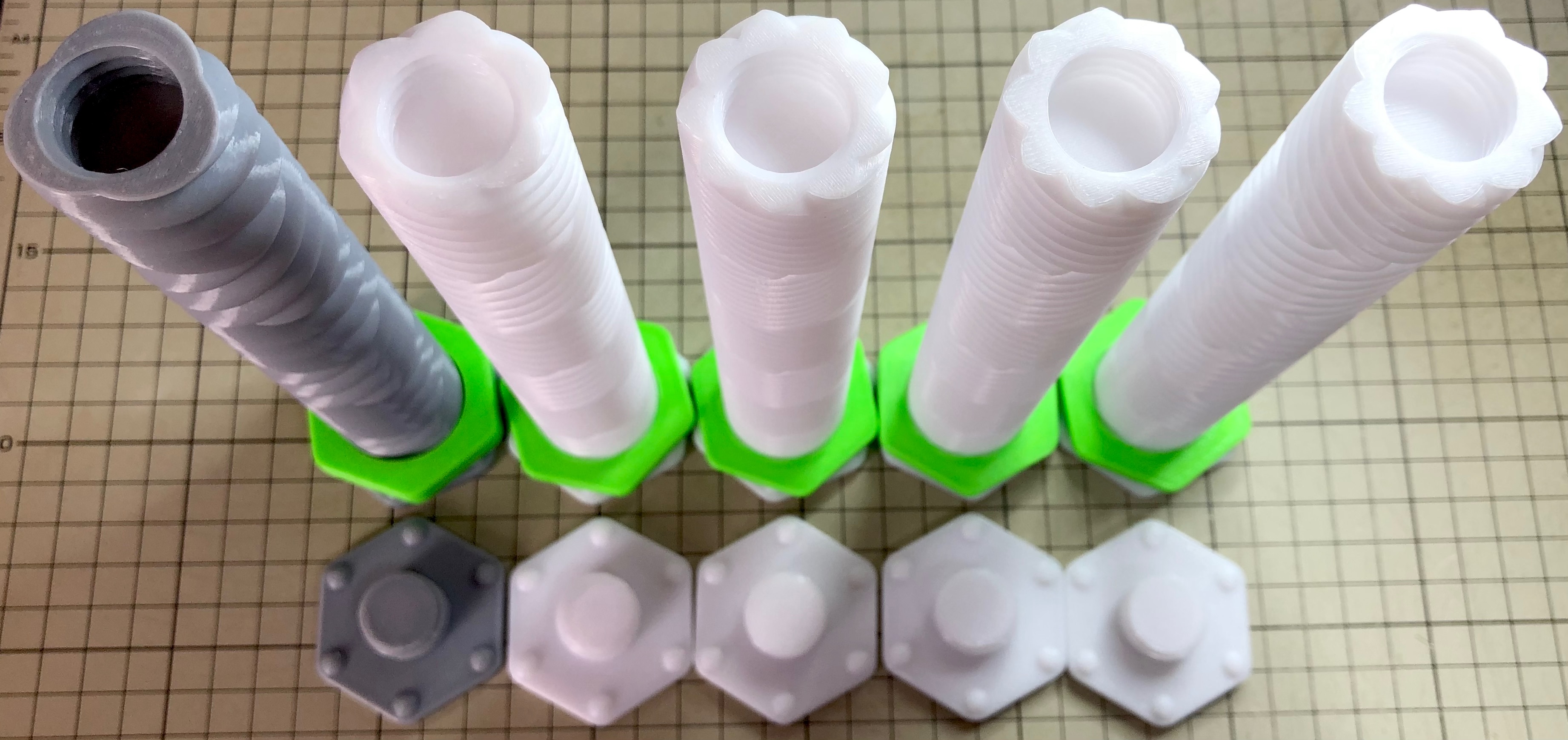
There are a total of five types of bolt, each with the following parameters.
ボルトは全部で五種類あり、それぞれのパラメータは以下のようになっています。
| Name | number_of_cross_section_vertex | twist_angle | |
| No.1 | 3v360deg | 3 | 360deg |
| No.2 | 6v360deg | 6 | 360deg |
| No.3 | 9v360deg | 9 | 360deg |
| No.4 | 9v280deg | 9 | 280deg |
| No.5 | 9v240deg | 9 | 240deg |
Perhaps No. 2 is the parameter of the original model.
The following pictures show the bolts from No.1 to No.5 in sequence. The leftmost one is No.1 and the rightmost one is No.5.
恐らくNo.2がオリジナルモデルのパラメータです。
以下の写真はNo.1からNo.5までのボルトを順に並べたものです。一番左がNo.1で、一番右がNo.5です。
Video
In the following video you can see how the nut moves: on the No. 2 bolt, the nut is sticking at the end. A protrusion was provided on the bolt to prevent this from happening, but it did not work. Therefore, this protrusion can be removed.
以下の動画で、ナットが動く様子を見ることができます。No.2のボルトで、ナットが端で固着しています。こうならないようにボルトに突起を設けたのですが、機能しませんでした。したがって、この突起は削除しても良いでしょう。
In the following video you can see the movement of the bolt when it is attached to the stand.
以下の動画で、ボルトをスタンドに取り付けた際の動きを見ることができます。
In the following video you can see the movement when four nuts are fitted.
以下の動画で、ナットを四つ取り付けた場合の動きを見ることができます。
If the nut does not move smoothly
ナットが滑らかに動かない場合
- Check the shape of the nut. Just a small piece of debris on them can have a big impact. Bolts are not as sensitive as nuts, but bolts should also be checked for shape.
ナットの形状をチェックしてください。小さなゴミがついているだけで大きな影響があります。ボルトはナットほど敏感ではありませんが、ボルトも形状をチェックしてください。 - A nut that does not move smoothly at first may become smooth after a number of turns by hand.
最初は滑らかに動かないナットも、手で何回も回しているうちに滑らかに動くようになる場合があります。 - Flipping the nut over may work.
ナットを裏返してみると、うまくいくかもしれません。 - Nuts need to be somewhat heavy and should be printed with an infill of 100%.
ナットはある程度重い必要があるので、インフィルを100%にして印刷してください。
PrusaSlicer project file
PrusaSlicerのプロジェクトファイル
I have created a PrusaSlicer project file, but have not checked that I can print with it, as I have been using BumbuStudio recently.
PrusaSlicerのプロジェクトファイルを作ってみましたが、最近はBumbuStudioを使っているので、これで印刷できる事を確認していません。
Parameters
パラメータ
The Autodesk Fusion parameters are listed below.
Autodesk Fusionのパラメータを以下に示します。
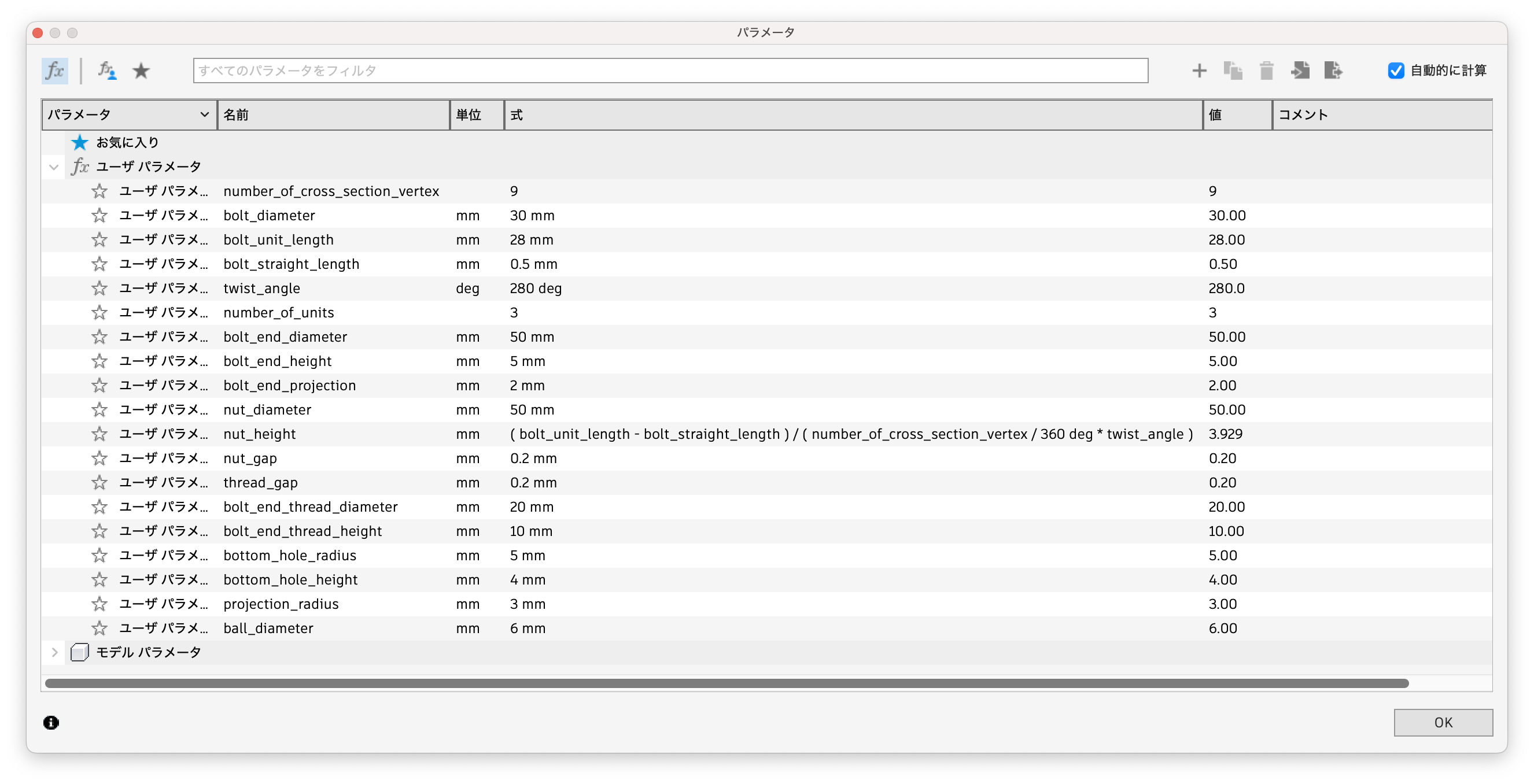
Changing the values is likely to cause errors, especially with nuts. If an error occurs, it is better to create a new identical feature before it and delete the old feature, instead of modifying the existing feature.
数値を変更すると、特にナットでエラーが発生しやすいです。エラーが発生した場合は、既存のフィーチャーを修正するのではなく、その手前に同じフィーチャーを新規作成して、古いフィーチャーを削除した方が良いでしょう。

Gostou deste modelo? Crie uma conta grátis para salvar seus favoritos e voltar a eles depois.
Criar conta