Você está no 3DFinder
Buscamos em Thingiverse, MakerWorld e Printables ao mesmo tempo para te dar o melhor de cada uma.
Descrição
This 3D printable circular template with a diameter of 25 cm is designed for the simple creation of string art projects. The template features evenly spaced notches around the perimeter of a circle, allowing users to customize the number of notches based on their desired string art design.
Each notch is labeled with a sequential number, starting from 0 and increasing up to the selected count. This feature ensures precise placement of the thread during the creation process, making it easy to follow patterns generated by online string art generators.
I included three pre-generated versions of the template with 100, 150 and 200 notches which can be printed out of the box.
For my design I used the string art generator tool at String Art Generator, which can transform any image into a number sequence for your string art design. You may need to play around with the settings number of lines and line weight until you are satisfied with the generated design. The number of pins needs to match your chosen number of notches of the template.
Even without an AMS you're able to set a pause inside Bambu Studio before the number labels are printed. Then you can change the filament color to get easier visible numbers.
Calculate the required length of the sewing yarn by multiplying your printed template's diameter with the number of lines of your generated number sequence.
I also included a Fusion 360 file, where you can customize your own string art template. Here is a short instruction for the customization process and how to automatically get the number labels on your template:
Open my Fusion 360 stringart_template_parametric file. Now you may go to SOLID > MODIFY > Change Parameters. You can play around with the parameters until you are satisfied with your template thickness, the number of notches (which equals the resulting number of pins) and the shape of the notches. I recommend a font height of 3 mm or more to keep it nicely and cleanly printable.
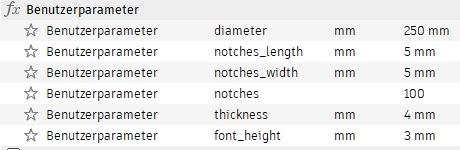
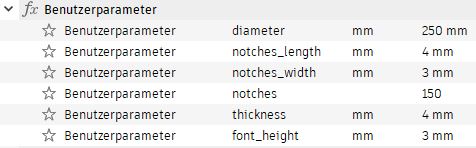
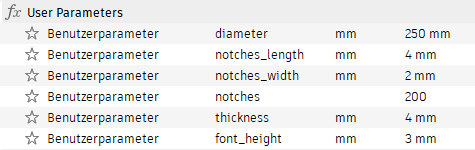
Here are the parameters I used for the three models I uploaded:
100 pins:
150 pins:
200 pins:
Now go to UTILITIES > ADD-INS > Fusion App Store. Search for ‘consecutive Numbers’ , click on the result (by 3D Design Fonshell) and click to download. Then go back to Fusion 360 and go to UTILITIES > ADD-INS > Scripts and Add-Ins…
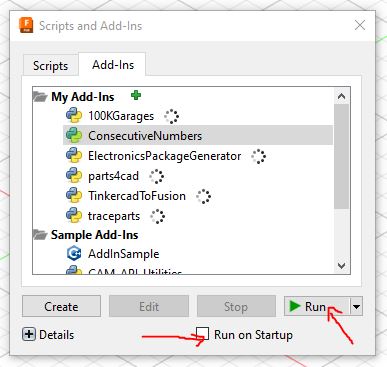
Click inside of Add-Ins on ConsecutiveNumbers, click ‘Run’ and maybe also check the ‘Run on Startup’ box for later edits.
To get the number labels onto the template move the object to see its bottom and thus sketch 4.
Go to SOLID > CREATE > Consecutive Numbers. Select the offset circular arc as shown in the picture (you may also edit the offset in sketch 4 if you want to move the numbers more towards the center or the outside of the circle). Set the parameters for Consecutive Numbers as shown below:
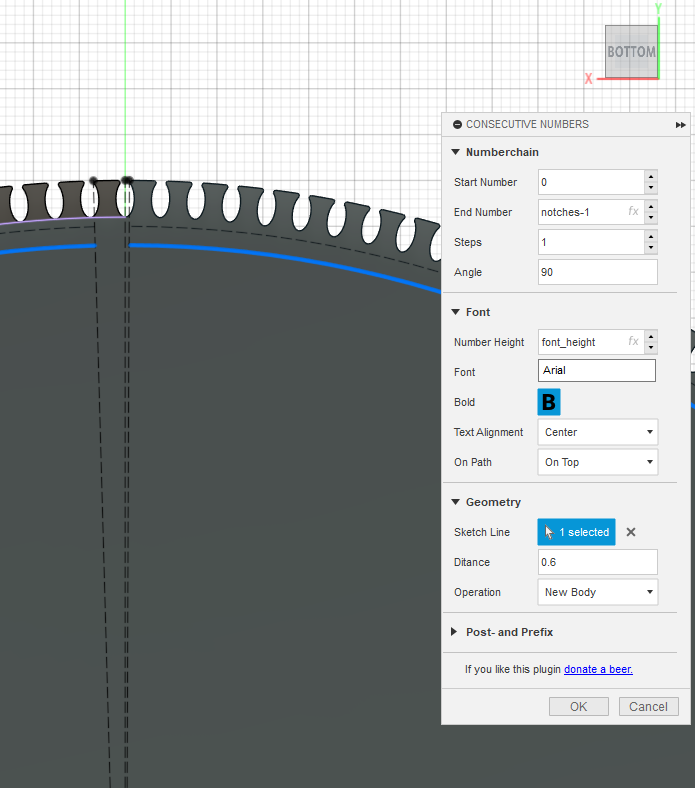
Click OK to generate the number labels. This may take a few minutes to compute. You may now export the model if you are satisfied or redo the process with different settings until you're happy with the result.
Features:
- Customizable Number of Notches: Adjust the number of notches around the perimeter to fit your string art project’s design.
- Numbered Notches: Each notch is sequentially labeled to correspond with the string art generator’s output, making it easy to follow complex patterns.
- Compatible with String Art Generators: Use with online tools like String Art Generator to convert images into usable string art patterns.
3D Printable: The template is designed for easy 3D printing without special settings or support, ensuring a durable, reusable tool for all your string art projects.
Specifications:
- 3D printable model in STL format
- Customizable circle diameter and notch count (depending on your design needs)
User-friendly design for easy assembly and use
Instructions:
- Download and 3D print the template using your preferred 3D printer.
- Use the String Art Generator to create a number sequence based on your selected image.
- Thread yarn or string around the notches, following the generated pattern.
- Enjoy your completed string art creation!
Gostou deste modelo? Crie uma conta grátis para salvar seus favoritos e voltar a eles depois.
Criar conta