Você está no 3DFinder
Buscamos em Thingiverse, MakerWorld e Printables ao mesmo tempo para te dar o melhor de cada uma.
Descrição
TL;DR:
I recreated a cabinet/drawer knob (Liberty's "Garrett" or “Classic Round” - they are both the same thing). It was a journey. I included a FreeCAD file and additional versions (largely untested) so it can be used/edited for use with with different standard screw sizes (Metric/Imperial) for convenience/versatility. No supports required.
This is going to be a long one
Read at your own peril. You might just learn something.
Why I made it
So we've had this knob in our kitchen that has been barely hanging on for literally years now, I think since we moved in. It's just one of the many identical, basic, round metal knobs that were pre-installed in our kitchen (for multiple cabinet doors). Upon seeing that Printables was holding a replacement parts contest, I looked around the house for something broken. I was reminded of this knob as it had recently fallen off the door again. The threading is stripped where the screw enters the knob, so it needs to be forced and then barely holds on. After a little while it eventually falls off when pulled. Between the contest, my desire to continue learning CAD (through FreeCAD), and the need before me… I figured I'd have a crack at it.
Disclaimer:
I was NEVER going to replace this knob with a 3D-printed replica. While I do intend to print my own replacement knobs, I want those to be more custom. This project served as a huge learning experience for me (and possibly others) in multiple ways, a service to anyone looking for a knob, and an entry in a contest. The contest really motivated me to try to see this through the rest of the way, despite me not necessarily planning to use the knobs as intended in the end. The lessons learned are helpful, and I plan to construct my own knobs and future objects using what I learned here.
I have made/posted other things here since my first foray into FreeCAD. But this project was my 2nd unique thing I used it to make. I just hadn't gotten around to posting about it yet.
The Process
So first thing's first. Here's the knob I set out to recreate, along with the accompanying screw:
Measuring
I took a lot of measurements of the knob using my cheap digital calipers.
I measured 6 different diameters (listed in order from bottom to top):
- Base
- Platform b/w base and lower curve
- Narrowest Point in lower curve (or overall)
- Platform b/w lower and upper curve
- Groove in upper curve (I wanted to try and recreate this subtle detail too)
- Widest Point in upper curve (or overall)
I then measured the overall height from top to bottom, as well as the thickness of the base. These I could do properly. I then approximated to the best of my ability the distances between each of the points I had measured in the above list (using the calipers as a guide).
I lastly took a depth measurement of the screw hole by inserting the screw, then marking the screw with tape when it was fully inserted. I removed the screw, then measured from the tip to the tape to get the depth. Most of the depth is extra and unused (unless you have a really long screw), but I wanted to get as close to the original design as possible.
Modeling
Next, it was time to fire up FreeCAD and start a new project.
I made a new body, then used Sketcher to add sketches of circles centered on the XY-plane (top view) using the measured diameters (but not the groove one). I gave those sketches helpful names and applied vertical offsets for each of them corresponding to the heights that I also measured. I then began applying Part Design operations to the sketches starting from the bottom. I used combinations of pads and lofts to create the knob's general shape.
Note: I needed to add an additional circle with the same diameter as one of them for a separate reference point. I also needed to add a circle at the highest point of the knob for the loft to work.
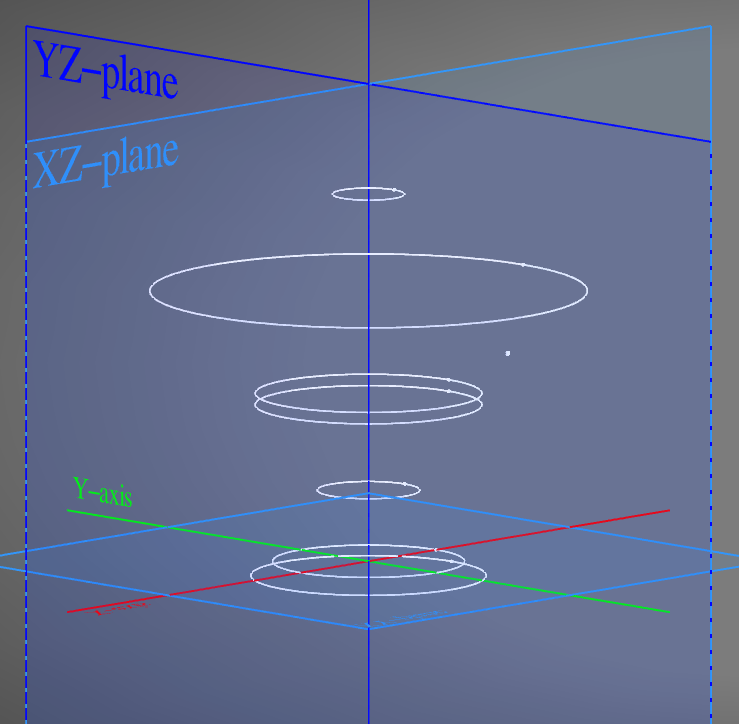
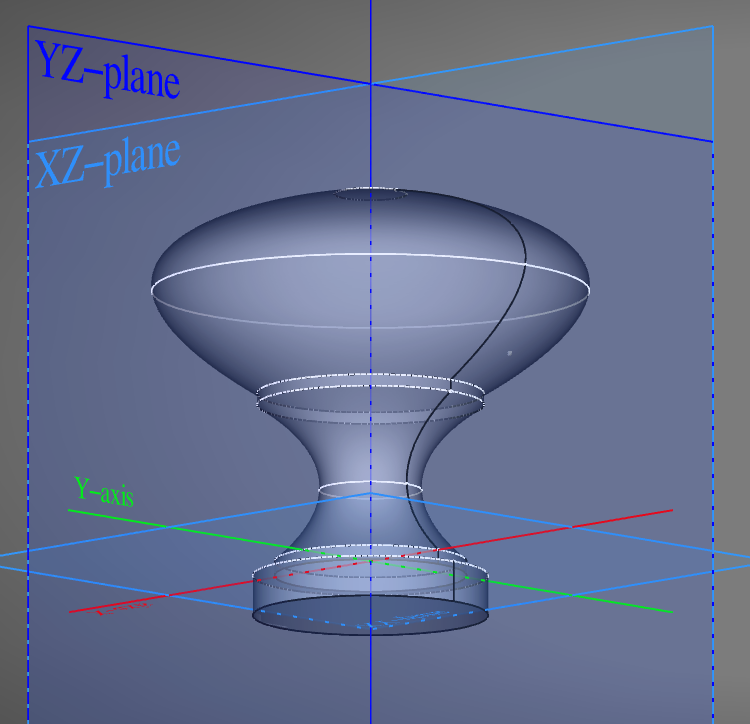
For the groove, I added a sketch on the YZ-plane (side view) of a tiny triangle, then offset it at the approximate height from Z and distance from Y (radius, or half the measured diameter). I applied a “Groove” to that sketch to create the groove by revolving it around the Y-axis.
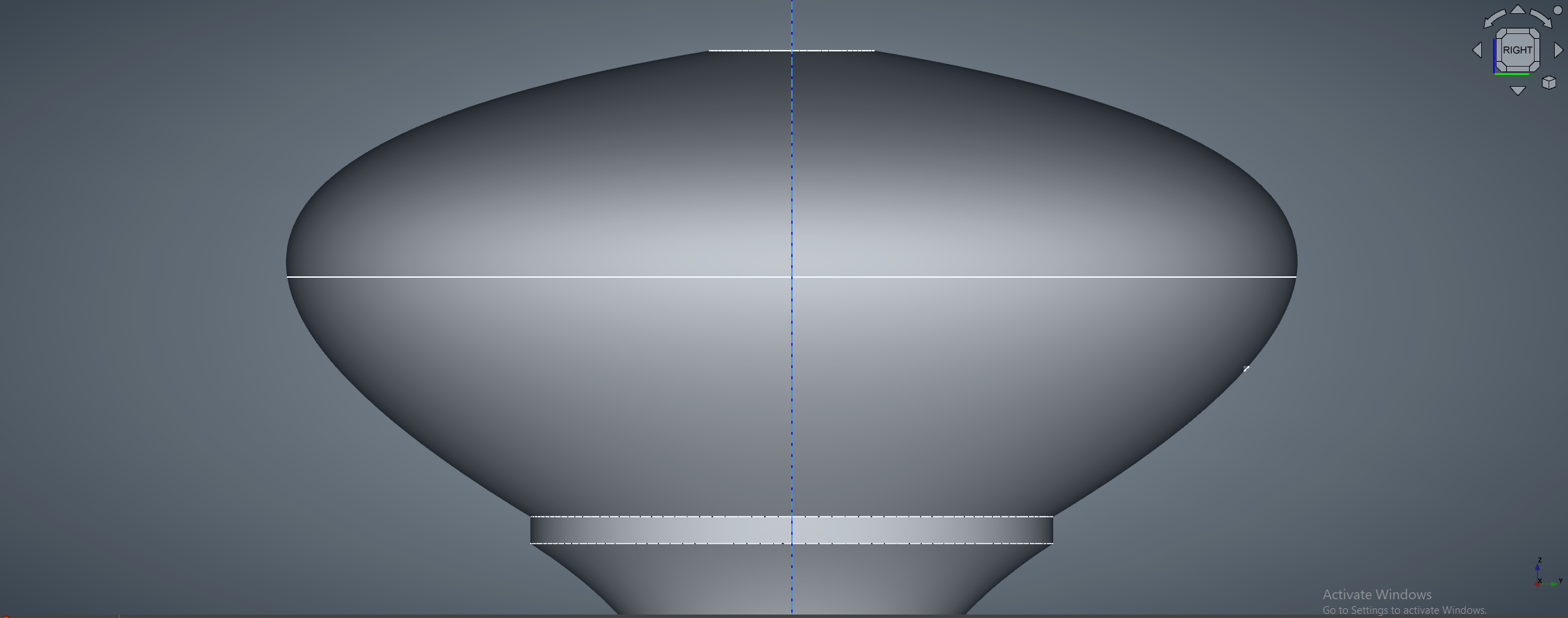
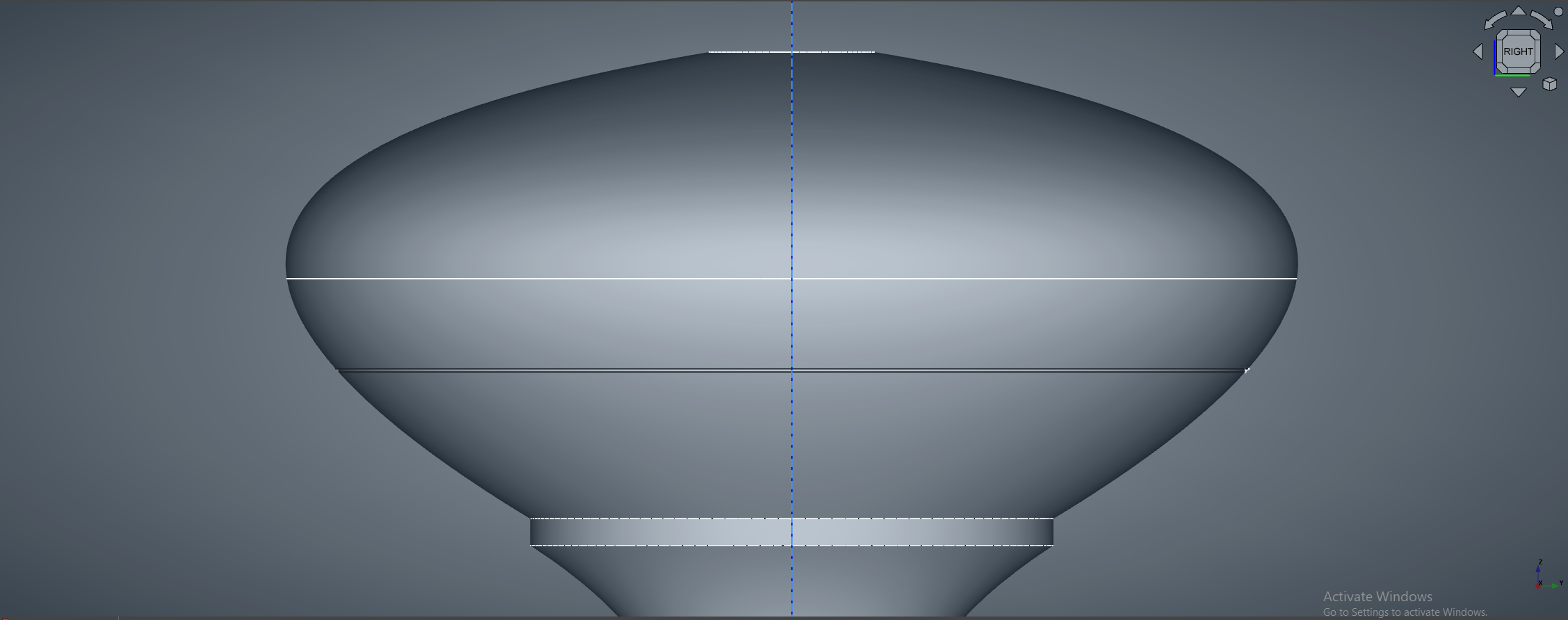
At this point, I had a model that I was already really proud of. I then used some visual comparison with the physical knob to further tweak the dimensions (as well as added fillets to smooth out the very top and the groove) until I got something that more closely resembled it on my screen. At this point, I wasn't going to change anything else until printing out what I'd modeled to compare for real. But I still needed to add one detail… The hole with threading for the screw. Because that was bound to require more than one print to get right.
Thread Trouble
Before even figuring out how to make the threaded hole, I had to discern what screw I had in order to design with it in mind. I looked up size charts for Metric/Imperial (or Unified Thread Standard, abbreviated “UTS”) screws, took the dimensions of my screw as best I could, and compared it to the charts. It seemed to closest resemble the UTS #6 screw. This made sense, as most things where I'm located are Imperial (oof, why…?). HOWEVER, the standard size screw for cabinet pulls is either a UTS #8 or a Metric M4. My screw was most certainly NOT either of those though, despite threading the knob once inserted a couple of millimeters. So I moved onto trying to design for the #6 screw I figured I had.
Of course even after deciding on “#6 screw”, there was also the matter of choosing whether or not the screw was “coarse” or “fine”, which is basically the thread density (how many threads per some unit of measure). I tried to measure as best I could, but mostly ended up going on visuals and deciding on “fine”. However, generally I think the screws will be coarse, calling for the use of the “coarse” profile for your thread instead…
Then there is the thread class. Goodness. This is basically the tolerance of the threads, so it affects their size. Higher value is a tighter tolerance, lower is looser. Here I thought all this was determined already when you know the name of the screw you're dealing with, lol. I decided on 2B, but it's possible that 1B would be better for 3D printing.
THEN you must consider that 3D-printing isn't perfect, and even if your model is “perfect”, some extra space must be granted for the fact that the filament will inevitably occupy some of the space that the model says it shouldn't. So an additional Clearance value must be specified. You will likely need to play around with this and see what works for you when designing stuff yourself. I fully expected to need to tweak it later.
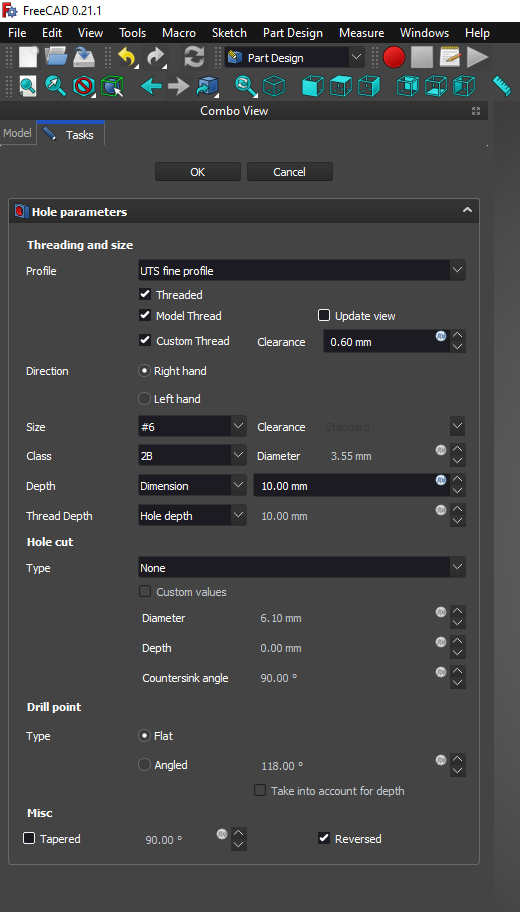
Finally, to make the actual threaded hole, I:
- Made a small circle sketch centered on the XY-plane.
- Used that sketch to apply a “Hole” to the model
- Under “Threading and size”, set the profile from “none” to "UTS fine"
- Set Size to “#6”
- Set Class to “2B”
- Set the Depth dimension to 10mm
- Set the Thread Depth to the entire “Hole depth”
- Checked the “Custom Thread” box and added a sub-1mm Clearance value
After that, you end up with something like this:
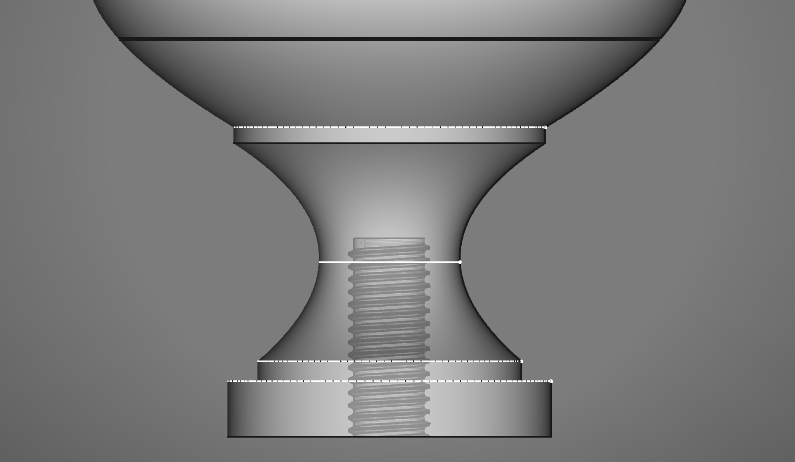
Now, I was ready for my first print!
It's worth noting that whenever I've really had trouble with something in FreeCAD, I've gotten pretty quick responses from some super helpful folks over on the FreeCAD discord server. If you're reading this, thank you again for all of the questions answered and all of your continued help! I really appreciate it!
First Prints and Model Tweaking
I printed out my first attempt (v1) at 0.2mm layer height and 10% infill. It was a short print, but it was so cool to see my work in the physical world! You aren't going to get amazing threads at this layer height, but I wanted to get the sizing decent before doing lengthier prints.
Despite how nice it looked at first glance, there were some clear changes that needed making if I was to make it as visually identical as possible to the original. I also quickly found that the threaded hole was too small, as I needed to drill it out to then force it with a screwdriver to make use of it. So I added a higher clearance to the hole, played around with the outer model dimensions (comparing caliper measurements b/w the original and my print helped a lot with this), made the base a little thicker due to yet unresolved printer issues with the first layers, and printed another.
I went through until v4 (or was it v5?), tweaking things in between each one until it looked and threaded as I wanted it to (meaning I could insert the screw just by twisting it with my hand with some force or very easily with a screwdriver). I had increased the resolution a bit by the end of testing different versions.
*edit: It was actually v6, for 6 versions! 7 if you count a slight change I made to v6 afterward. Don't give up something if it's not right the first couple of times!

Obligatory “It works” Photo. I don't remember what version this one was though.
Print Refinement
At this point, I felt pretty good about the model as it was. Now what I wanted to do was print a higher quality version. I had already printed some that were finer than 0.2mm, but I wanted to see how good I could get it.
So I tried 0.1mm layers, and it looked pretty nice (although the top still quite noticeably stair-cased).
I then tried the - somewhat extreme for FDM - 0.05mm layers (which my Ender-3 V2 Neo states as the minimum).

The top came out quite amazingly. Although at this resolution the PLA takes on a totally different sheen, almost like satin. A comparison of 3 quite different resolutions.
But as for the overhangs…well the surface was ROUGH. I set up a few more prints (waiting patiently b/w each one, as they were much slower at this resolution) to see if I could get it working…

I tried:
- Reducing the nozzle temperature
- Reducing the bed temperature
- Reducing the print speed
- Making sure cooling was at max
Unfortunately, I didn't get any noticeable improvement on those overhangs. It's possible that with better cooling or some other upgrade/setting it could be done. I did try 0.08mm though, which is a tad less fine. It's also is a number divisible by 0.04mm, which I learned should correspond to a full step of my z-axis stepper motors. This is why for a lot of Ender-3 type printers, the slicer defaults are all in increments of 0.04mm. Although, it still struggled with those overhangs a bit more than I was happy with.
The Solution - Variable Layer Heights
My response was to try out another thing I'd never done before, using different layer heights for different parts of the print. This way I could have smaller layers (and hence higher detail) on the top surface where there were no overhangs, while using bigger layers on the overhangs so they could print successfully. Cura, the slicer I currently use, calls this “Adaptive Layers”, and it's found under the Experimental settings.
My first attempt at this amazed me. I only used 3 different layer heights, all divisible by 0.04mm (0.08mm,0.12mm, 0.16mm). The top wasn't as smooth as possible, but it was pretty smooth, and the overhangs were successful! Only thing is that the jump in layer heights created a weird rings in the print where you can clearly see the sheen of the surface change from shiny to satiny. Not a huge deal, but felt I could do better.
My next attempt was in some ways better and in some ways worse than the previous one. I tried using even more different layer heights, this time with a much shorter leap between them (0.01mm difference). While this allowed for greater tuning, and let me get the top quality even better while succeeding the overhangs. Although I found that instead of eliminating the visible rings, it created more, smaller rings instead. While this may be preferred by some, it made the surface finish look really busy. And I was after the best-looking part “hot-off-the-printer”, meaning without any post-processing work.
I didn't even bother to print another iteration after this. I had already put far more time and effort into this project than I had expected (and hadn't yet written a sentence here about it). I was losing steam and for little gain at this point. This was the last one for me. Even if I had gotten it printing even better, what's the point if people can't easily and reliably recreate it? Resin printers could do better without all of this tweaking too. I settled on my first attempt at variable layer height being likely the ideal option for most seeking quality with their FDM printer.

A family photo of all but 2 of the knobs. The missing 2 were being post-processed (see bottom “BONUS 2” section for more details). Yes, one failed. The filament got tangled as I set up a better feeding system. Actually “v2” also failed near the top too, it's just covered by tape.
Finding the Knob Make/Model
So this whole time I hadn't established what the actual part I was recreating was called (brand/model). I did some searching on Google, Amazon, and The Home Depot to find what looked like mine.
The closest ones I could find were:
- Liberty Garrett 1-3/16 in. (31mm) Satin Nickel Round Cabinet Knob
- Liberty Classic Round 1-¼ in. (32mm) Satin Nickel Solid Cabinet Knob
- Design House Midtown 1-3/16 in. Satin Nickel Cabinet Knob
Weirdly, the images included for the first 2 listed above both have a top and side view with dimensions that are IDENTICAL (see photos below), despite the product info and title stating 2 DIFFERENT diameters. I struggled to find the true differences between these, and luckily I found one of the listings had a customer question posted asking the difference. The manufacturer answered that THE KNOBS ARE THE EXACT SAME. Yay trickery!




Okay, so that's cleared up. Pretty sure that's what mine is. But the 3rd listing may also be the same as the first 2. Not sure. It has the height listed significantly off from what I measured. They are more expensive though, and I doubt they were what was chosen for our kitchen (even if they are also turn out to be identical).
A Frustrating Discovery…
So determining the make/model brought with it another realization. They state that they come with #8 Screws! At first I thought this meant I was wrong about which knob this was. THEN I went through my box of spare screws and found one that seemed the closest to a #8 (can't say with certainty, as they aren't labeled). I took it and tried threading it in the knob I had just spent so many hours replicating. I realized it fits even better than the screw that was with it. IN FACT, it threads right at the start. IN FACT, it works flawlessly when installed with that screw! The knob wasn't broken in the first place… it was installed with the wrong screw!!! To further verify this, I removed a different cabinet screw in our kitchen, only to find that it was installed using what seemed like a #8 screw. The problem was the screw the whole time! It was installed incorrectly for whatever reason!
This actually occurred while I was still getting through some of the last couple of prints. I made a new copy of the model I had been using, but set the thread from #6 to #8 and basically called it a day. The first print after that worked with the sized up screw just fine. I did change the clearance to be a little less though ultimately, but those last couple prints I made were with the #8 screw sized hole. It works even better this way to be honest.
LESSON:
TRY REPLACING THE SCREW FIRST!
BONUS 1 - Alternate Versions
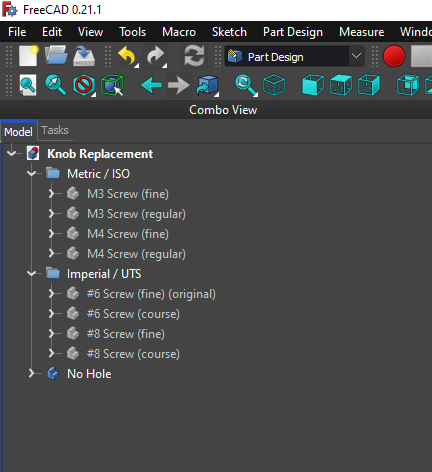
I also made versions for metric M4 and M3 screws, to allow for more installation possibilities! In addition, I made 2 versions for each screw type. 1 Version is with coarse/regular threads, the other with fine threads. Keep in mind though, that I have not changed the clearances for these other screws or tested them. If you really want to make it work with your screw, you should setup the threads the way you want in FreeCAD (or in the CAD software of your choice by importing the version I included with no hole). If I end up testing with other screws or get feedback from anyone who does, I'll plan to update the files/descriptions accordingly.
BONUS 2 - Post-Processing


I used 2 of 4 of the not-great-overhang 0.05mm prints as an opportunity to experiment with post-processing and share my findings:
One of them I sanded at multiple grit levels all the way up to 3000-grit. It's so smooth! That's the finest I've ever sanded something to by far. Here's 0.05mm, sanded version, and the original part:
With the other one, I did some rough sanding (only 100-grit tops I think), sprayed filler primer, then did some quick high-grit sanding (enough to remove the textured spray-paint surface), followed by a coat of gray glossy spray paint (the most similar thing I had on hand). Here's 0.05mm, painted version, and the original part:
EDIT:
I never added the photo directly above. I put that in, as well as 2 photos of the painted and sanded versions in the main model photos. Enjoy!
Replacement Drawer/Cabinet Knob

Publicado em 15 de dez de 2023