Você está no 3DFinder
Buscamos em Thingiverse, MakerWorld e Printables ao mesmo tempo para te dar o melhor de cada uma.
Descrição
Create your very own Cribbage Pegs or create them for friends and family for great gifts for all occasions!
To Edit name:
- In the Objects menu right click the name you want to start editing then find the edit text and select it
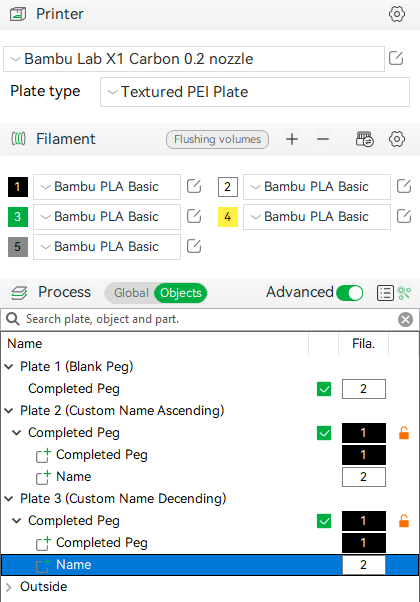
- Once in edit mode you can change lots of settings
- Font Style
- Size
- Text Gap (spacing)
- Input Text (whatever you want the next for that line to be)
DO NOT adjust Embedded Depth. This is set to print flat on your build plate (for textured upside down printing) and changing it could cause issues. You can change the Thickness up to 2mm if you choose, but .6 is normally more than enough for most dark colors to pop, so I highly recommend not adjusting that either. (saves filament swaps as well)
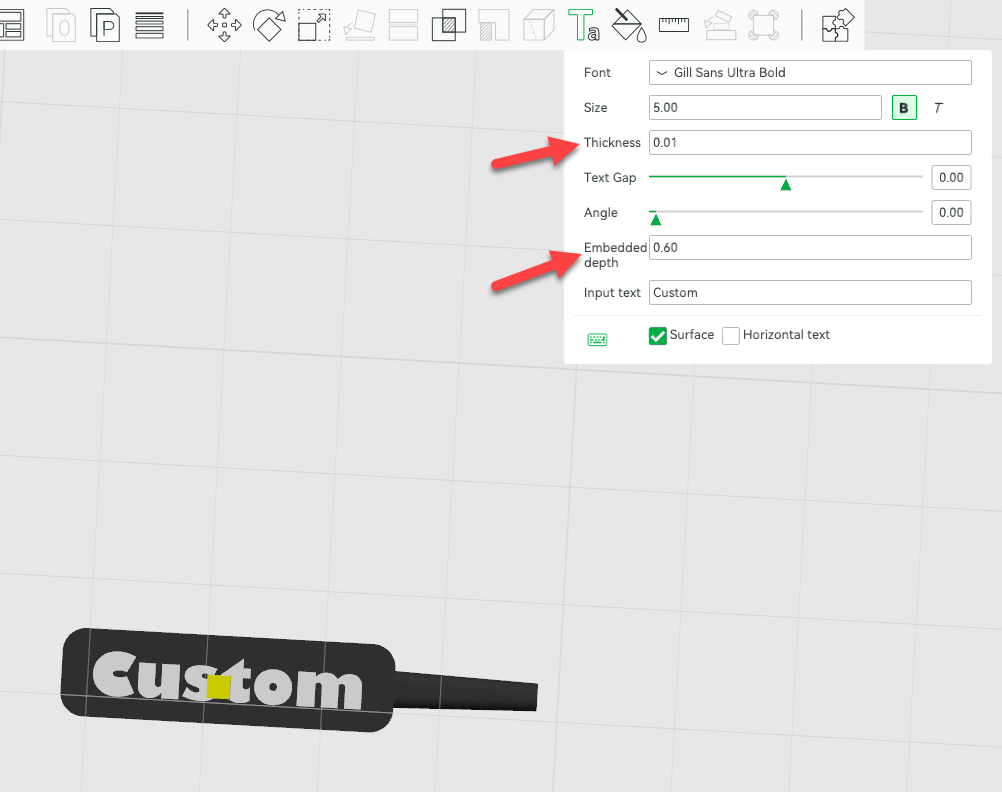
- Note: Adjusting text may result in off centering of words. If this happens just right click the name you need to adjust in the Left Object Menu to open drop down menu, click Center to center Name; Then click Move in the top menu or hit M for Move and adjust left or right with the arrows. This will keep it on the same center line as the peg.
- If you need additional Pegs, DO NOT CLONE Pegs & Names until you have the lettering where you want! Otherwise you will have to freehand the text to match every item you cloned!
If you like any of my models and feel like buying me a drink to continue my late hours of modeling, your generosity is always welcome!
Filament I use regularly for my projects that offer a WIDE range of colors and options that fit perfectly in the AMS system
Disclosure: This post contains affiliate links. If you make a purchase through these links, I may earn a commission at no extra cost to you. Thank you for your support!