Você está no 3DFinder
Buscamos em Thingiverse, MakerWorld e Printables ao mesmo tempo para te dar o melhor de cada uma.
Descrição
Due to this

You will need to add the G-code yourself manually. To do this, slice the model and go to the right sidebar. Go to the layer you wish to add in the G-code and right-click to bring up the menu that will allow you to add the G-code.
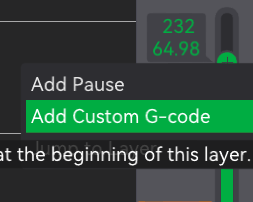
For the following layers, I used the custom G-code.
Layer 193: M104 S260
Layer 145: M104 S265
Layer 97: M104 S270
Layer 49: M104 S275
The filament profile that comes with this starts at 280C. If you don't want to use this filament profile, you will need to add
Layer 1: M104 S280
as a custom G-code, but you will notice that the initial layer will be the default temperature of your filament profile, and then it will change the temperature to the next layer.
For my printer, the filament sticks to the bed at roughly 100C so that is what the filament is set to. However, this may not be the case for your own printer. Start at 90C and keep redoing the print, clearing the bed when it fails, and increasing the bed temperature by increments of 5C until you get a clean print. That will be the bed temperature you start at, while this temperature tower is meant to set the temperature you print at.
Polycarbonate Temperature Tower

Publicado em 23 de nov de 2024