Você está no 3DFinder
Buscamos em Thingiverse, MakerWorld e Printables ao mesmo tempo para te dar o melhor de cada uma.
Descrição
Is your GPU starting to sag in all the wrong places and look tired just like my wife? Is your PCI socket looking a little frayed around the edges like my marriage? Then your GPU, not unlike my marriage could use some support. But unlike my marriage you can 3d print your way out of this problem for very little cost, both financially and emotionally.
This GPU support is knurled so that you don’t lose your grip when tightening like I’m losing my grip on my fading reality, it’s easy to print and doesn’t need supporting unlike my tortured emotions. There is a print pause set at layer 25 to add a magnet measuring 10mm x 3mm, the hole for the magnet is 10.2mm x 3.2mm, once installed or if not required press play to continue print. Please remember to clean and wipe your build plate with alcohol regularly just the same way I wipe my memories every night.
This GPU support extends from 55mm to 100mm and is 15mm in diameter, unlike some other things in my life. There is a small flat on the face of the bottom part so that you could put some raised or embossed text on if you would like to. A size 10 text works nicely and is what I have used in the pictures, the maximum emboss depth is 0.5mm to retain strength.
MAGNET INSTALLATION AT PRINT PAUSE:
- Place a small dot of super glue into the hole or onto the magnet, be careful not to get any glue on the top layer of the part as this can stop the next layer sticking.
- Press magnet into the hole and wait a couple of seconds before releasing.
- Select play on print screen to continue print.
When installing magnets, I like to use a stainless-steel bolt or rod with the magnet on the end and put a dot of glue on the magnet and use this to press it into place. This works a treat as the stainless-steel is only slightly magnetic.
I recommend printing this in PETG/ABS/ASA or other high temperature tolerant filaments, please set a print pause at the first layer to cover the magnet hole if you would like to install the magnet when using your own print profile. With 0.2mm layers this should be layer 20 and with 0.16mm layers this should be layer 25.
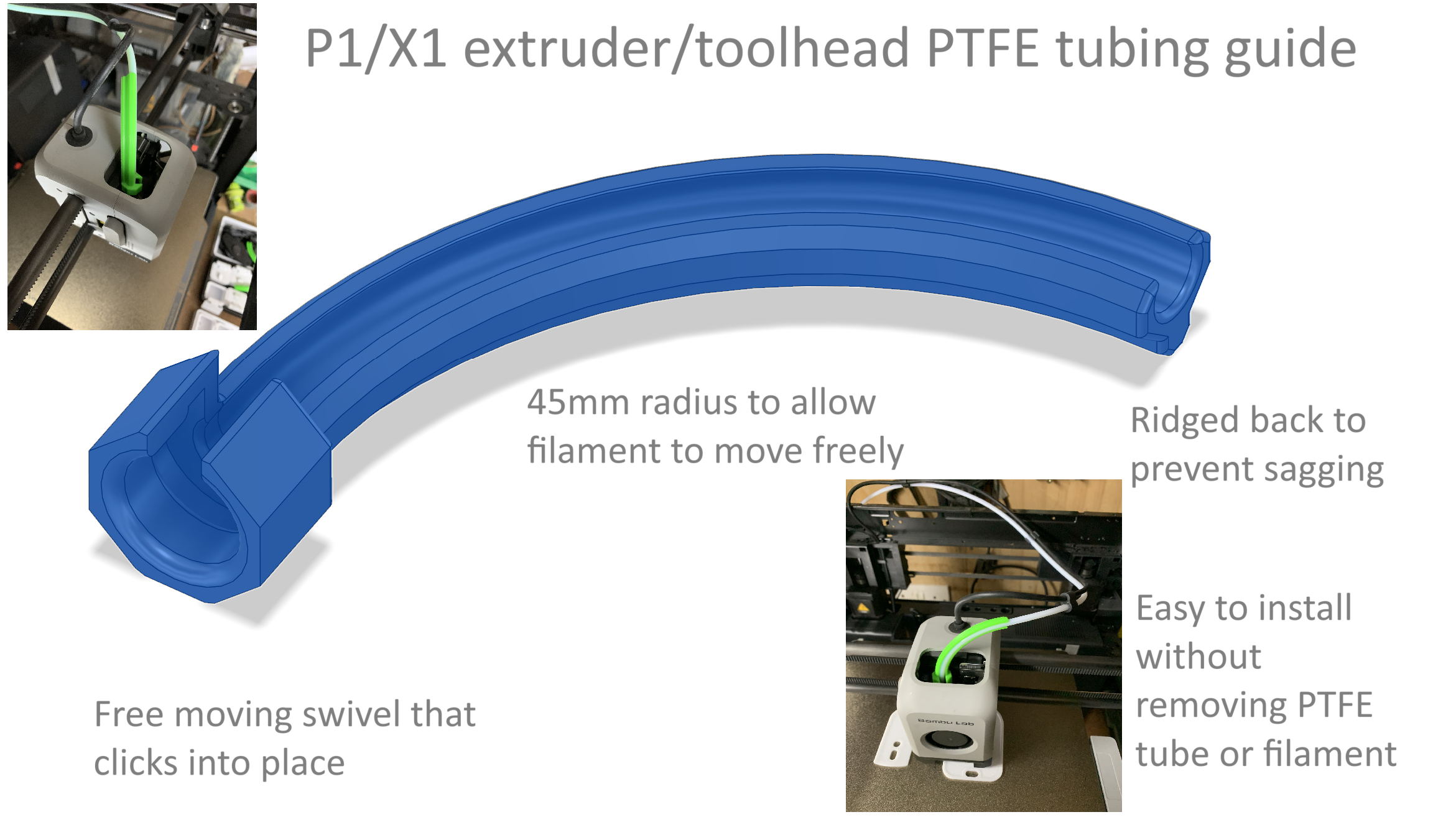
Is your toolhead PTFE tubing starting to droop? Dose it sometimes uncontrollably rise and bump into the top of your case without warning?, If so then it could be suffering from PTFE erectile dysfunction disorder. But there’s no need to panic, I have a way you can 3d print yourself out of this problem to with my Toolhead PTFE guide. Its easy to print and can be installed with one hand and without removing the PTFE tube or filament, and with its ribbed back you can rest assured it won’t go limp when things start to heat up in your chamber.
Get yours today HERE
Thanks for looking, if you like my work please don’t forget to like, rate and leave comment. You can also boost to show your support and appreciation. You can check out my other models HERE
Adjustable Gpu support / anti sag / riser

Publicado em 11 de ago de 2024