Você está no 3DFinder
Buscamos em Thingiverse, MakerWorld e Printables ao mesmo tempo para te dar o melhor de cada uma.
Descrição
📢CAD Files released - Ultimate and Commercial backers, download it here.
INSTRUCTIONS
Notes:
❶ 👉Raise bed temp if you have bed adhesion issues. (PETG may need up to 90°C for some beds)
❷ Dry your filament to avoid stringing and bridging issues. Dry PETG for 24hrs at 65°C and use within 2 days for best results.
❸ Preconfigured profiles work with Bambu Studio, OrcaSlicer & Creality Print. For other slicers, select “Download STL/CAD Files” in the drop down and use the generic 3MF files.
Slicer warnings of non-manifold edges can be safely ignored. All files have been tested and print correctly. Detailed explanation, printing tips, full BOM and specs at bottom of page.
Step 1: Choose your frame
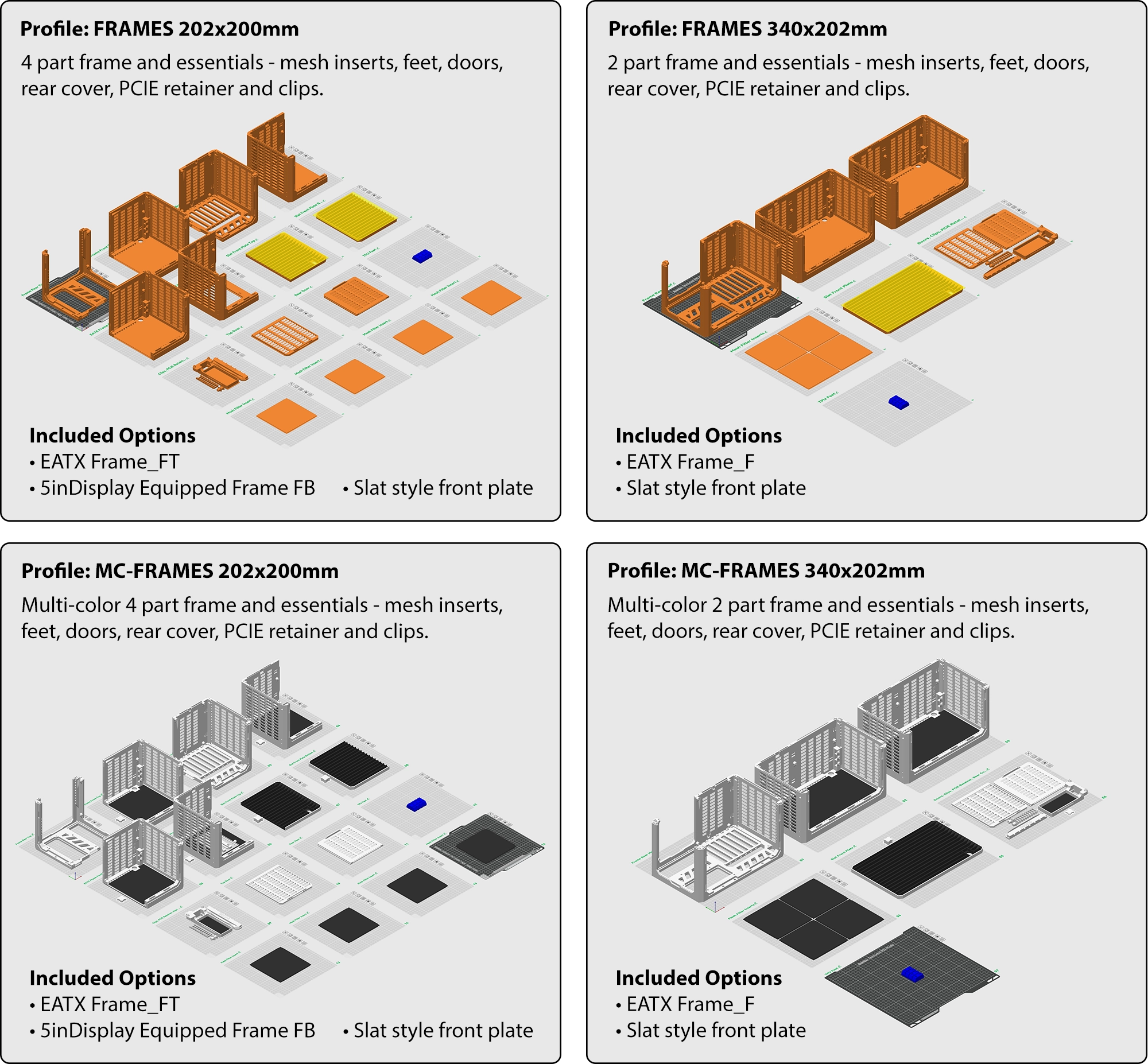
Notes:
❶ E-ATX frame has USB-C port removed to fit E-ATX motherboards. Otherwise it is the same size as the ATX frame.
❷Click the images in Handy app to view high resolution.
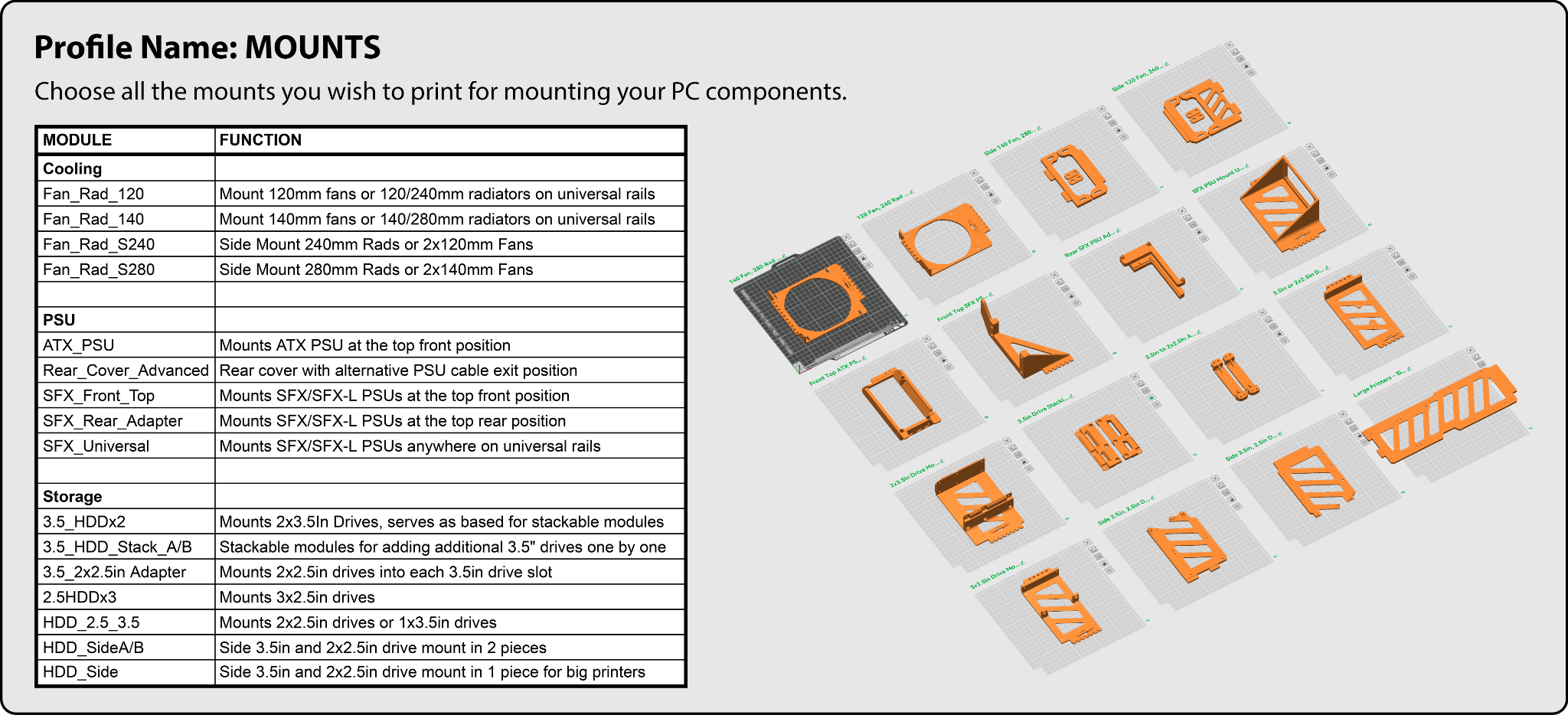
Step 2: Choose your mounts
OPTIONAL: Choose your expansion
The new 3 size expansion pack has been released. These let you increase the length of your case to fit 360mm radiators, 450mm long GPUs, add more drive support, more fans and allows more components to be mounted together.
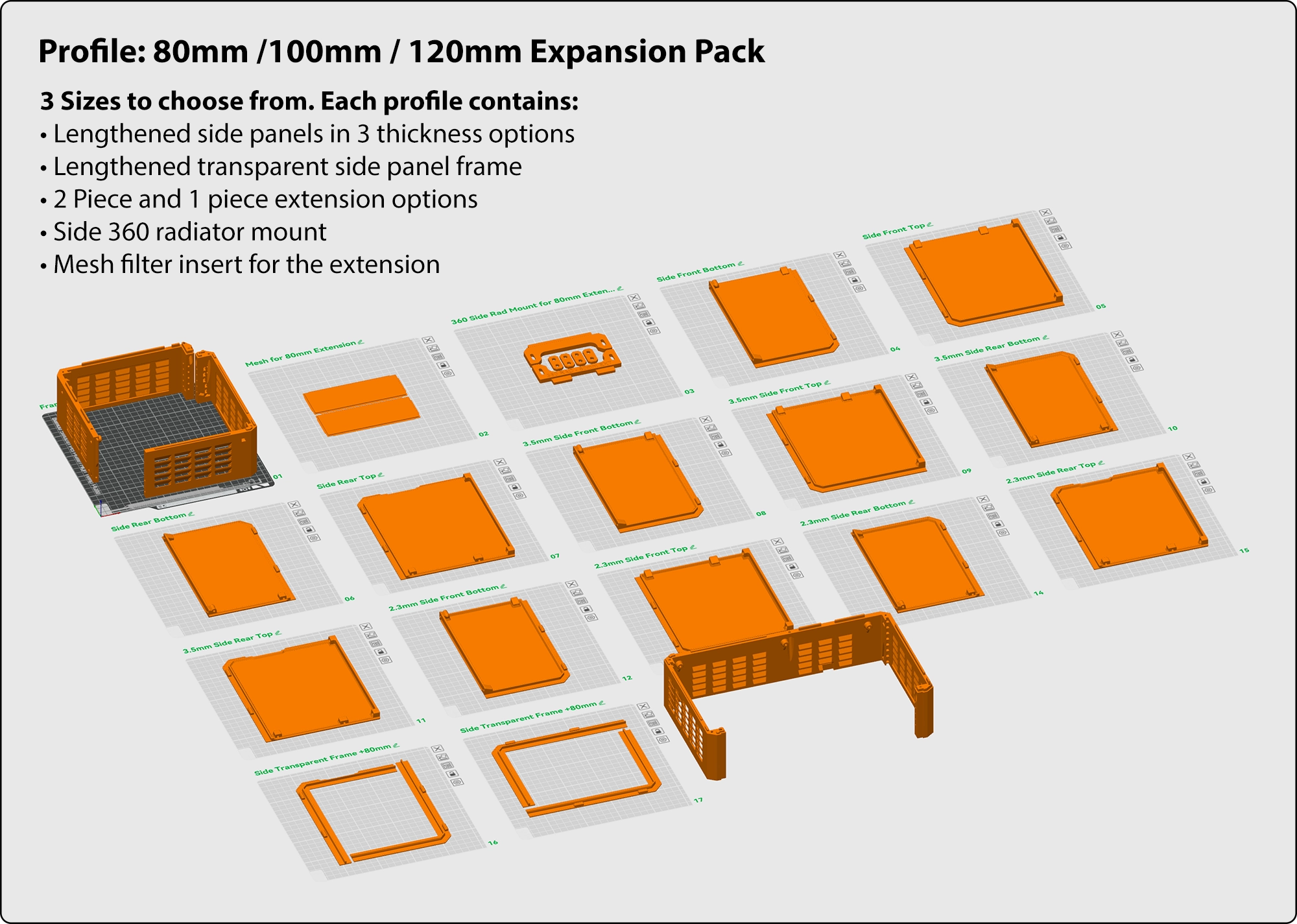
Note: Each expansion pack includes the lengthened side panels to go along with it. You do not need to print the standard length side panels below if you are using the expansion pack versions.
Step 3: Choose your side panel
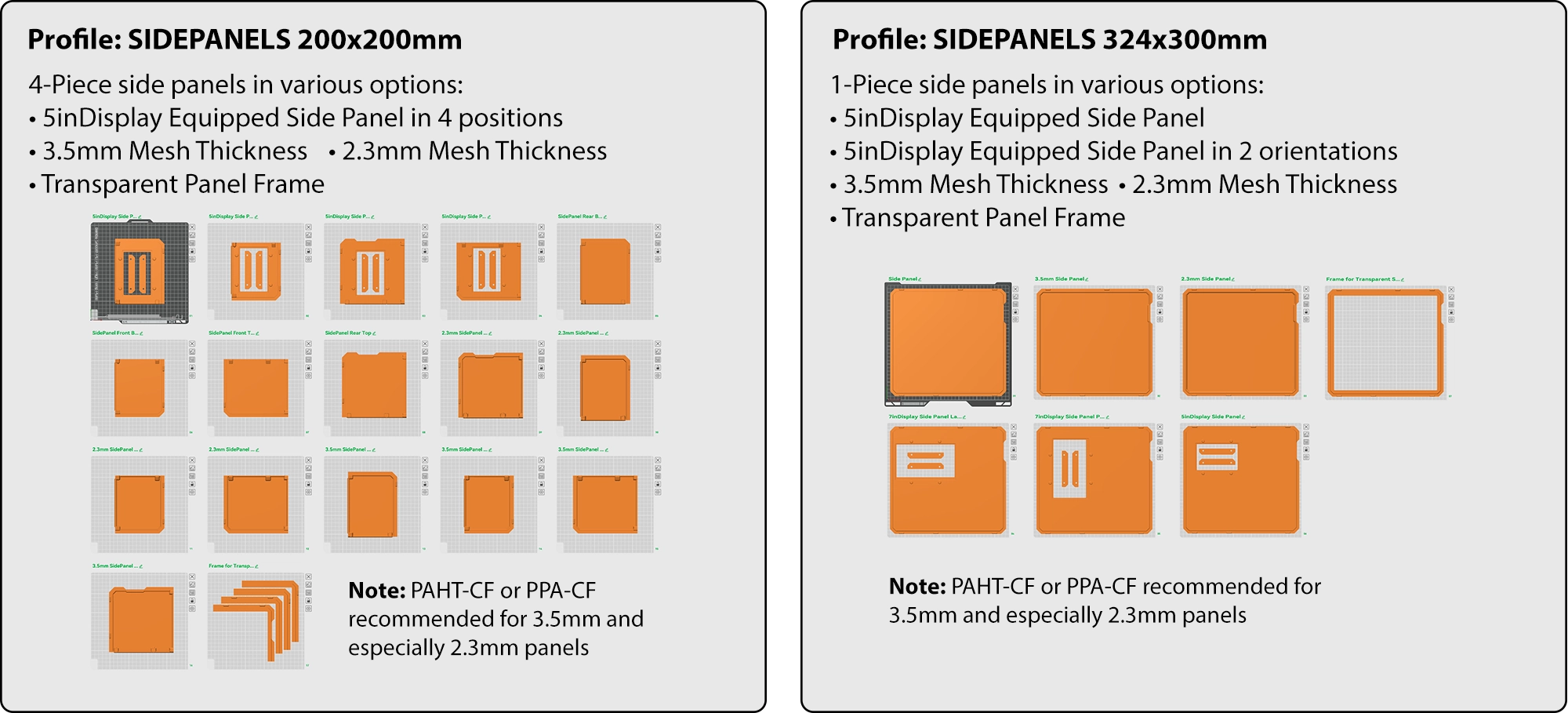
Thinner mesh side panels have higher airflow and greater visibility. However, they require stronger materials for the same rigidity. PAHT and PPA-CF were the tested material. PPA-CF is recommended for the 2.3mm panel. PAHT and PPA-CF both work for the 3.5mm panel.
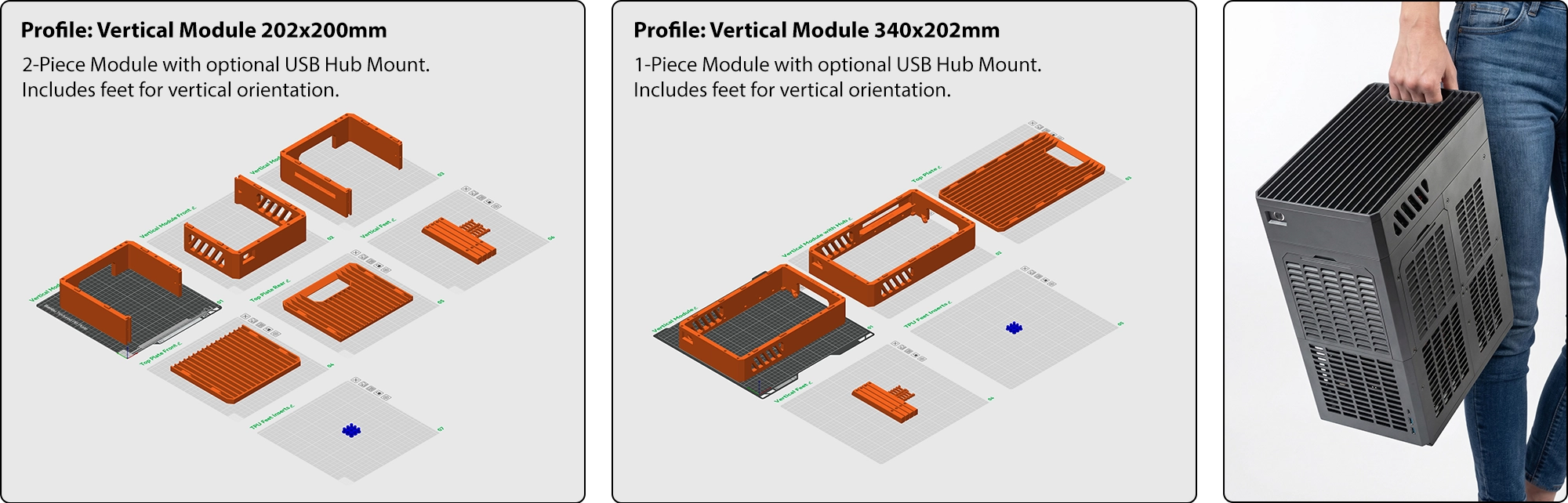
OPTIONAL: Vertical Module
Add a handle and use your case vertically for minimal footprint.
ASSEMBLY
Step 1:
Assemble Front and Rear quarters with BT3x20 self tapping screws
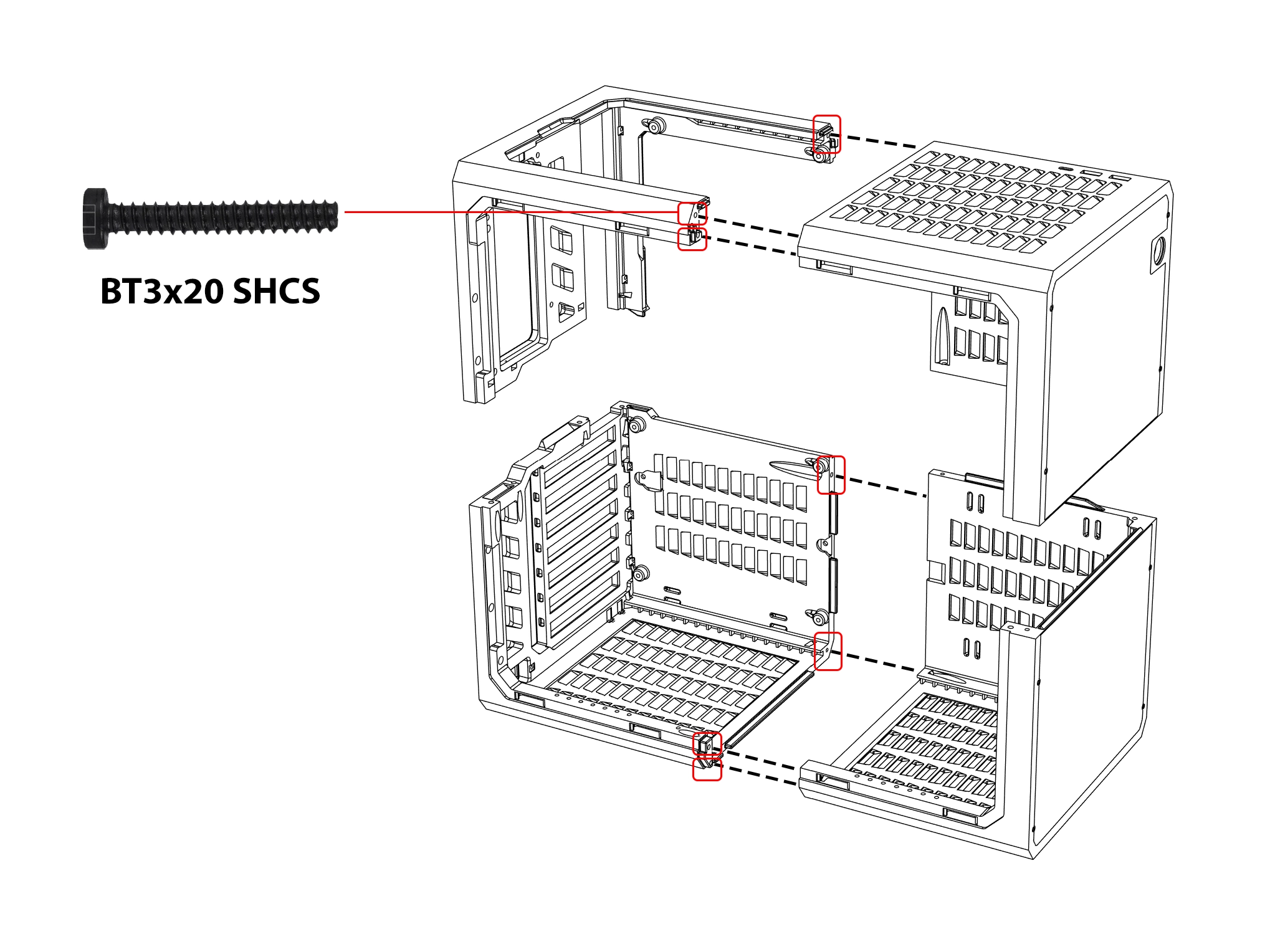
M3x20 and #4x3/4 screws are also compatible.
Step 2:
Join the halves
OPTIONAL:
Install front plates
Expansion module installation
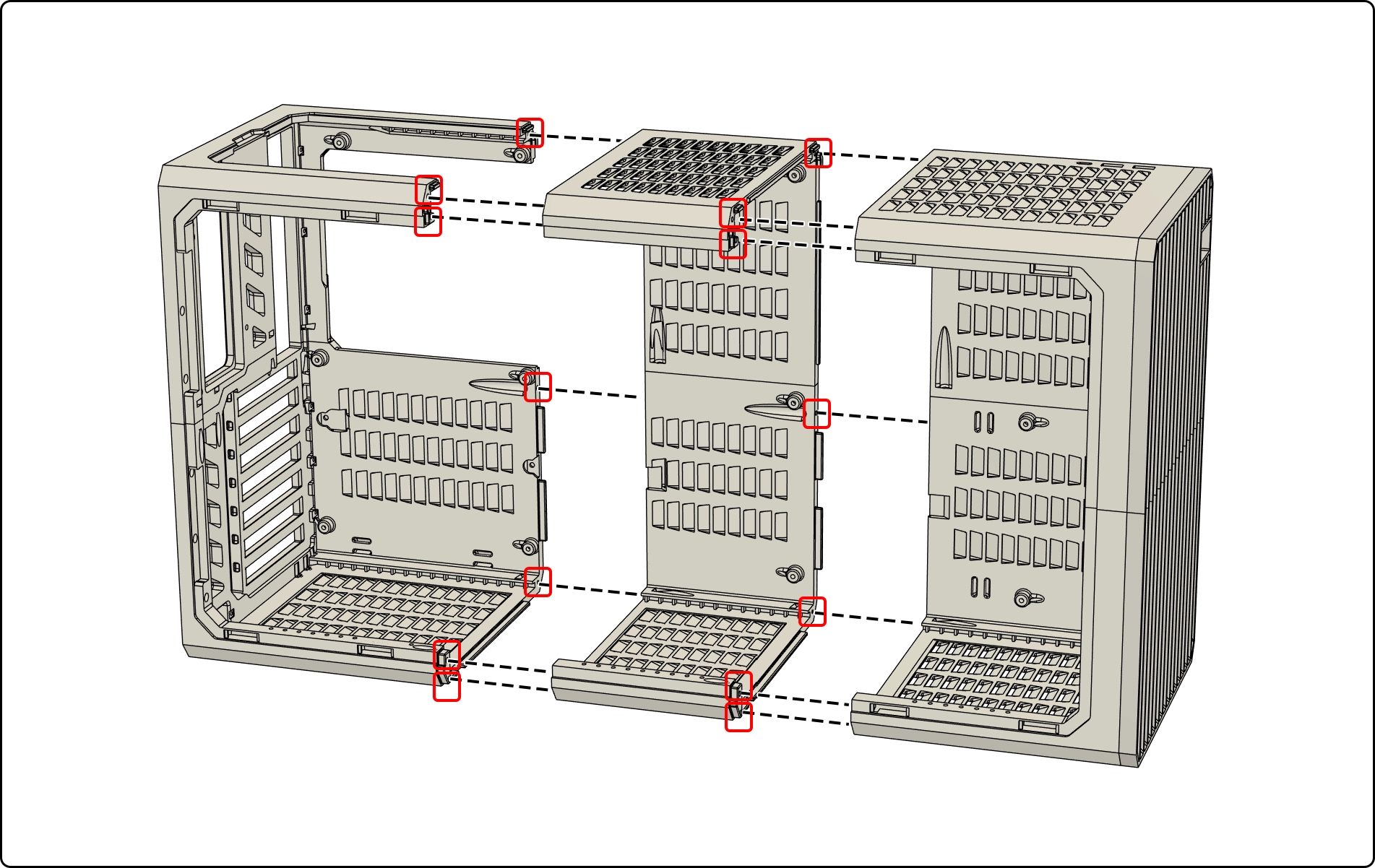
Note: HYPER v2.1 has added 2 additional screws to join the middle on the side panel side for additional rigidity. You do not need to reprint your original frames, one screw works well with side panel installed and has been verified by builders over the past 8 months on the original version.
MOTHERBOARD Installation
E-ATX, ATX, MATX, ITX - Mount directly using standard PC case screws.
Insert included standoffs for MATX motherboards.
GPU / PCIE Installation
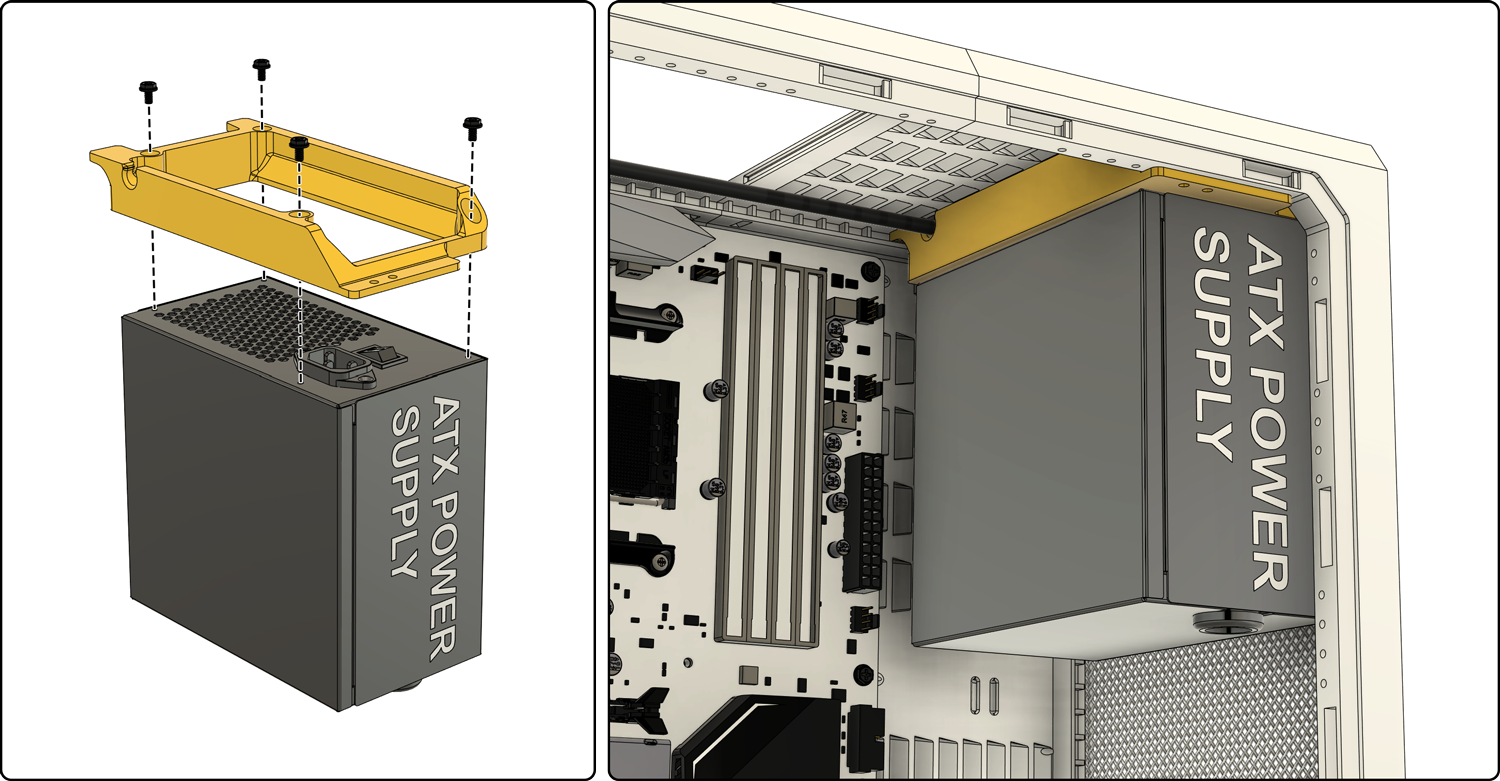
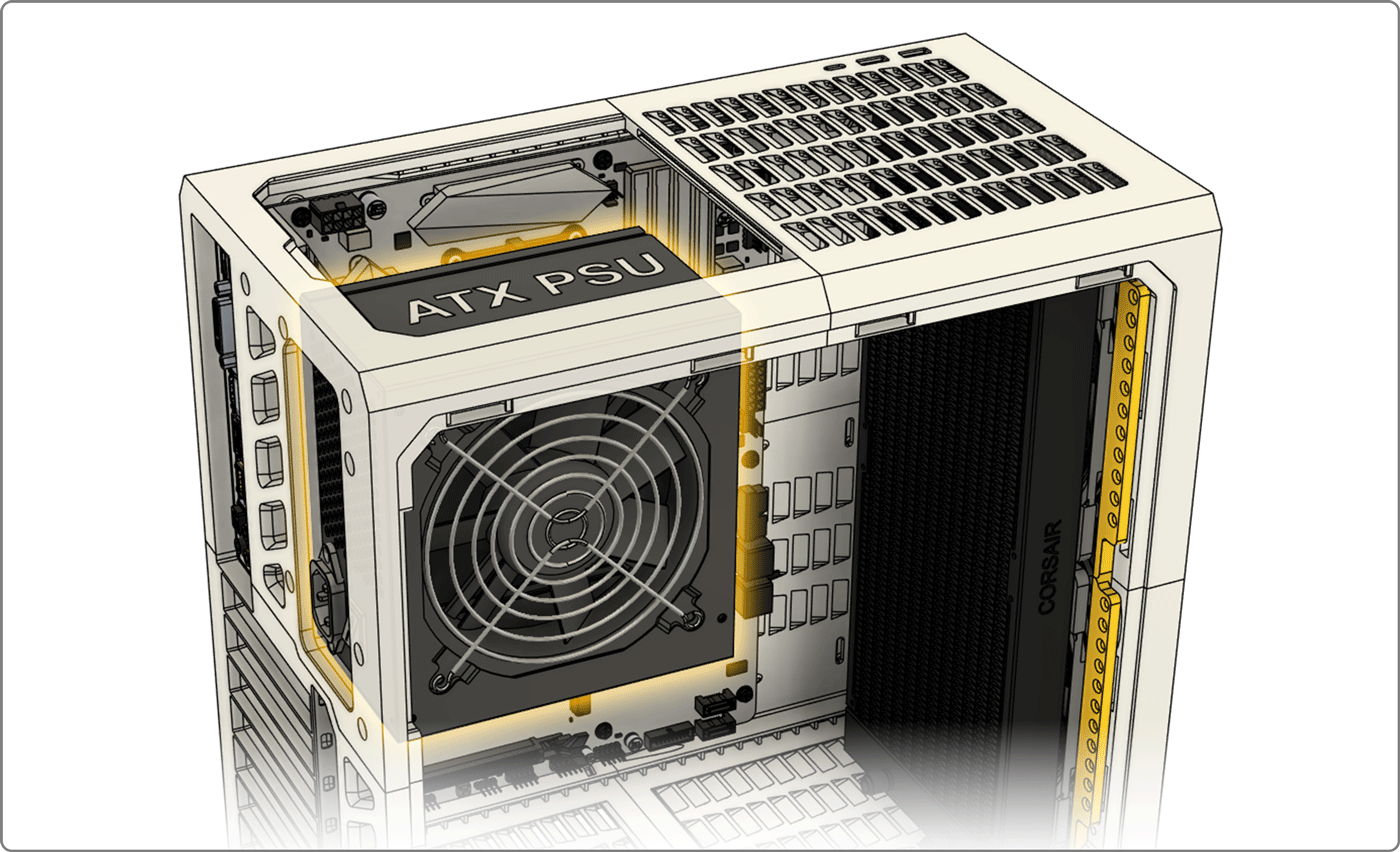
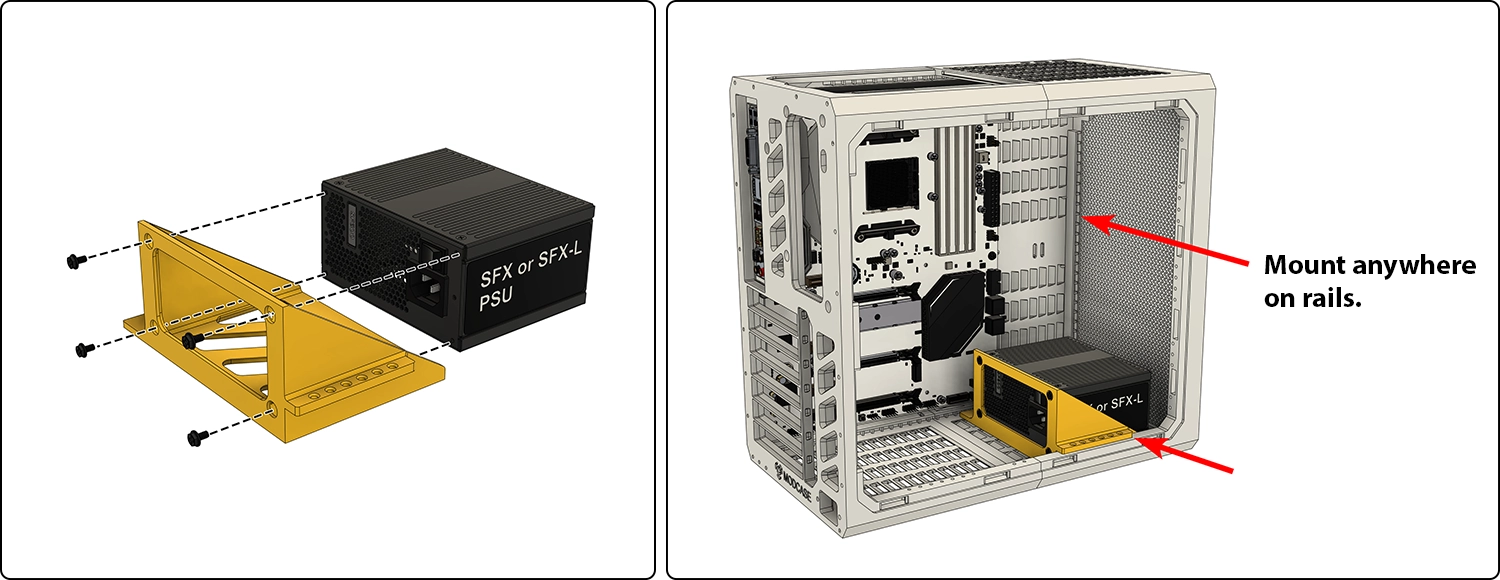
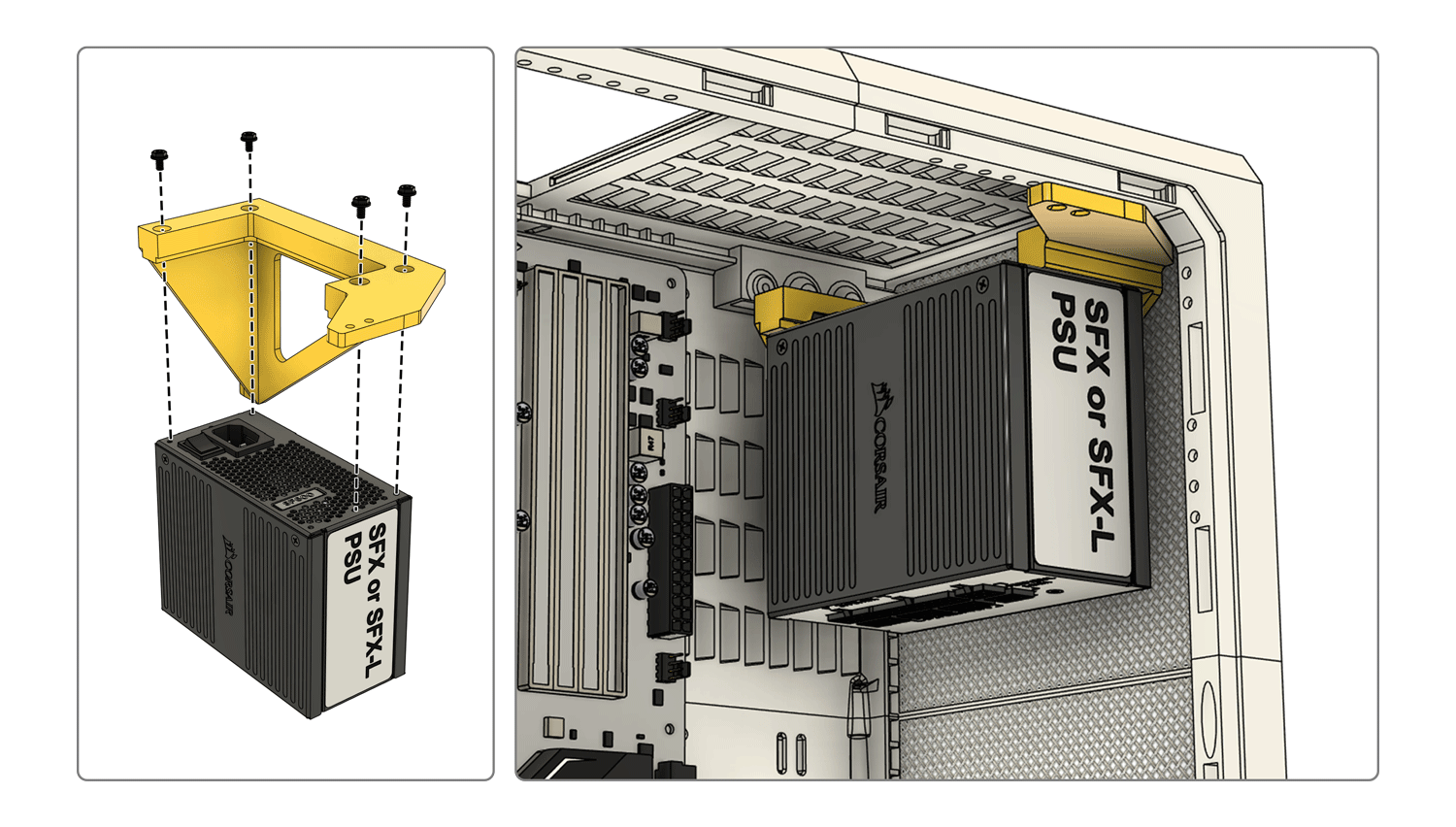
PSU Installation
Front ATX PSU option
Rear ATX PSU option
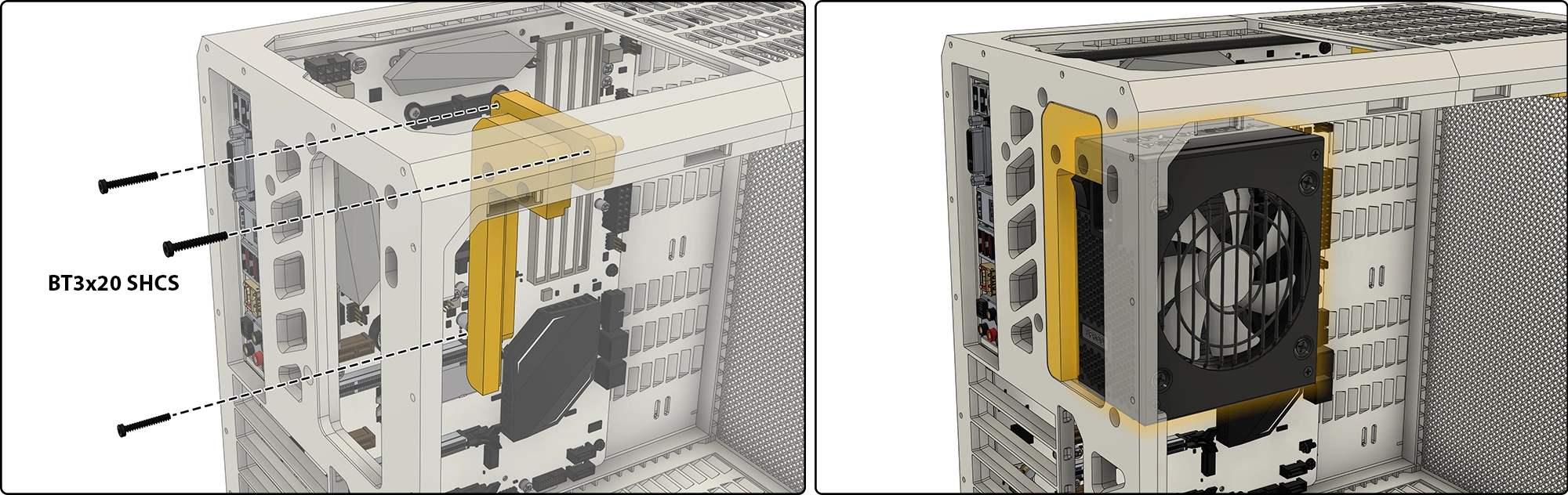
Universal SFX PSU option
Front SFX option
Rear SFX PSU option
Mesh Inserts
👉Customize your mesh density and hole shape by changing your infill % and pattern.
Fans
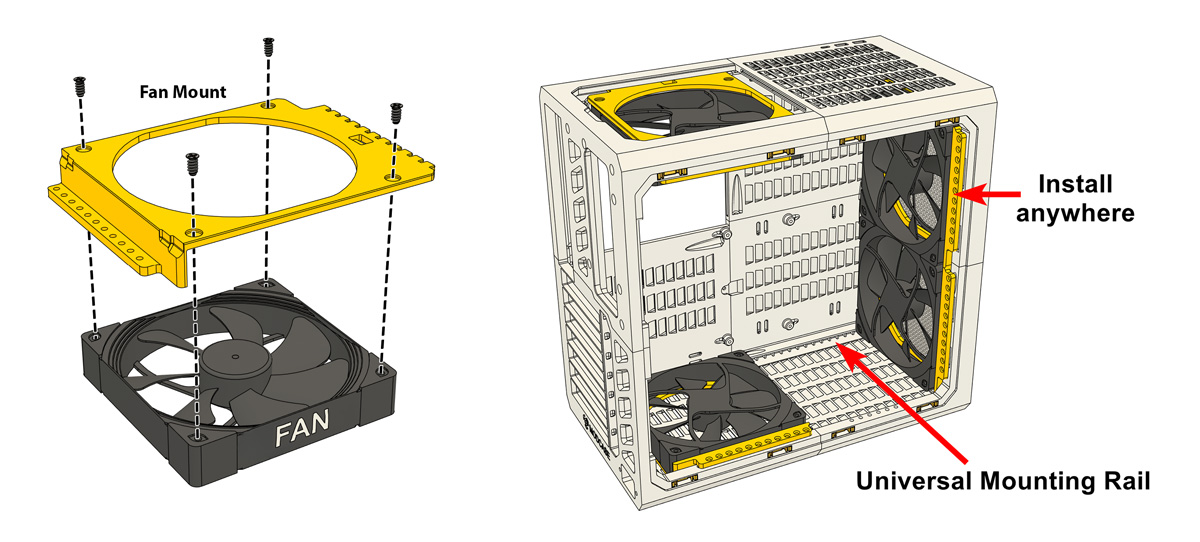
120mm and 140mm fans are mounted on universal brackets that can be installed anywhere along the top, front and bottom of the case.
Radiators
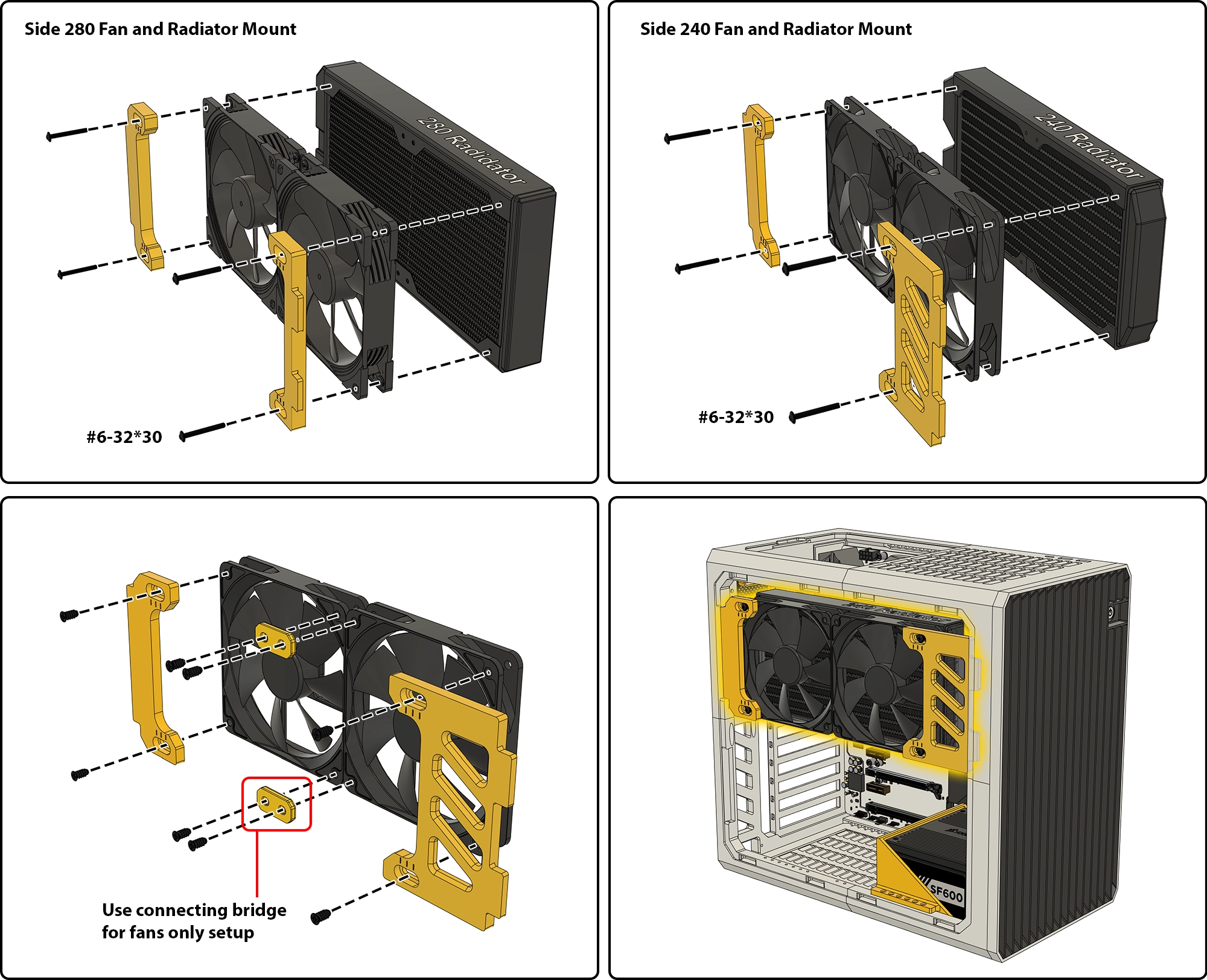
Use the same bracket as fans.
Side Mount Fans and Radiators
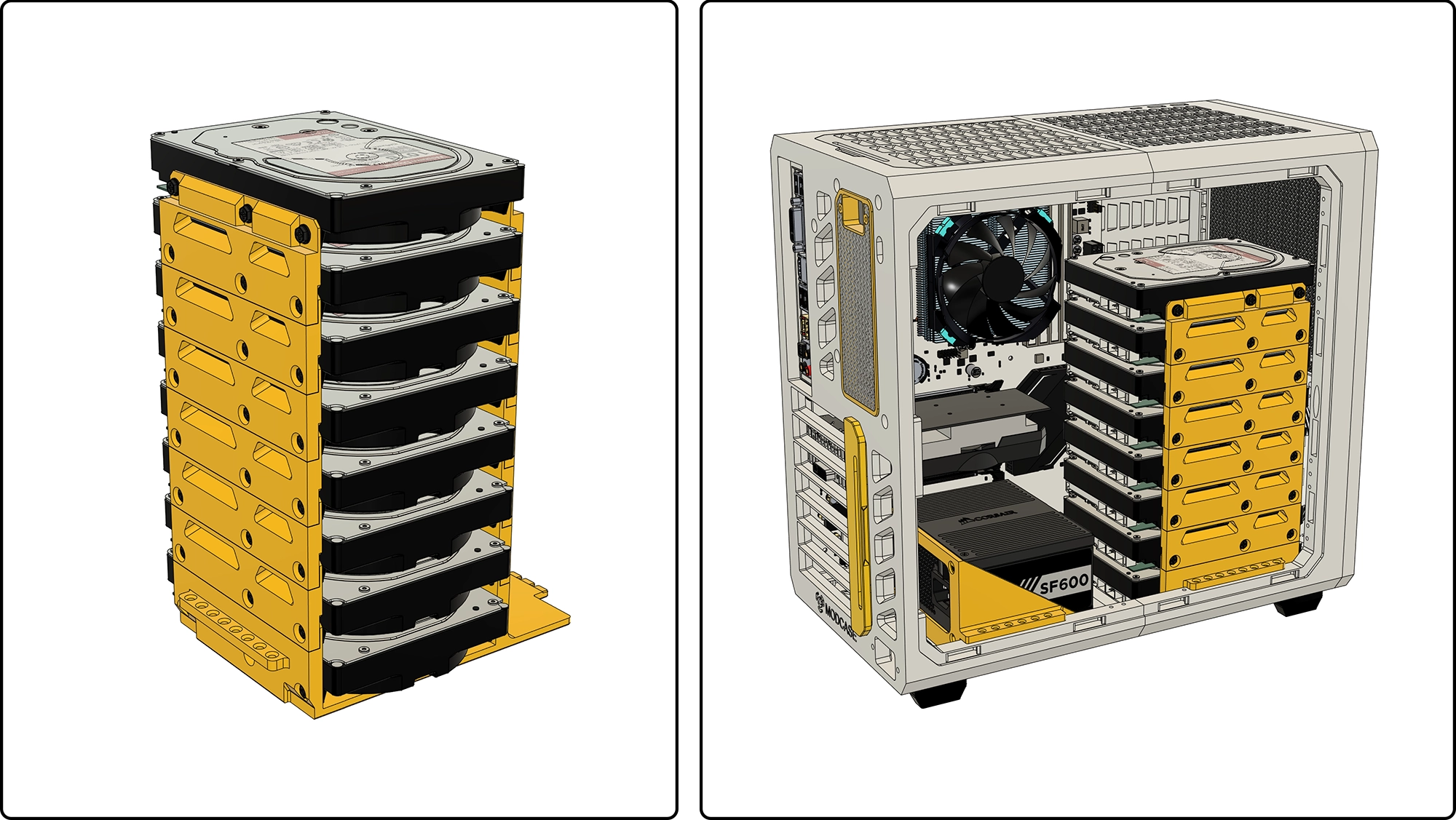
Hard Drives
3.5” or 2.5” HDDs can be mounted on the mounts below. Multiple plates can be used if you have room. Place anywhere along the top, front and bottom of your case.
Stackable Drive Module
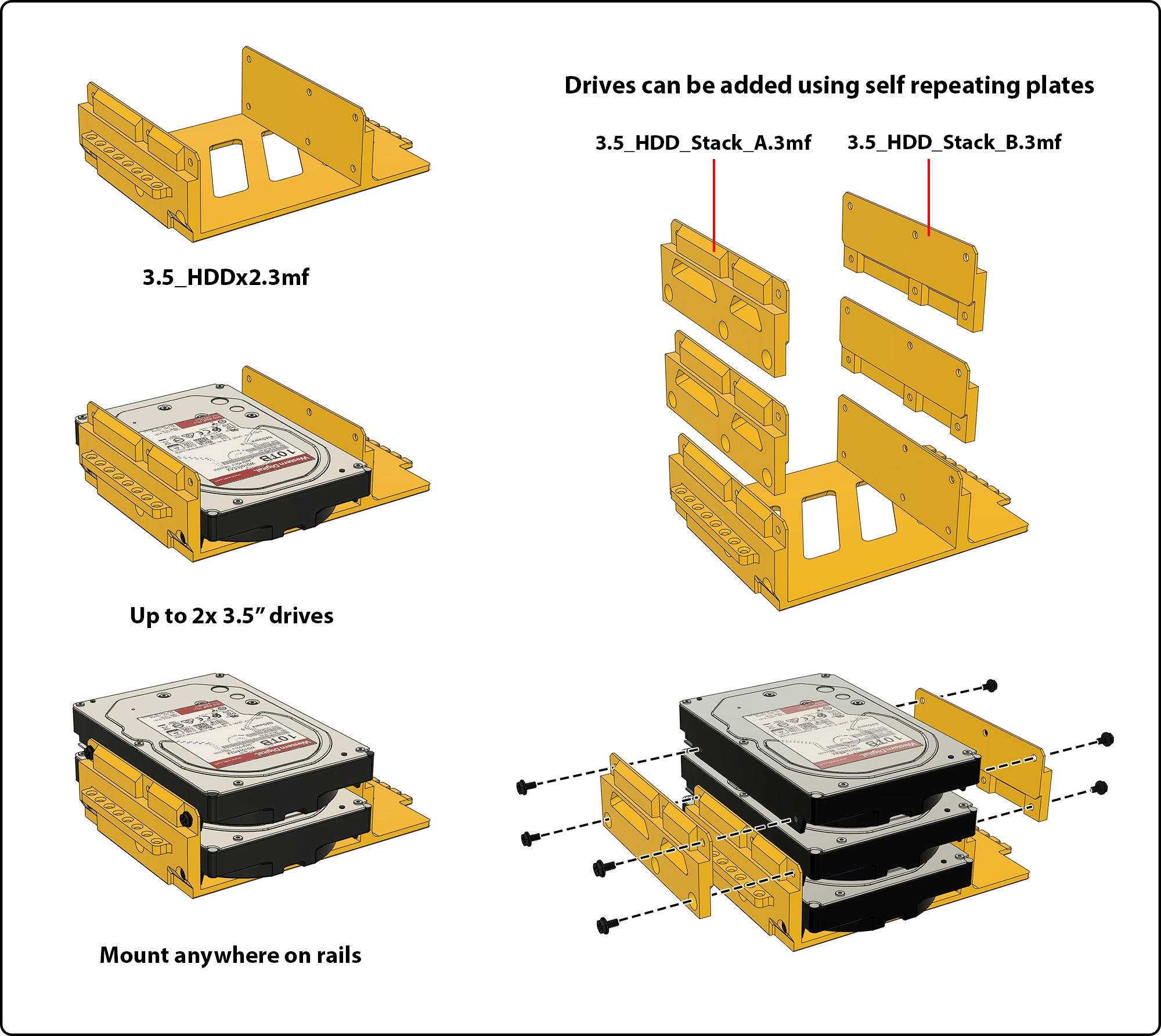
Mounts onto universal rails.
2.5" Drive Adapter for Stackable Module
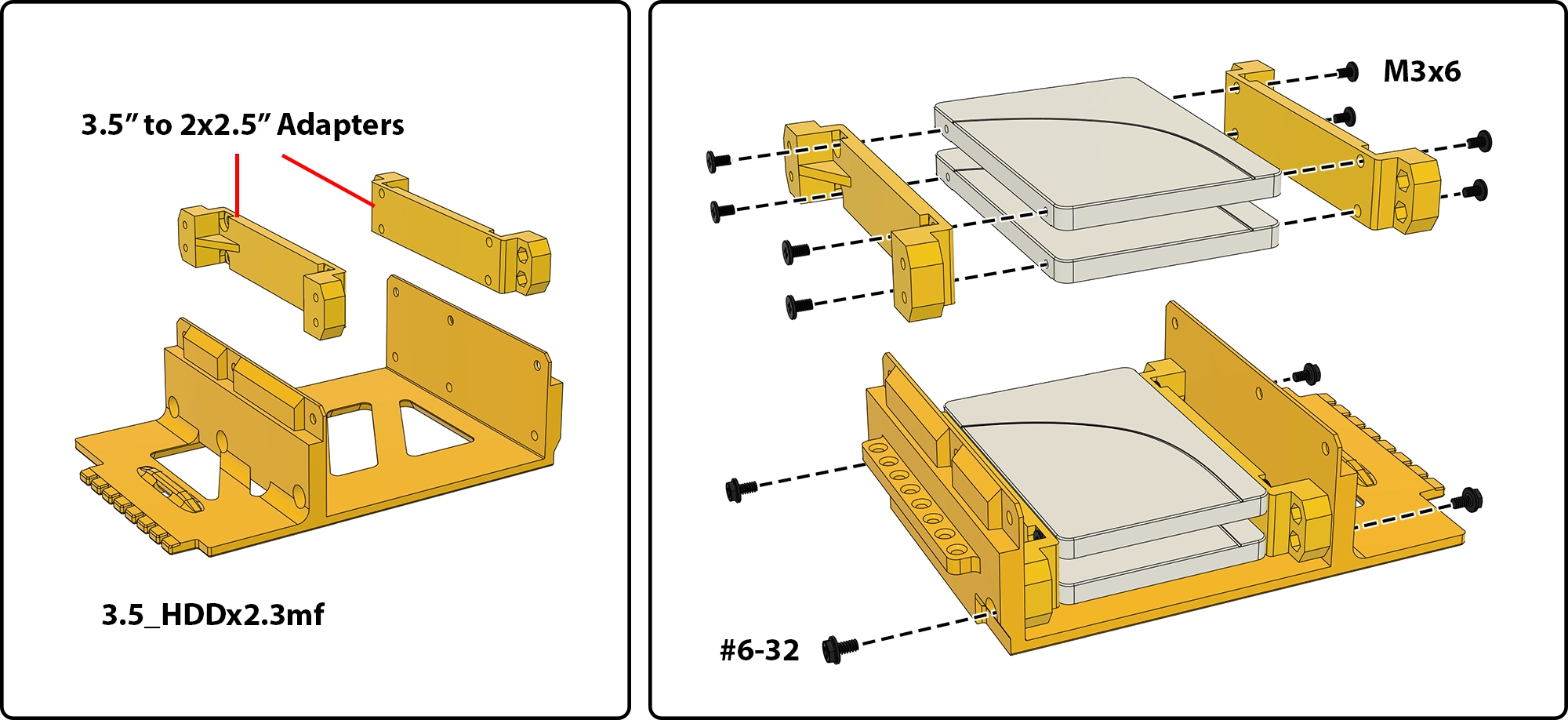
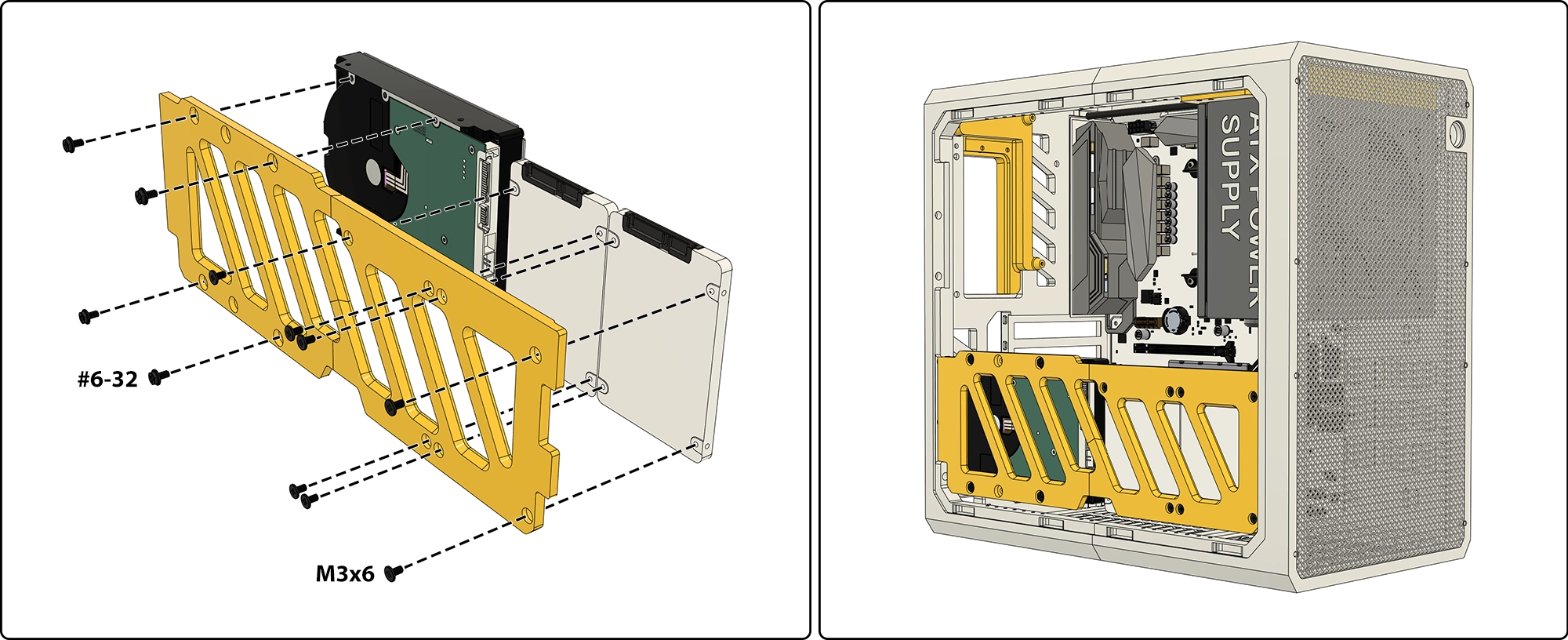
Use standard PC drive screws: M3×6 for 2.5" drives, #6-32 for 3.5" drives.
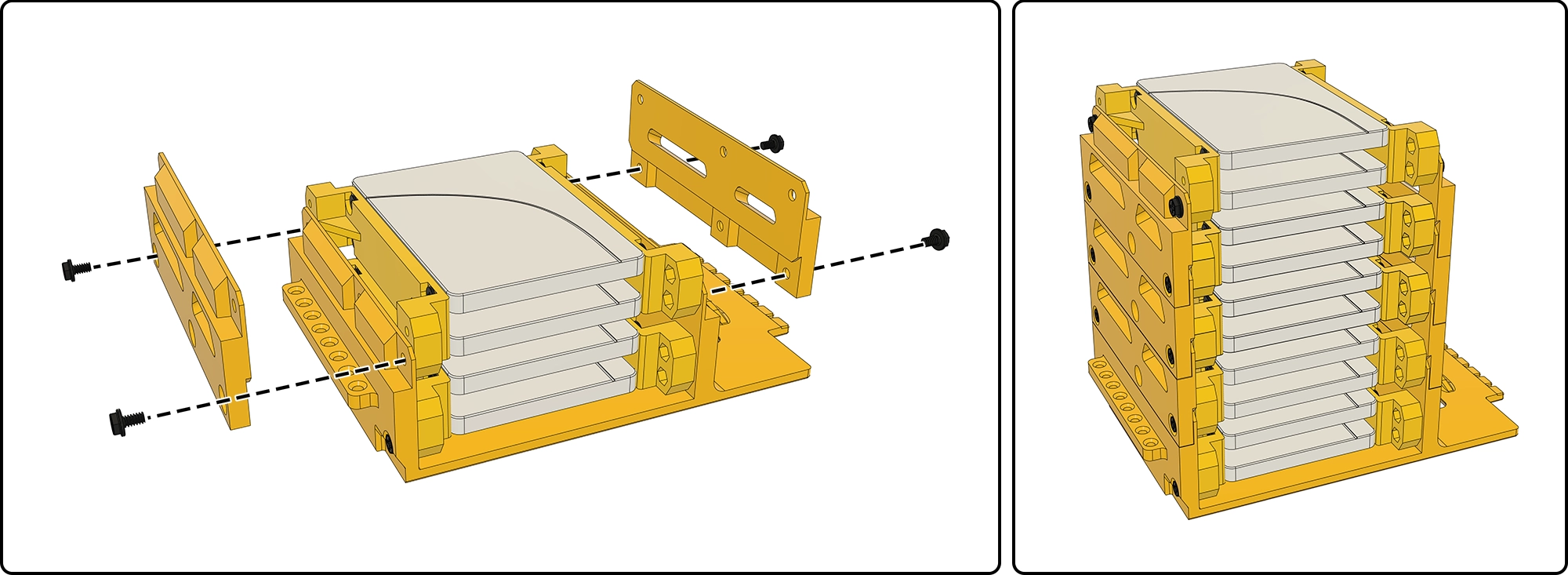
2.5" Drives can also be stacked using repeating plates.
Side Drive Mounts
USB and Power Button
- USB-A Cable (Link) - 👉Cut the rubber tabs (it's soft) and use standard computer screws (#6-32*6) to secure the cable.
- USB-C Cable (Link) - Similar cables may also work.
Install POWER BUTTON (Link)
👉It is a standard Ø16mm hole, to suit commonly available 16mm round PC power buttons.
Side Panels and Doors
4 Split side panels are included for smaller printers
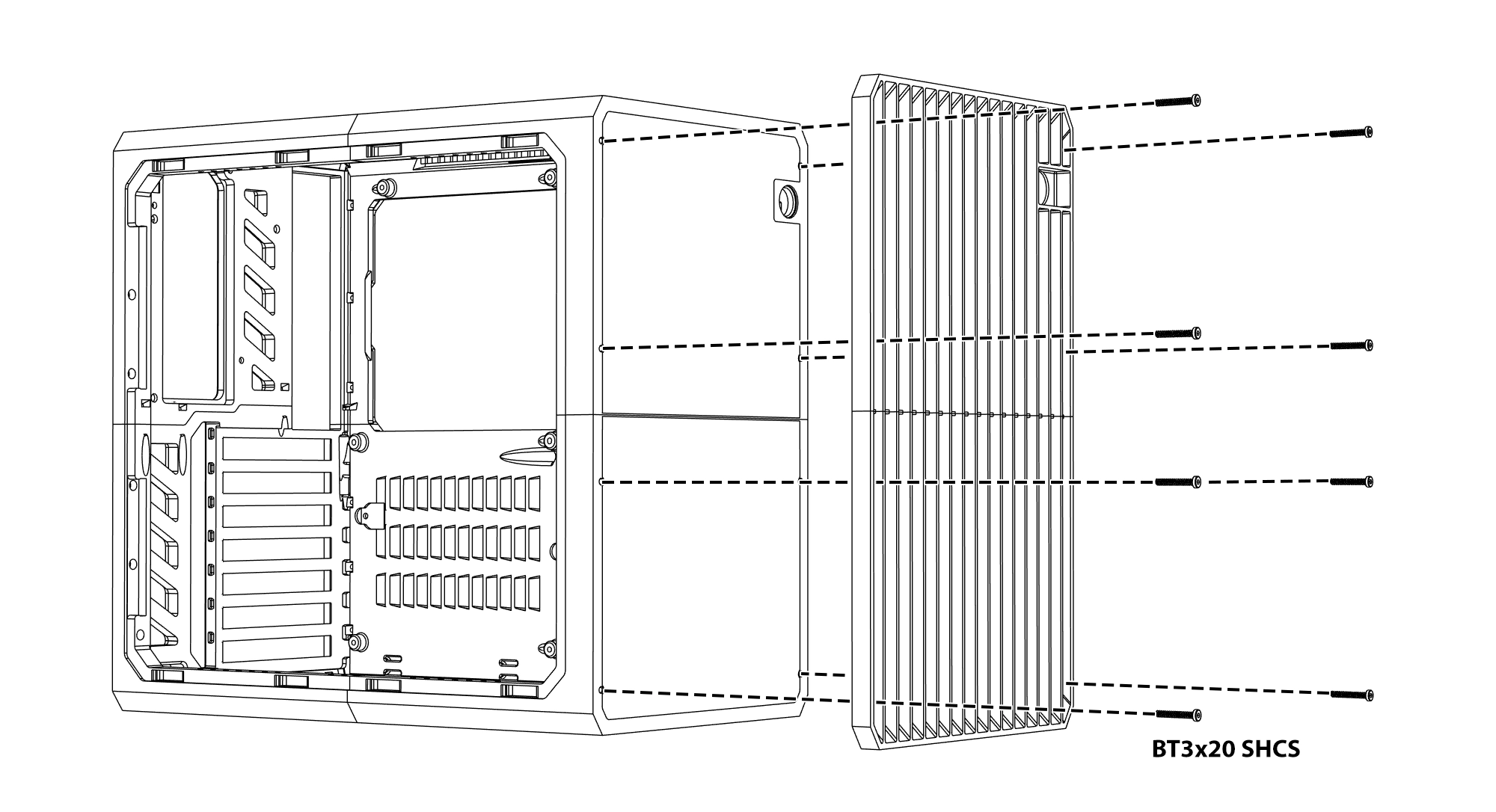
Rear Cover Installation
The new rear cover is installed from the inside and secured with screws.
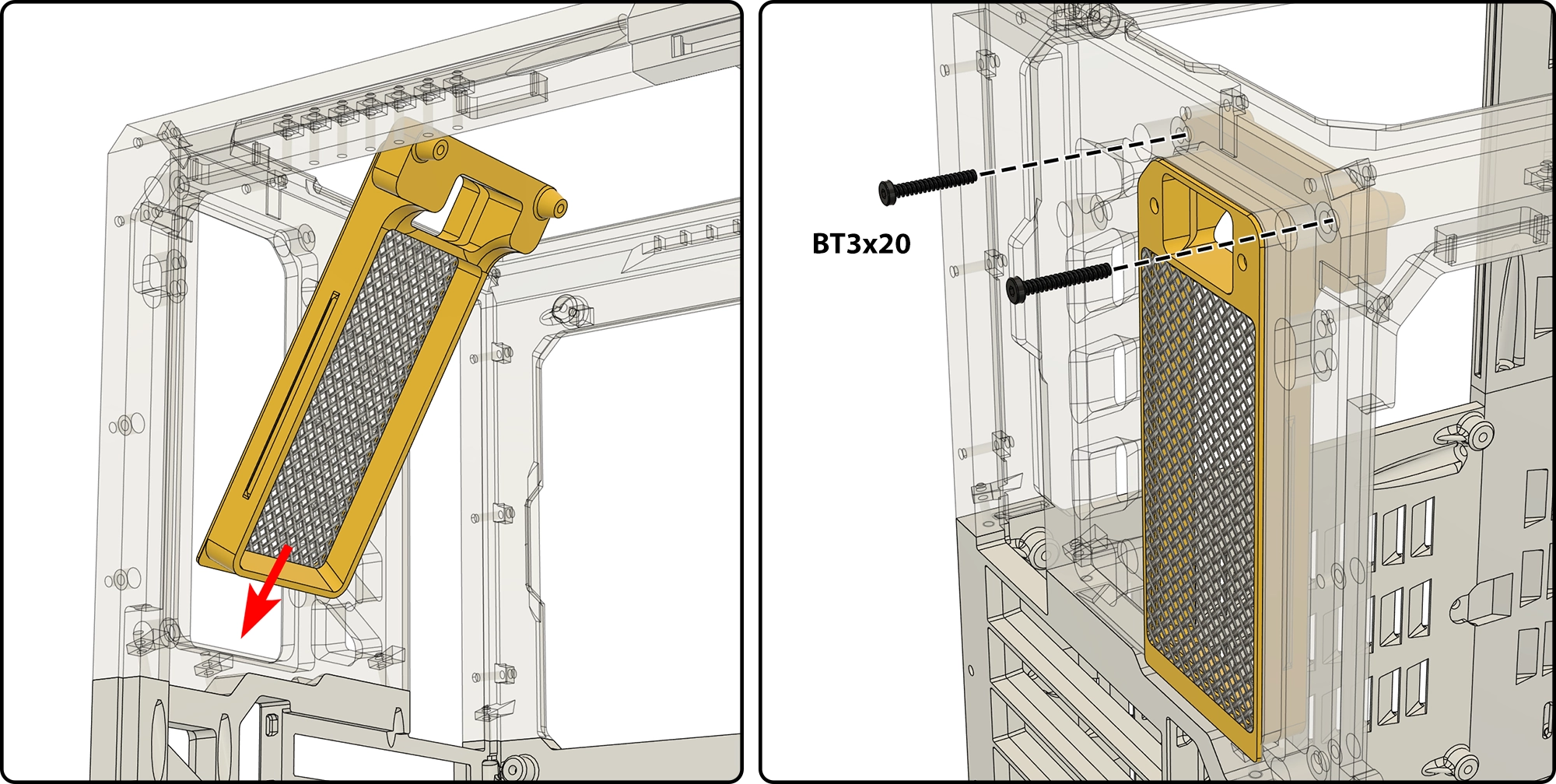
This rear cover has a mounting point for the PSU cable.
Side panels with displays
4 Split side panels can hold 5" displays (Link). Single piece side panels can hold 7" (Link) as well as 5" displays.
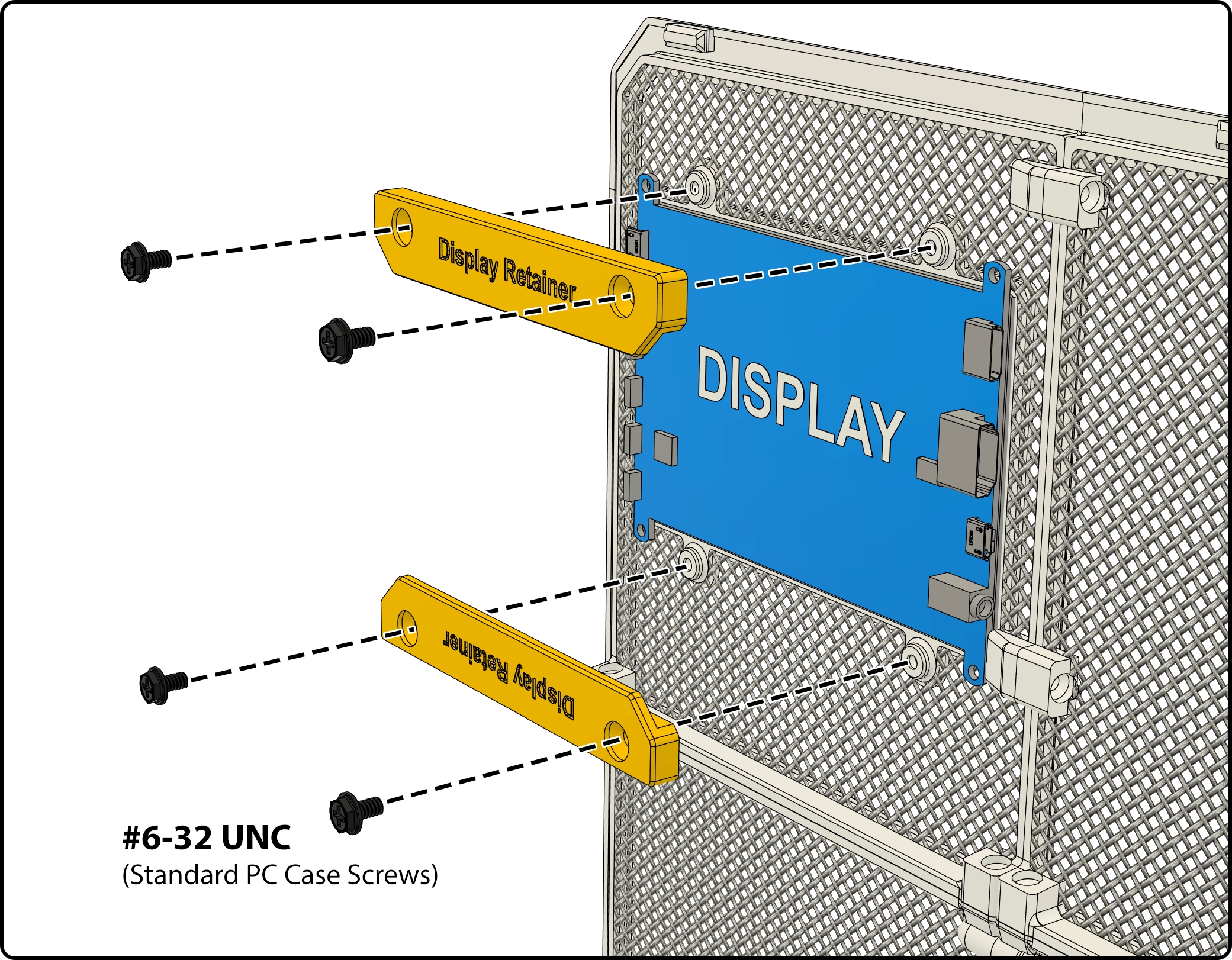
Note: Side Panel with Phone Dock has been removed according to feedback - due to safety considerations around mounting battery-powered devices in a heated environment. The 5" and 7" display mounts are recommended for stat screens.
Transparent Side Panel Mod
This frame lets you mount your own clear material (acrylic or polycarbonate) for a transparent side panel option. You'll need to cut your material to the following size and use CA (super glue) or 2-part epoxy to bond your panel to the frame.
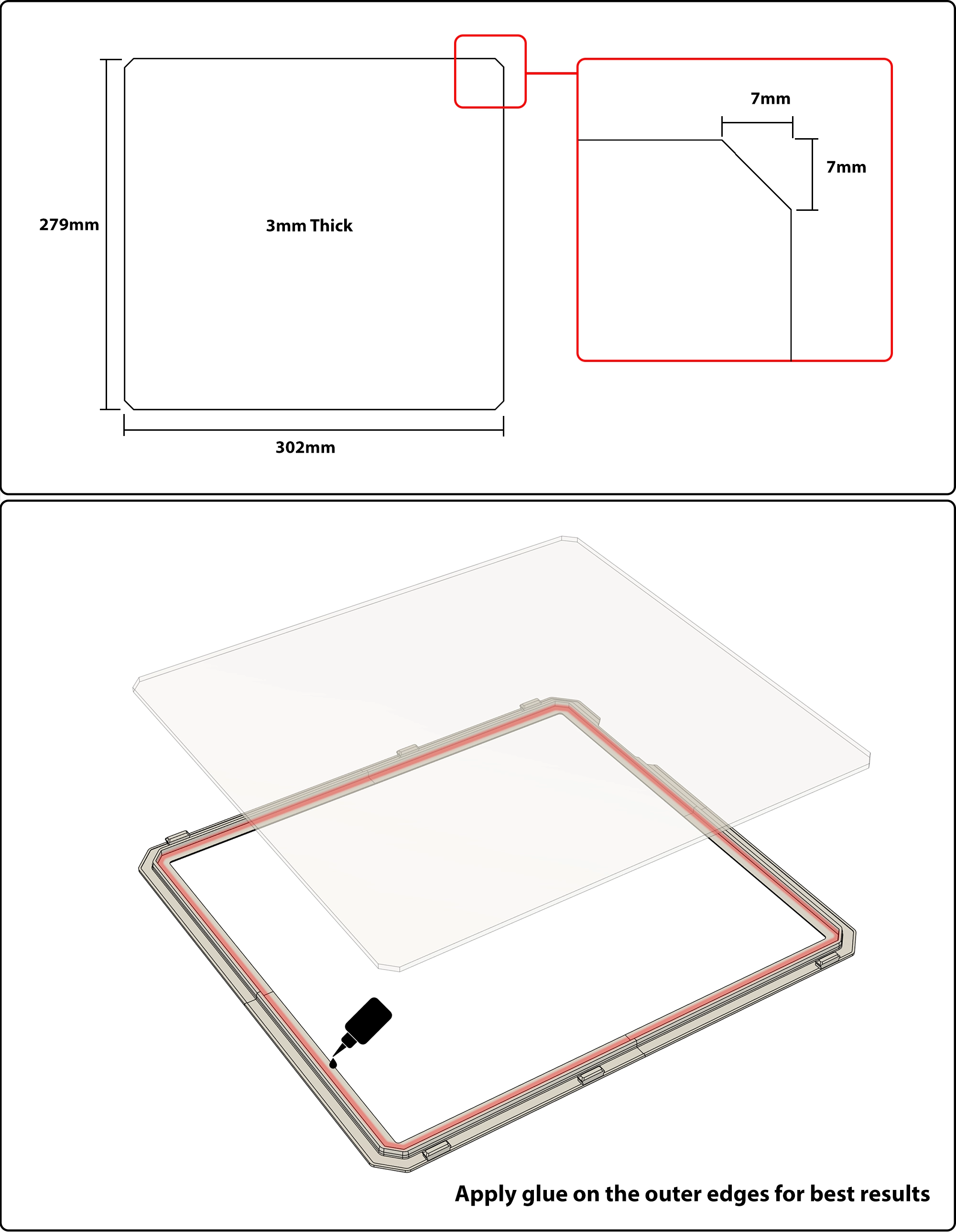
Note: Mesh panels are recommended for the best air flow. Ensure adequate cooling when using this solid side panel.
Update: HYPER now has 3 size expansion pack options. The material dimensions for the expanded side panel options are as follows.
| Standard (No expansion) | 279 x 302 x 3mm |
| 80mm Expansion | 279 x 382 x 3mm |
| 100mm Expansion | 279 x 402 x 3mm |
| 120mm Expansion | 279 x 422 x 3mm |
Vertical Module
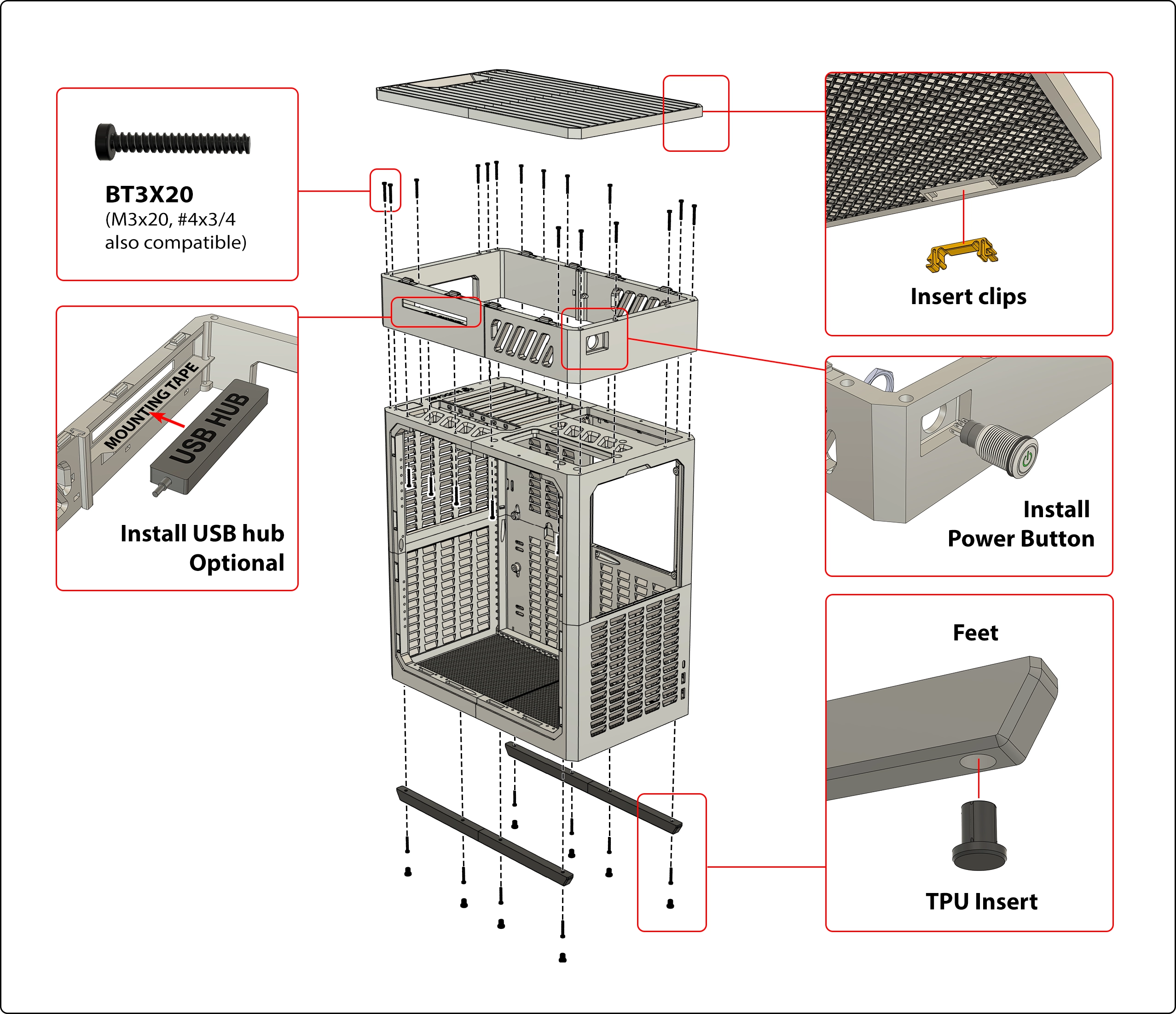
HYPER's vertical module adds a handle and lets you use your case vertically for minimal footprint. The top plate is removable for easy access to all your IO ports.
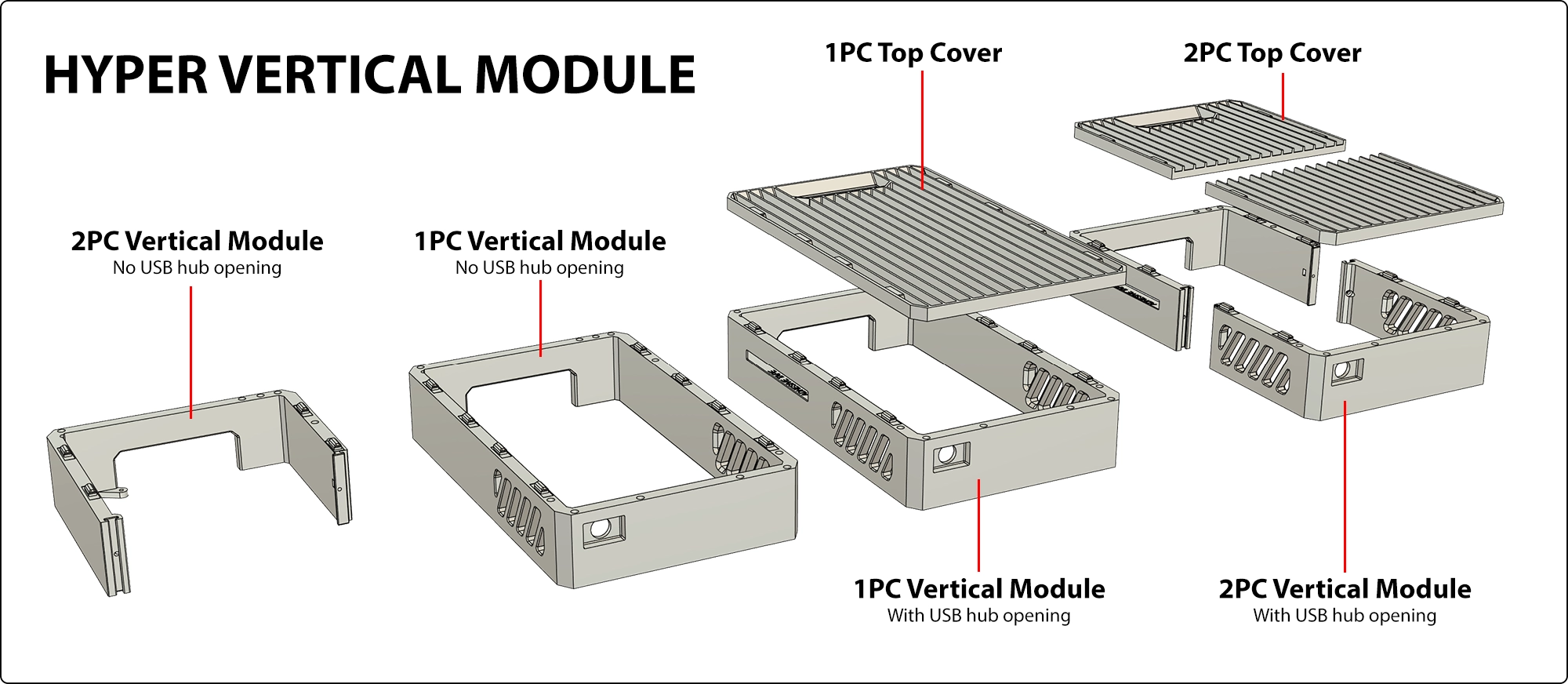
An optional USB Hub mounting variant is included for expanding your IO options. Use mounting tape. This hub (Link) works well with an extension cable. Other hubs also work, max recommended USB Hub length is 155mm. Flat rectangular shaped hubs are optimal.
HYPER Vertical GPU Mount
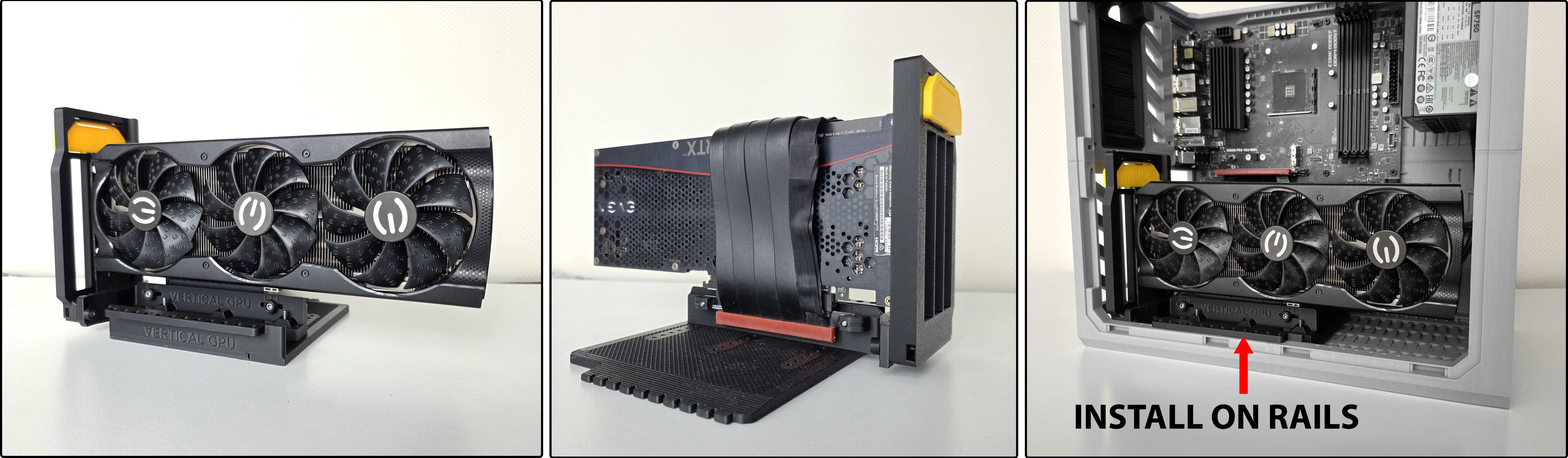
This vertical GPU mount can be adjusted in 3 directions to accommodate your straight PCIE Riser cable. It accounts for variations in pitch and height of the mounting holes on your cable.
All straight riser cables are supported. 19cm length is recommended. E.g. PCIE 4.0 Dual Reverse, or Linkup PCIE 5.0 Dual Reverse. (Since the motherboard end doesn't require reverse connector, single reverse riser cable works even better, but they may be harder to find.)

You need 2x M3x20 screws and 2x M3 Square nuts for the riser mount blocks. The rest can use self tapping screws or M3 screws without nuts in the optional pockets.
GPU Support Module
HYPER's GPU support comes in 3 lengths (35mm, 45mm and 65mm) and can be mounted to the case with a rail mounted base, or be used standalone. Two styles of rubber end caps are included for soft contact with your components.
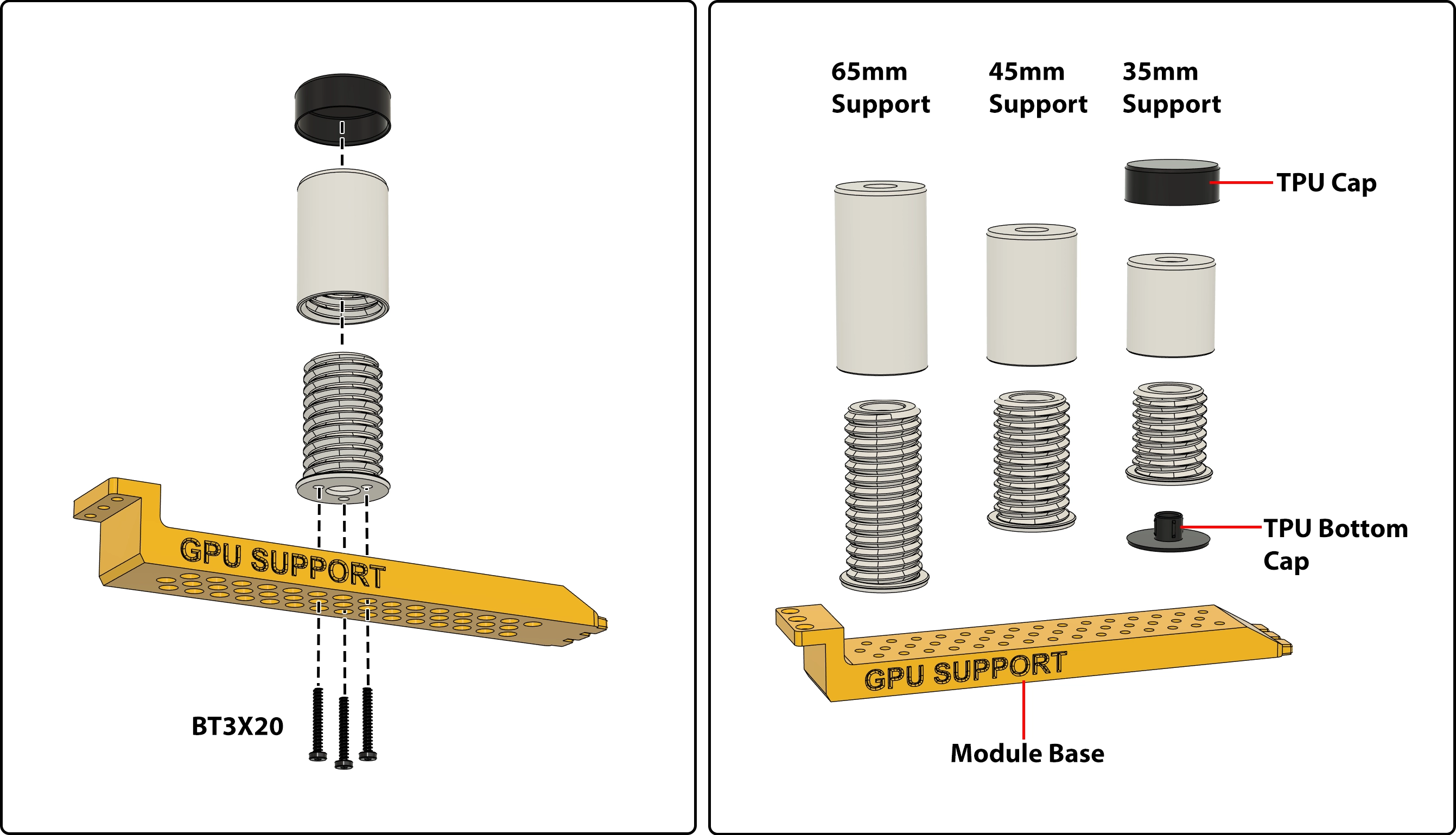
When mounted to the base on the universal rails, the support will be securely fasted even when the PC case is being moved around frequently.
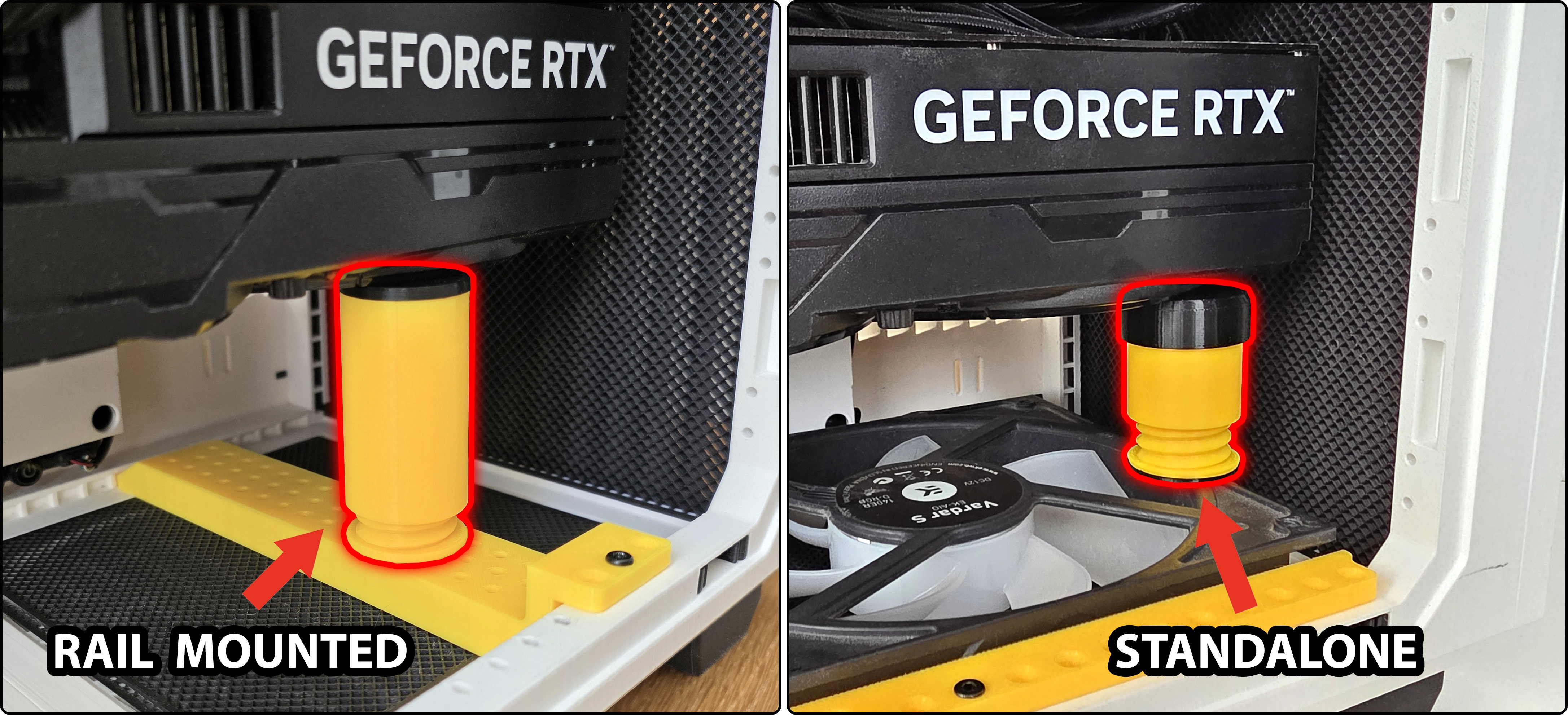
Optionally, the support can also be used standalone without the base, so it can be stacked on top of other components such as a fan or drives.
FRONT PANEL DESIGNS PACK
New optional front panels let you change the look of your case without disassembly.
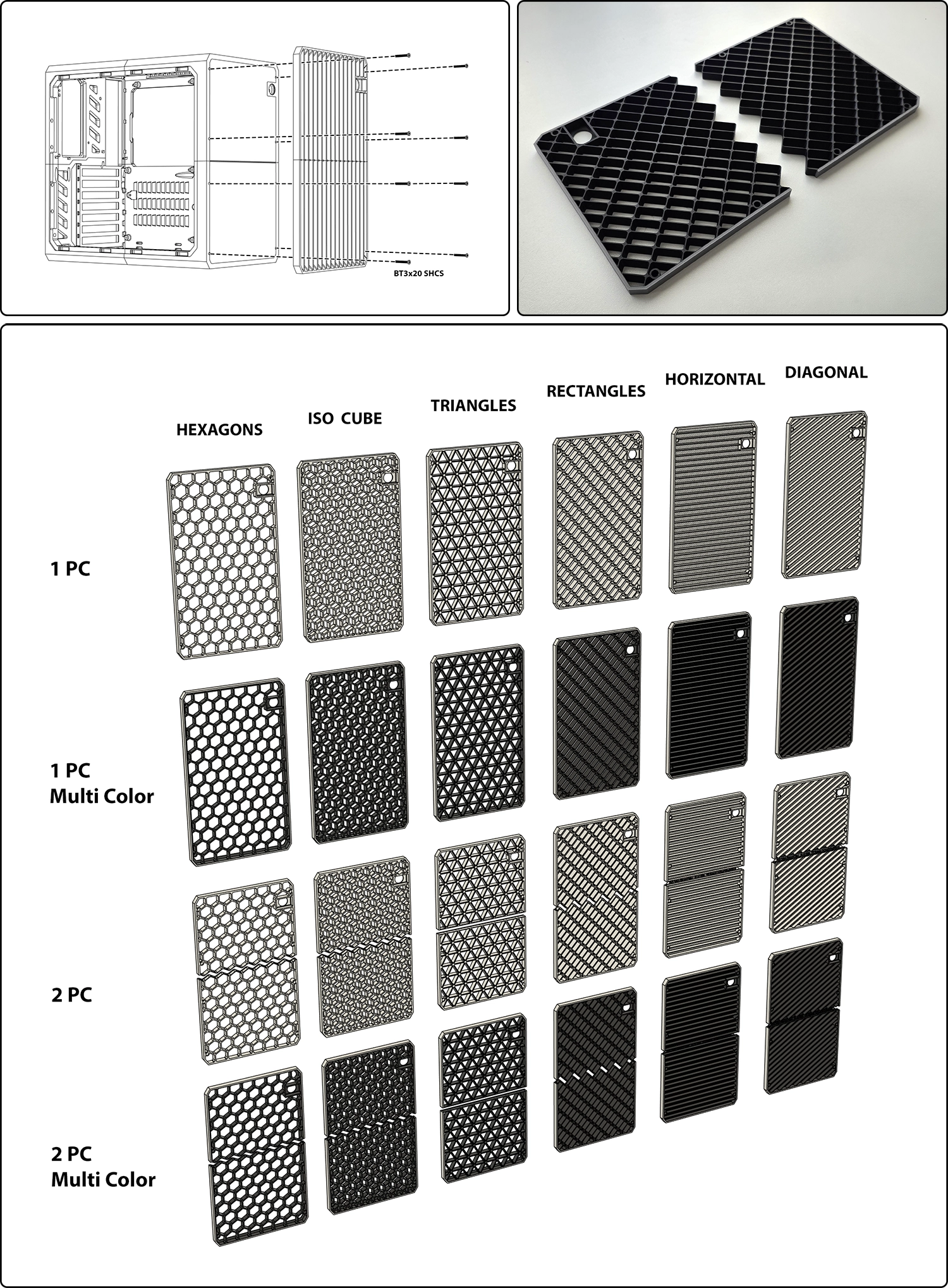
Two piece plates use 8 screws to secure.
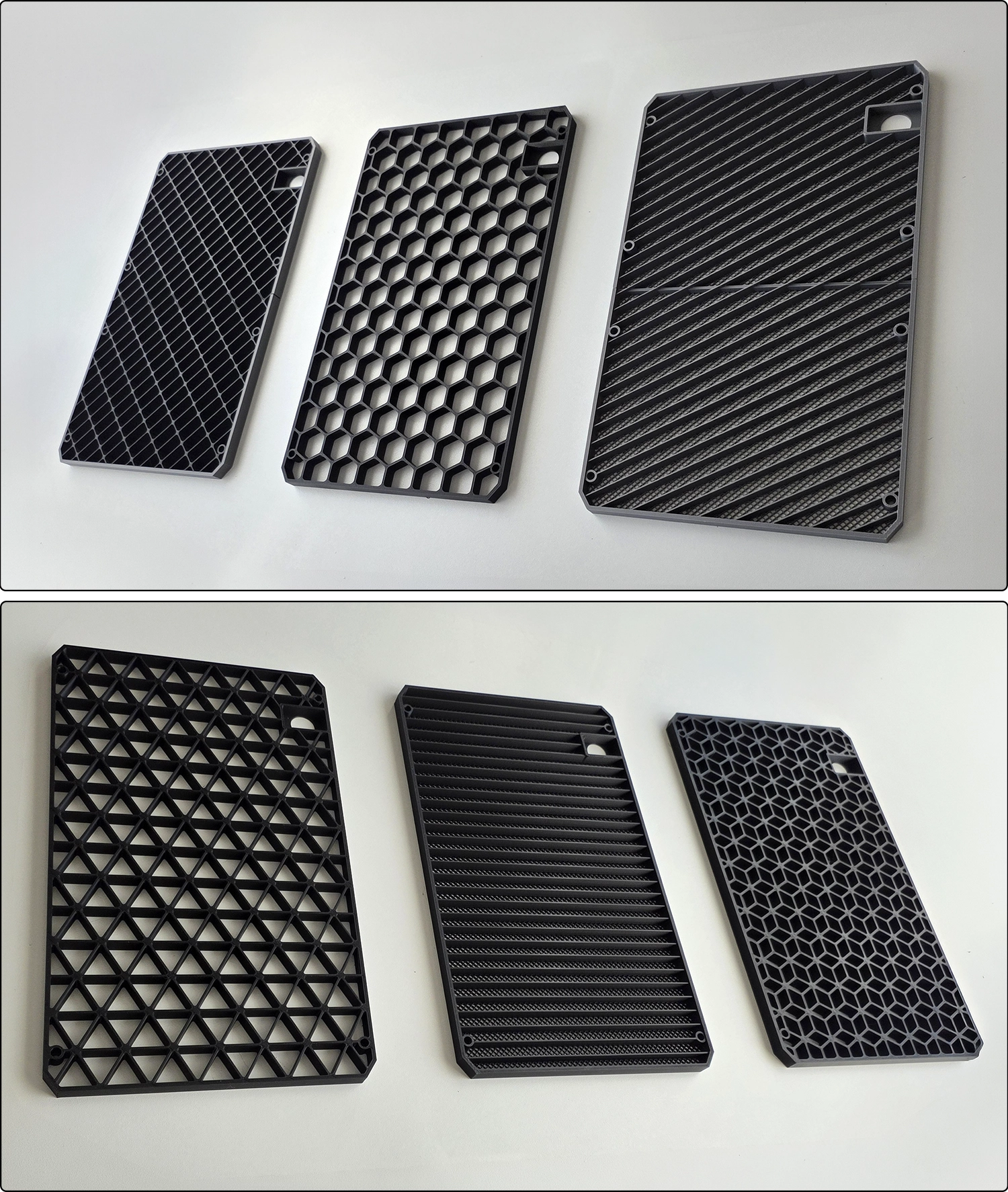
Metal Nut Inserts
M3 Square Nuts (Link) can be inserted behind holes. Captive nut insert is a backup option. Use them with M3 Machine Screws (Link).
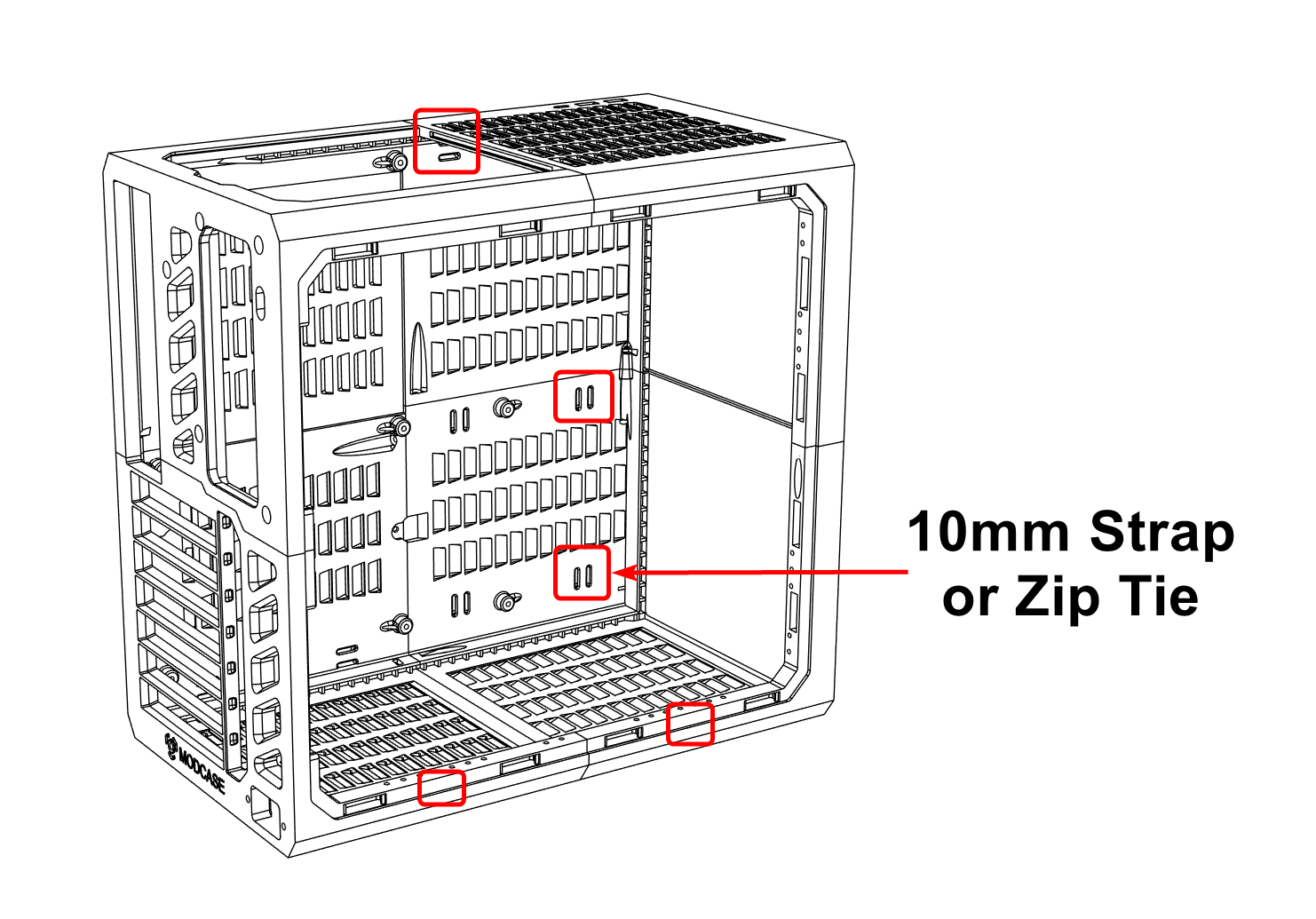
CABLE MANAGEMENT
Slots are on the inside of the case for zip ties or 10mm wide Velcro strips.
HYPER CAD
CAD files are available for Ultimate and Commercial Licence Tiers. HYPER is created via direct modeling in Fusion 360. You can use the native .f3d format if you use Fusion 360, or use the STEP files which are compatible with all other CAD programs. There are no proprietary features exclusive to Fusion 360. The STEP file contains the full functionality of HYPER's CAD.

The CAD is structured into 7 groups - Side Panels, Mounts, Frames, Templates, 3 Size Expansion Pack, Vertical Module Pack and Front Panels Pack. The .f3d format has the full assembly in one file. The STEP format has a full assembly in one file, as well as each group in their own files for easier loading in other programs.
Download CAD Files Here
Opening the file:
Double-click the .f3d file with Fusion 360 installed.
Exporting the files for printing from Fusion 360:
Right-click a body > Save as mesh > Choose "3MF" > tweak refinement (optional) > Save.
It's recommended to export as 3MF instead of STEP for printing for resolution controls and generally better slicer compatibility.
SPECIFICATIONS
| Parameter | Supported |
|---|---|
| Motherboard | E-ATX, ATX, mATX, ITX |
| GPU | 7 PCIE slots × 450mm long × 168mm tall |
| CPU Cooler | Up to 168mm (Noctua NH-D15 confirmed) |
| PSU | ATX, SFX, SFX-L |
| Fans | 6× 140mm or 7× 120mm |
| Radiators | 120 / 140 / 240 / 280 / 360mm |
| Storage | 24× 2.5", 10× 3.5" (18× 3.5" by expansion*) |
| IO Ports | USB-C, USB-A ×2 |
| Dust Filters | All intakes. Customizable mesh density. |
| Dimensions | 353 × 338 × 202mm – 24L, ~1.9 kg |
*Expansion modules have been released, they now unlock 450mm GPUs, 360mm radiators, 18× 3.5" drives, and more.
MY BUILD
- AMD Ryzen 9800X3D
- NH-D15 CPU Cooler
- Palit 5070 ti 16g GPU
- NZXT B650 N7 ATX Motherboard
- SF1000W SFX Platinum PSU
- 64GB Dominator Ram
BOM - Bill of Materials
| Part | Notes |
|---|---|
| BT3x20 Screws (40pc) | Also compatible with #4×3/4" screws and M3×20 machine screws (machine screws just require more turns to advance). All head types work: socket cap, button head, pan head, and flat head. |
| Ø16mm Power Button | |
| Filament 2–3 kg PETG | HYPER uses approximately 2.5 kg of filament, accounting for unlocked stretch goals. The basic case with 15% infill can still be printed in just under 2 kg. PETG-CF, ABS, ASA, PC, PAHT-CF, ASA-CF, ABS-GF and other engineering materials also work — just pay more attention to chamber temp and bed adhesion. Do not use PLA — it may bend over time.
Multicolor: 2 kg of your primary color (frame, ~1.6 kg) and 1 kg of your secondary color (mesh, ~0.4 kg) is sufficient. Mounts can be either color to preference.
TPU: A small amount (~18 g) is recommended for printing the feet. |
Optional
| Part | Notes |
|---|---|
| PSU Internal Cable | For repositioning the PSU to positions other than the rear. |
| USB-A Cable | Similar cables may also work. |
| USB-C Cable | Similar cables may also work. |
| Square Nuts | Captive nuts sit behind the hole and are extremely robust — they'd require pulling through the entire print to fail. Use with M3×20 machine screws. It's recommended to start with screws only. HYPER is designed for 20mm screws with deep thread engagement into the surrounding material, so you may not need this backup option. |
| M3×20 Machine Screws | For use with the captive nut option above. |
| Zip Ties or 10mm Velcro Strips | For cable management — slots are on the inside of the case. |
| 5" Display / 7" Display | For use as integrated displays on supported frame and side panel options. |
| Clear Panel (acrylic or polycarbonate) | For transparent side panel mod. 302 × 279 × 3mm with 7 × 7mm corner chamfers. See instructions for corner detail and dimensions for expanded options. Source from local hardware stores or online cut to size plastics stores. |
PC Screws
HYPER uses standard PC screws for mounting components. (You may already have these.)
Tips for maximizing strength
- Dry PETG before printing (65°C for 24hrs). Wet filament causes bad layer adhesion, stringing, and uneven walls. In open air, a spool can absorb enough moisture in 1–2 days to cause problems.
- Increase infill % and perimeter count. Since the Expansion pack stretch goal was unlocked, HYPER’s profile has increased infill to 20%. You can increase wall (perimeter) count to 5 for even greater strength.
- Set infill/perimeter overlap to 20%.
- Print at the upper end of your material’s recommended temperature.
- Use stronger materials. CF-Filaments greatly improve rigidity. For ABS, ASA, Nylon, PC, use an actively heated enclosure and 110°C bed with glue stick, otherwise prints may crack or lift.
Slicer Warnings Explained
❶ The "Non-manifold edges" or "open edges" are infinitesimally small precision gaps from high-polygon CAD export, far below any printable scale. All files have been tested and verified to print correctly. ❷ "Floating cantilevers" on parts with mesh are not floating — the mesh body is actually supporting the solid geometry as designed.
Using Other Slicers
For the simplest print experience, it's highly recommended to use the preconfigured 3MF file provided. Bambu Studio, OrcaSlicer, and Creality Print typically would have presets for your printer. If you prefer to slice your own files in a different slicer, please select ‘Download STL/CAD Files’ and use the generic 3MF files included. Slicing instructions are included in the download.
Support: support@modcase.com.au
Every effort has been made to ensure accuracy on this page. If you spot any issues or discrepancies, please contact support.
RECOMMENDATION: Dry your PETG! (65C 24hrs) |
STRETCH GOALS
All stretch goals are included for Premium, Ultimate and Commercial tiers.
| Goal | Status |
|---|---|
| 3 Size Expansion Pack | RELEASED |
| HYPER Vertical Module | RELEASED |
| Vertical GPU Module | RELEASED |
| GPU Support Brackets | RELEASED |
| Front Panel Design Pack | RELEASED |
| Advanced Feet Pack | ETA July 8 |
RELEASE NOTES:
HYPER v2.6.1 - 29Jun2026
- Improved retainer fit for 7in display side panels
HYPER v2.6 - 25Jun2026
- Front Panel Designs Pack released
HYPER v2.5 - 14Jun2026
- GPU Support Module released
HYPER v2.4 - 12Jun2026
- Vertical GPU Module released
HYPER v2.3.1 - 8Jun2026
- Improved vertical module side grill appearance
HYPER v2.3 - 5Jun2026
- Vertical Module Pack released
HYPER v2.2 - 3Jun2026
- Fixed motherboard standoff position on 120mm and 100mm extensions
HYPER v2.1 - 1Jun2026
- 3 Size Expansion pack released. 80mm, 100mm and 120mm expansion options
- 360mm Radiator support added with expansion
- 2 extra joining screw added to frames for additional rigidity. (Located in the middle, on the side panel side of the case.)
- Improved tolerance on all side panels
- Fixed 20mm screw compatibility on 4-Split side panels
- Added pop-out power cable cover on frame and rear cover
HYPER v2.0 - 22May2026
- Premium, Ultimate, and Commercial editions released
HYPER v1.2 - 14Apr2026
- Added mounting holes for use with HYPER Premium* modules. (Frame_RT, Frame_RB updated)
- Improved 4 split side panel joint quality.
*HYPER Premium is live on MakerWorld Crowdfunding. See it here
HYPER v1.1 - 6Sep2025
- MultiColor Profile added
- Frame FT mesh hole size corrected
- Counter bore rear holes to allow more screw engagement on large PSUs
- Improved 120 Fan mount for greater screw and radiator compatibility
- Improved Hard Drive mount for more layout flexibility and screw compatibility
ABOUT MODCASE
I'm a prototype specialist and MODCASE is my passion project. If you like it, visit modcase.com.au for more!
COMMERCIAL USE
To sell physical printed versions of MODCASE designs, you must purchase a HYPER Commercial Licence available here.
DISCLAIMER
The Files provided by the MODCASE HYPER are for experienced PC builders, as they are intended to be used with the user's own printer, computer parts, screws and cables. MODCASE is committed to ongoing development, with recommendations for maximizing print strength and reliability included for best results. However, it is the user's responsibility to source parts and cables from reputable suppliers and to observe their new PC after building, running some real-world stress tests, and ensuring that the parts are not brittle or easily delaminated. Additionally, the quality of the printed case may be affected by the filament, printer model, settings and any modifications made via CAD.
By using MODCASE files, you understand and agree that MODCASE is not responsible for any loss or damage that may result from the use of the print files. Otherwise, please do not use the files, contact support.
More from MODCASE: HYPER Premium | Free HYPER | MODCASE MASS | support@modcase.com.au
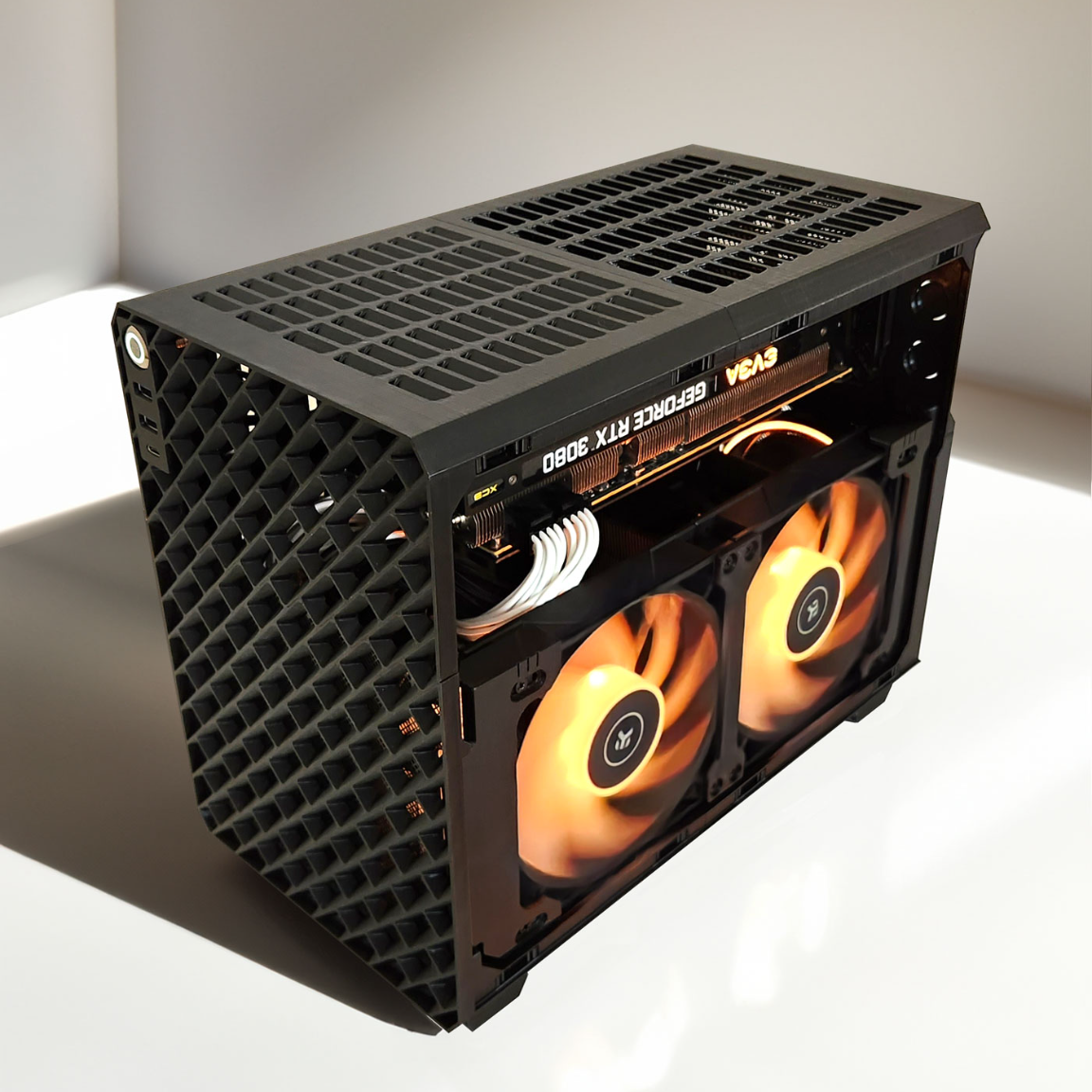
MODCASE HYPER Premium - Universal PC Case
Publicado em 15 de mai de 2026