Você está no 3DFinder
Buscamos em Thingiverse, MakerWorld e Printables ao mesmo tempo para te dar o melhor de cada uma.
Descrição
This update improves the font selection. You can now choose whether you want to use the fixed dropdown font lists or select fonts directly through the MakerWorld Font Picker.
The setting is available in Basic Settings. When the MakerWorld Font Picker is enabled, you can choose the font for the initial and the name separately.
The overall Customizer layout stays the same, with Basic Settings, Color Settings, and Advanced Settings, so the model remains easy to use.
V5.1 Update
This update improves usability, the export workflow, and stability for small name details.
The most important change:
The model now uses real MakerWorld multi-plate output.
Plate 1 = Initial
Plate 2 = Name Insert
This means the initial and the name insert no longer need to be manually exported together or arranged on one plate. Both parts are now generated cleanly on separate plates.
━━━━━━━━━━━━━━━━━━━━
NEW USER-FRIENDLY STRUCTURE
━━━━━━━━━━━━━━━━━━━━
The parameter layout has been rebuilt to make the model easier to use and less overwhelming.
Instead of many separate sections, the settings are now grouped into 3 clear main areas:
1. Basic Settings
This section contains the most important settings for everyday use:
name, initial, font selection, preview/export mode, size, position, rotation, and fit tolerance.
2. Color Settings
This section contains all material and color preview options for the initial and the name insert.
3. Advanced Settings
This section contains optional expert tools such as Cut Depth, Bottom Flat Cut, MakerWorld Font Picker, advanced name tuning, and the new Detail Connectors.
The goal is to make the model easier for new users while keeping all advanced functions available.
━━━━━━━━━━━━━━━━━━━━
MAKERWORLD MULTI-PLATE
━━━━━━━━━━━━━━━━━━━━
V5.1 now uses real MakerWorld plates:
Plate 1: Initial with cutout
Plate 2: Name Insert
The previous “Export Both Parts” mode has been removed because the parts are now automatically generated on two separate plates.
This makes the workflow easier and prevents problems with overly large combined exports.
━━━━━━━━━━━━━━━━━━━━
TOLERANCES
━━━━━━━━━━━━━━━━━━━━
The fit tolerances have been made clearer:
Tight: 0.10 mm
Standard: 0.20 mm
Loose: 0.30 mm
Custom: user-defined value
Recommendation:
For most printers, 0.20 mm is a good starting point.
If the name insert fits too tightly, choose a looser tolerance.
If the insert is too loose, choose a tighter tolerance or use a small amount of glue if needed.
━━━━━━━━━━━━━━━━━━━━
DETAIL CONNECTORS
━━━━━━━━━━━━━━━━━━━━
New in V5.1 are up to 4 optional Detail Connectors.
These help with small floating parts such as:
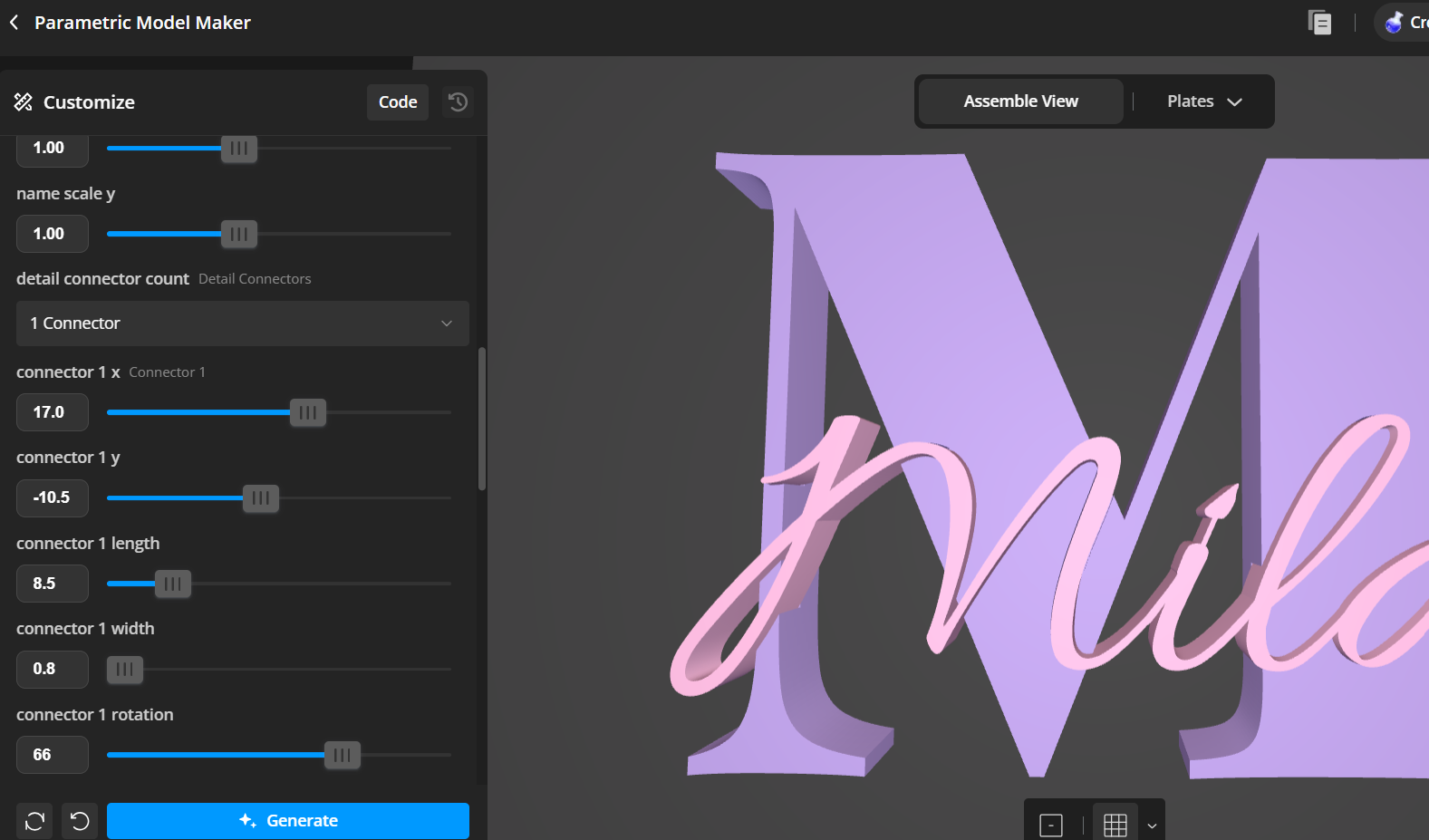
i-dots
- j-dots
- umlauts
- accents
- small decorative script details
Some fonts generate these details as separate small parts. If they do not touch the name or the initial, they may fail during printing, get lost, or break off during assembly.
Detail Connectors can be used to connect these small details.
How to use them:
- Enable 1–4 Detail Connectors in the Advanced Settings.
- Move the connector using the X/Y position settings.
- Adjust length, width, and rotation.
- Make sure the small detail visibly touches the name or the initial.
- Check the preview before printing.
Important:
The connectors become part of the Name Insert and also part of the matching cutout. This means the Name Insert will still fit correctly into the initial.
Tip:
Only use Detail Connectors when small details are actually floating. For regular names without floating details, simply leave them turned off.
━━━━━━━━━━━━━━━━━━━━
ADDITIONAL IMPROVEMENTS
━━━━━━━━━━━━━━━━━━━━
- Clearer parameter layout
- Clearer preview and export labels
- Better separation between Basic, Color, and Advanced Settings
- Simplified output modes
- All previous core functions remain available
- Bottom Flat Cut remains available
- MakerWorld Font Picker remains available
- Basic and Matte color preview remain available
- Initial and name can still be adjusted separately
━━━━━━━━━━━━━━━━━━━━
IMPORTANT BEFORE PRINTING
━━━━━━━━━━━━━━━━━━━━
Always check the preview before printing.
Pay special attention to:
- Does the name touch the initial?
- Are i-dots connected?
- Are umlauts or accents connected?
- Is the name not placed too deep?
- Is the tolerance suitable?
- Is a Bottom Flat Cut needed for rounded letters?
Floating separate parts are not connected and may cause problems during printing or assembly.
━━━━━━━━━━━━━━━━━━━━
QUICK WORKFLOW
━━━━━━━━━━━━━━━━━━━━
- Enter name and initial.
- Select font.
- Adjust size and position.
- Choose tolerance.
- Set preview colors.
- Check the preview.
- Use Plate 1 and Plate 2:
- Plate 1 = Initial
- Plate 2 = Name Insert
- Use Detail Connectors if i-dots, umlauts, accents, or other small details are floating.
Update V5.0
This update mainly improves the user experience and the export workflow of the parametric model.
The parameter layout has been reorganized to make the model clearer and easier to use. The preview and export modes are now more user-friendly, and the output mode names have been simplified.
A new option, “Export Both Parts,” has been added. With this mode, the initial and the name insert can now be exported together in one file. When using this combined export, the initial is placed at the top and the name insert below it. The visible spacing between both parts is also kept more consistent.
The fit tolerance presets have been adjusted and simplified:
Tight: 0.10 mm
Standard: 0.20 mm
Loose: 0.30 mm
All previous features are still included.
For the recommended workflow, use “Preview Only” to set up and check your design. Use “Export Both Parts” if you want to quickly export the initial and name insert together in one file. Use “Export Initial Only” and “Export Name Insert Only” if you want to export both parts separately or need more control in your slicer.
New, More User-Friendly Layout
The parameters have been reorganized to make the model easier to use.
The new layout guides you step by step through the most important settings:
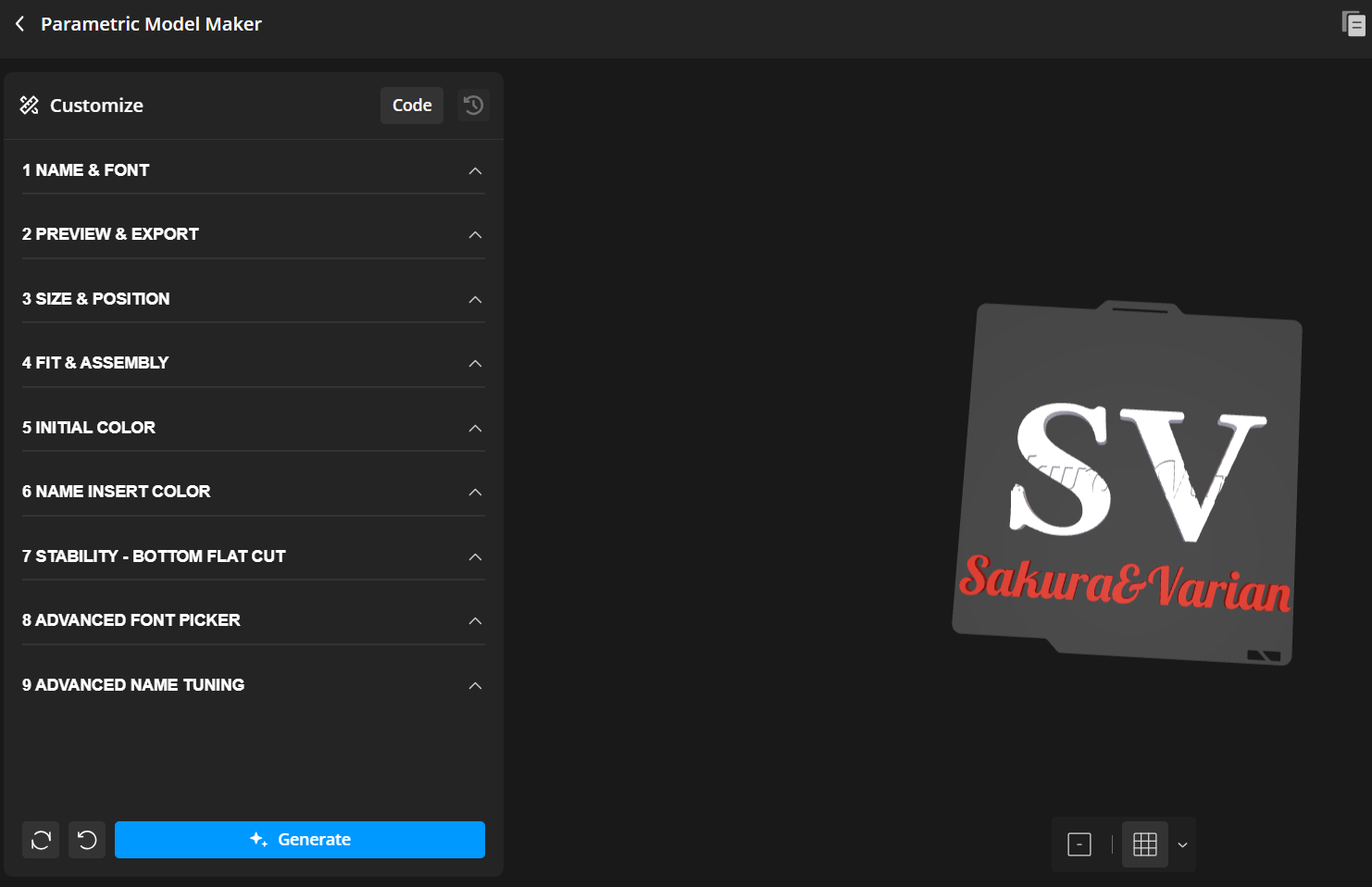
1. Name & Font
Enter the initial and the name, and choose the fonts.
2. Preview & Export
Choose whether you want to preview the model only or export it.
New: “Export Both Parts” allows the initial and the name insert to be exported together in one file.
3. Size & Position
Adjust the size, thickness, name position, and rotation.
4. Fit & Assembly
This section contains the tolerance and fitting settings.
The presets have been simplified:
- Tight: 0.10 mm
- Standard: 0.20 mm
- Loose: 0.30 mm
5. Initial Color
Color and material preview for the large initial.
6. Name Insert Color
Color and material preview for the name insert.
7. Stability – Bottom Flat Cut
Option for round or difficult letters that need a more stable base.
8. Advanced Font Picker
Optional MakerWorld Font Picker for custom fonts.
9. Advanced Name Tuning
Fine adjustments such as Z-offset and scaling.
10. Quality
Quality setting for the curves.
All previous features remain available. The new layout simply makes the model clearer, more organized, and easier to use.
Update Notice – Fit Tolerance Change
The default fit tolerance has been updated from 0.10 mm to 0.20 mm.
This change makes the name insert easier to assemble for most users and reduces the risk of the insert fitting too tightly.
What changed:
- Old default: 0.10 mm
- New default: 0.20 mm
- Tight preset remains: 0.05 mm
- Loose preset remains: 0.25 mm
- Custom tolerance is still available
Thank you for the feedback and support! ❤️
✨ PERSONALIZED MONOGRAM NAME CREATOR
Parametric Letter + Name Decor
Create your own elegant personalized initial name sign directly in MakerWorld.
This fully parametric model lets you customize the initial letter, name text, fonts, colors, size, position, rotation and fit tolerance. It is designed as a decorative 3D printable name sign for gifts, nursery decor, desk decor, room signs, birthdays, weddings and personalized home decoration.
The initial letter and the name insert can be exported separately, so you can print both parts in different colors, materials or finishes.
⭐ SPECIAL FEATURES
✅ Fully parametric initial + name generator
✅ Custom initial letter and custom name text
✅ Separate export modes for initial and name insert
✅ Adjustable fit tolerance for easier assembly
✅ Custom name position, rotation and scale controls
✅ Multiple font combinations
✅ Bambu Lab PLA Basic color preview
✅ Bambu Lab PLA Matte color preview
✅ Separate color preview for initial and name insert
✅ Bottom Flat Cut option for round or difficult letters
✅ Supports matte / glossy color combinations
✅ Great for personalized gifts, nursery decor and home decoration
✅ Usually printable without supports
🧩 OUTPUT MODES
Use the output mode to choose what you want to preview or export.
- Standard Preview Shows the complete model
- Export Initial Only Export only the large initial letter
- Export Name Insert Export only the name insert
- Show Name Cut Tool Preview / diagnostic only
- Show Bottom Flat Cut Tool Preview / diagnostic only
⚠️ Important:
Modes 3–5 are only for preview and diagnostics.
Do not use them for final STL export.
🎨 MATERIAL & COLOR PREVIEW
This model includes organized material and color preview options for both parts.
🧱 Initial Material
| Value | Material Type |
| 0 | PLA Basic |
| 1 | PLA Matte |
🎨 Initial Colors
Use these settings to preview the color of the large initial letter:
• initial_basic_color
• initial_matte_color
🧱 Name Insert Material
| Value | Material Type |
| 0 | PLA Basic |
| 1 | PLA Matte |
🎨 Name Insert Colors
Use these settings to preview the color of the name insert:
• name_basic_color
• name_matte_color
💡 Tip:
The color preview is only for visualization in MakerWorld.
You can still print the parts in any real filament color you want.
Recommended color combinations:
🤍 White initial + Sakura Pink name
🤍 White initial + Marine Blue name
🤍 White initial + Latte / Beige name
🖤 Black initial + White name
🖤 Black initial + Silver / Gray name
🤍 White initial + Soft Blue name
🔤 FONT SELECTION
Choose a font combination that fits your style.
Recommended styles:
✨ Elegant / Premium initials:
• Bodoni Moda
• Cormorant Garamond
• Cinzel
💫 Script / Name fonts:
• Great Vibes
• Parisienne
• Playball
• Marck Script
💡 Tip:
Thin script fonts look beautiful, but may be fragile.
For very small names or delicate details, increase the name size or choose a stronger font.
📐 SIZE & POSITION
You can adjust the name insert with:
• name size
• name x offset
• name y offset
• name z offset
• name rotation
• name scale x
• name scale y
Use these controls to place the name cleanly on the initial.
✅ Good placement:
The name is readable, balanced and touches the initial.
❌ Bad placement:
The name floats, sits too low or has disconnected details.
⚙️ FIT TOLERANCE
The fit tolerance controls how tightly the name insert fits into the initial.
| Setting | Result |
|-------------------|-------------|
| Smaller tolerance | Tighter fit |
| Larger tolerance | Easier fit |
Recommended starting value:
✅ 0.20 mm
If the insert is too tight:
➡️ Increase the tolerance slightly.
If the insert is too loose:
➡️ Reduce the tolerance or use a small amount of glue.
✂️ BOTTOM FLAT CUT
The Bottom Flat Cut feature helps with round or difficult initials.
Useful for letters such as:
• O
• C
• G
• S
• J
These letters may not always have a naturally flat base.
Available settings:
• bottom_flat_cut
• bottom_cut_height
• bottom_cut_y_offset
Use this feature if the initial needs a more stable standing surface.
💡 Tip:
Use only as much cut as needed.
Too much cutting can change the visual shape of the letter.
⚠️ IMPORTANT BEFORE PRINTING
Please always check the preview carefully before exporting.
Very important:
✅ All parts of the name must touch the initial.
✅ The name insert must not float.
✅ Small details must be connected.
✅ The i-dot must touch the initial or another connected part.
✅ Umlaut dots and accents must be checked carefully.
✅ Script loops must have enough contact.
✅ The name should not sit too low inside the initial.
Special attention for:
• i
• j
• ä
• ö
• ü
• accents
• separated script details
• decorative loops
⚠️ Floating parts are not connected.
They may fail during printing or break during assembly.
🔍 CHECK PROBLEM AREAS
Before exporting, check:
✅ Is the name readable?
✅ Does the name touch the initial?
✅ Does the i-dot have contact?
✅ Are all small details connected?
✅ Is the name too low?
✅ Is the name too high?
✅ Does the initial stand well?
✅ Is Bottom Flat Cut needed?
✅ Is the tolerance correct?
If the name sits too low:
➡️ Move it slightly upward.
If the name is not connected:
➡️ Adjust position, rotation or size.
If the letter does not stand well:
➡️ Use Bottom Flat Cut.
🖨️ PRINT SETTINGS
Recommended print settings:
| Setting | Recommendation |
| Layer height | 0.16 – 0.20 mm |
| Walls | 2 – 3 |
| Infill | 10 – 15% |
| Supports | Usually not needed |
| Material | PLA recommended |
Recommended workflow:
1. Export the initial letter.
2. Export the name insert.
3. Print both parts separately.
4. Use different colors if desired.
5. Carefully insert the name into the initial.
🧩 ASSEMBLY
After printing:
1. Remove the parts carefully from the build plate.
2. Check the name insert for small fragile details.
3. Align the name insert with the initial.
4. Press it gently into place.
5. Do not force thin script parts.
If the fit is too tight:
➡️ Increase tolerance and export again.
If the fit is too loose:
➡️ Use a small amount of glue.
🛠️ TROUBLESHOOTING
❌ Name insert is too tight
➡️ Increase fit tolerance slightly.
❌ Name insert is too loose
➡️ Reduce fit tolerance or use a small amount of glue.
❌ Small parts are floating
➡️ Move the name until every detail touches the initial.
❌ i-dot is not connected
➡️ Adjust the name position or rotation until the dot touches.
❌ Round letter does not stand well
➡️ Enable Bottom Flat Cut.
❌ Name sits too low
➡️ Move the name slightly upward.
❌ Thin script breaks
➡️ Increase name size or choose a stronger font.
❌ Preview looks good but print is fragile
➡️ Use thicker fonts, increase size or reduce very thin script details.
💡 DESIGN TIPS
For a premium look:
✨ Use white initial + colored name
✨ Use black initial + white or gray name
✨ Use matte initial + glossy name
✨ Keep the name readable
✨ Avoid too many disconnected details
✨ Use soft colors for baby / nursery decor
✨ Use black, gray or blue for masculine designs
✨ Use pink, latte or beige for warm gift designs
Recommended showcase combinations:
• White + Sakura Pink
• White + Marine Blue
• Black + White
• Black + Silver Gray
• White + Latte Brown
• White + Soft Blue
📌 FINAL NOTE
This is a parametric model.
Results may vary depending on:
• selected name
• selected initial
• font combination
• printer calibration
• material
• tolerance setting
Please always check the preview before exporting and printing.
Have fun creating your own personalized name sign!
Personalized Monogram Name Creator
Publicado em 1 de mai de 2026