Você está no 3DFinder
Buscamos em Thingiverse, MakerWorld e Printables ao mesmo tempo para te dar o melhor de cada uma.
Descrição
Parametric tray with customizable insert.
Mix and match different patterns and make it your own.
Simple, elegant, minimalist, limitless options.
A fully parametric tray with an insert that will fit any space and style. Both the tray and the insert are fully customizable, giving you limitless possibilities to design just the right part for you.
Common uses for this design include a drip/drain tray, sponge holder, soap dish, or coaster. Can be made with any materials (PLA not recommended if used as a coaster for hot drinks).
Play with various combinations and generate your tray in seconds.
Try it out, print, and enjoy.
See a detailed description of the parameters below. In addition, I have provided some configuration and printing tips to get you started faster.
Parameters
- shape - determines the shape of the model.
- Hexagon gives the most possibilities, as you are not limited to a uniform hexagon.
- size - set your base dimensions as [width, height, width2, radius]
- width2 - used only with a hexagon shape to set the side length.
- radius - determines the corner radius of the rectangle or hexagon shapes.
- smooth_hexagon - uses an alternative method to generate the hexagon. It may not always produce the desired result, so try toggling it.
- height - total height of the model.
- wall - base perimeter wall thickness. The insert will overlap ½ of this thickness.
- bottom - base bottom thickness.
- insert_pattern - determines the cutout pattern of the insert.
- insert_size - similar to the size parameter above, just for the insert pattern cutout.
- insert_h - insert height or thickness.
- insert_wall - minimum material thickness between neighboring insert cutouts.
- base_edge_h - base wall height above the insert top surface.
- support - enable the generation of a center support feature. Useful for heavier objects.
- resolution - set the resolution of curved surfaces.
Parameter tips
If you want to make a uniform/regular hexagon, use a calculator to determine the correct dimensions.
For example: [https://www.omnicalculator.com/math/hexagon](https://www.omnicalculator.com/math/hexagon)
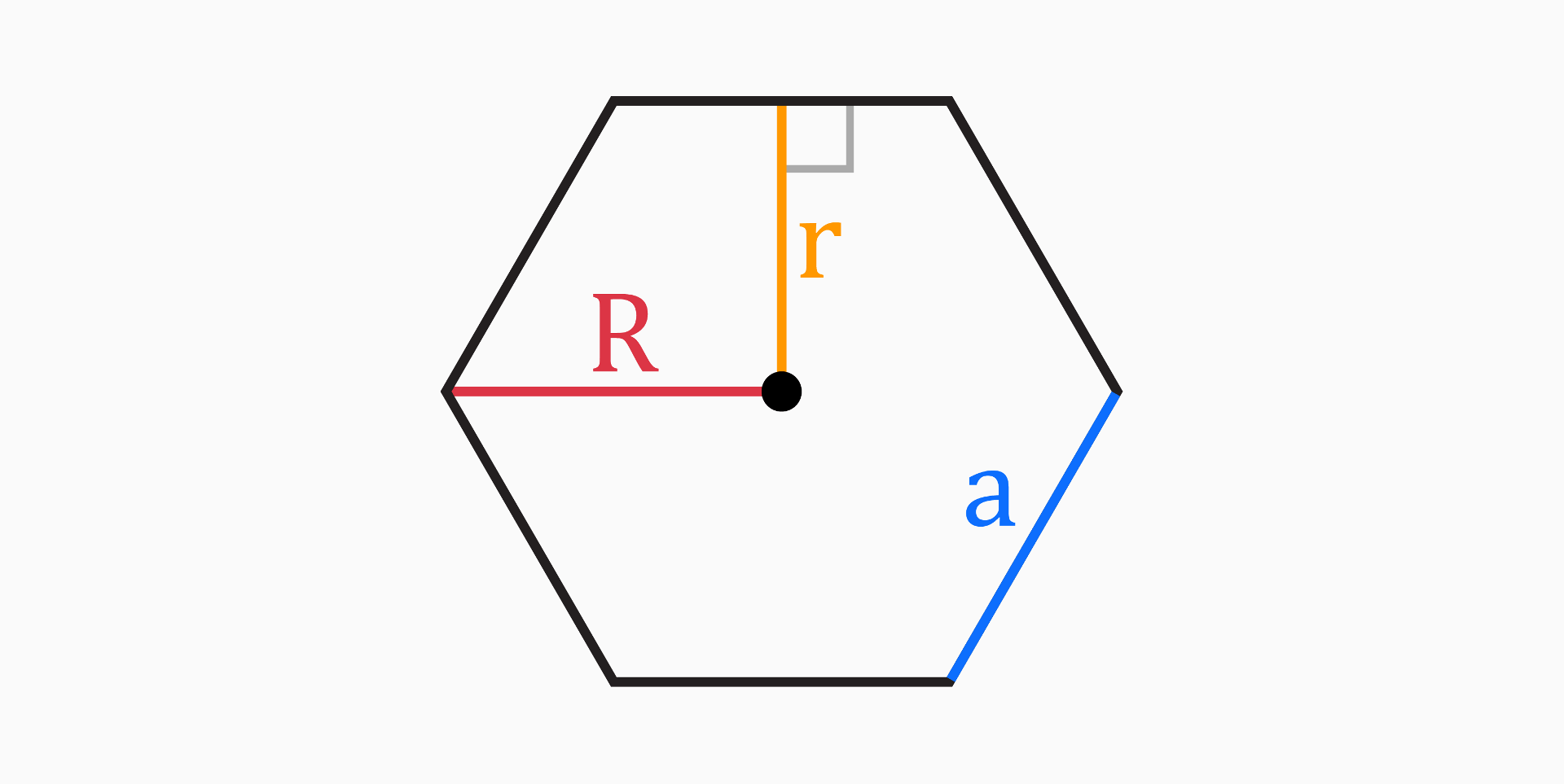
Based on the above picture, the size parameter values are as follows:
- 2 x R (circumcircle diameter - width)
- 2 x r (inscribed circle diameter - height)
- a (side length - width2)
- Use the last value to round the corners.
Alternatively, use the circle shape and set the resolution to 6. You can't get rounded corners in this case.
You can make a bow tie shape by using the hexagon shape option and setting the width parameter lower than the width2 parameter.
Play with resolution settings. You can make interesting shapes by setting it to a low value (1-10) and using the circle shape.
If the model doesn't generate properly with rectangle or hexagon shapes, try adjusting the corner radius (last value of the size parameter) or toggling the smooth_hexagon option for the hexagon shape.
You should back-calculate the base height (height parameter) based on your desired base bottom thickness, insert height, base edge height above the insert, and clearance between the base bottom and insert. For efficient draining, you usually want at least a few mm of clearance between the base bottom and the insert.
Enable support generation if you plan to place heavier objects onto the model. For example, if you plan to make coasters.
Printing tips
PLA works great for most use cases. However, if you want durability or want to make coasters that must handle hot drinks, PETG should be used.
For very hot objects, you will need to use ASA or Nylon to prevent warping. It may be enough to print just the insert in a more durable material.