Você está no 3DFinder
Buscamos em Thingiverse, MakerWorld e Printables ao mesmo tempo para te dar o melhor de cada uma.
Descrição
Meet GridCrate.
GridCrate is a fully parametric basket that's perfect for those Gridfinity setups that need to move around. Think things like frequently used tools and hardware, toiletries, or art and craft supplies.
Features
- Customizable Gridfinity baseplate for inner floor
- Handles on all sides to easily pull out and move around
- Stackable: Crates of the same width easily stack on top of one another, even if their depths are different
- 5 Crate Configurations: Standard, Side Handles Only, No Handles, Front Handle Only, and Full Crate are all available to cover any use case
- Top Tray: Customize your own catch-all/work tray to hold additional items on top
- Top Baseplate: Customize your own Gridfinity baseplate to stack on top, sized to perfectly fit your crate
- Downloadable parametric Fusion files are available if you want to really dig in
- Works great with my other stackable storage system StackRack
How to use
Option 1: Use included profiles to print pre-configured crates and top trays/baseplates
- For those who don't want to use the Customizer
- “GridCrate” profile contains 25 crate sizes ranging from 1x1 to 5x5 Gridfinity units, all are 130mm tall
- Necessary supports (under each handle) have been added for each size. They're removed very easily once printed
- “Top Tray” profile contains various top tray sizes to fit the crates in the other profile
“Top Baseplate” profiles contains various Gridfinity baseplates with thicker borders to fit the crates in the other profile
Option 2: Customize your own crate, top tray, and top baseplate
- Click the Customize button above to generate your own crate, top tray, or top baseplate. Five crate versions are available:
- Standard: Has front, side, and rear handles
- Side Handles Only: No front handle, still has side and rear handles
- No Handles: All handles removed
- Front Handle Only: No side and rear handles, still has front handle
- Full Crate: Your typical milk crate - all four walls are equal height, has equal handle cutouts on all sides
- Customizer giving a Timeout error?
- Try changing parameters in batches instead of everything at once.
- For example, enter your baseplate width and depth, click Generate, wait for it to generate, then change wall height, etc.
- Wall Height and Front Wall Height specifically seem to slow it down.
- Fusion files are also available to download if you're still having issues.
- IMPORTANT: Once you download .STL/.3MF from Customizer, add supports under the handles ("All Handles Removed" version doesn't need any supports)
- Crates made in the customizer don't include supports in the .3MF it generates, so they need to be added manually in the slicer
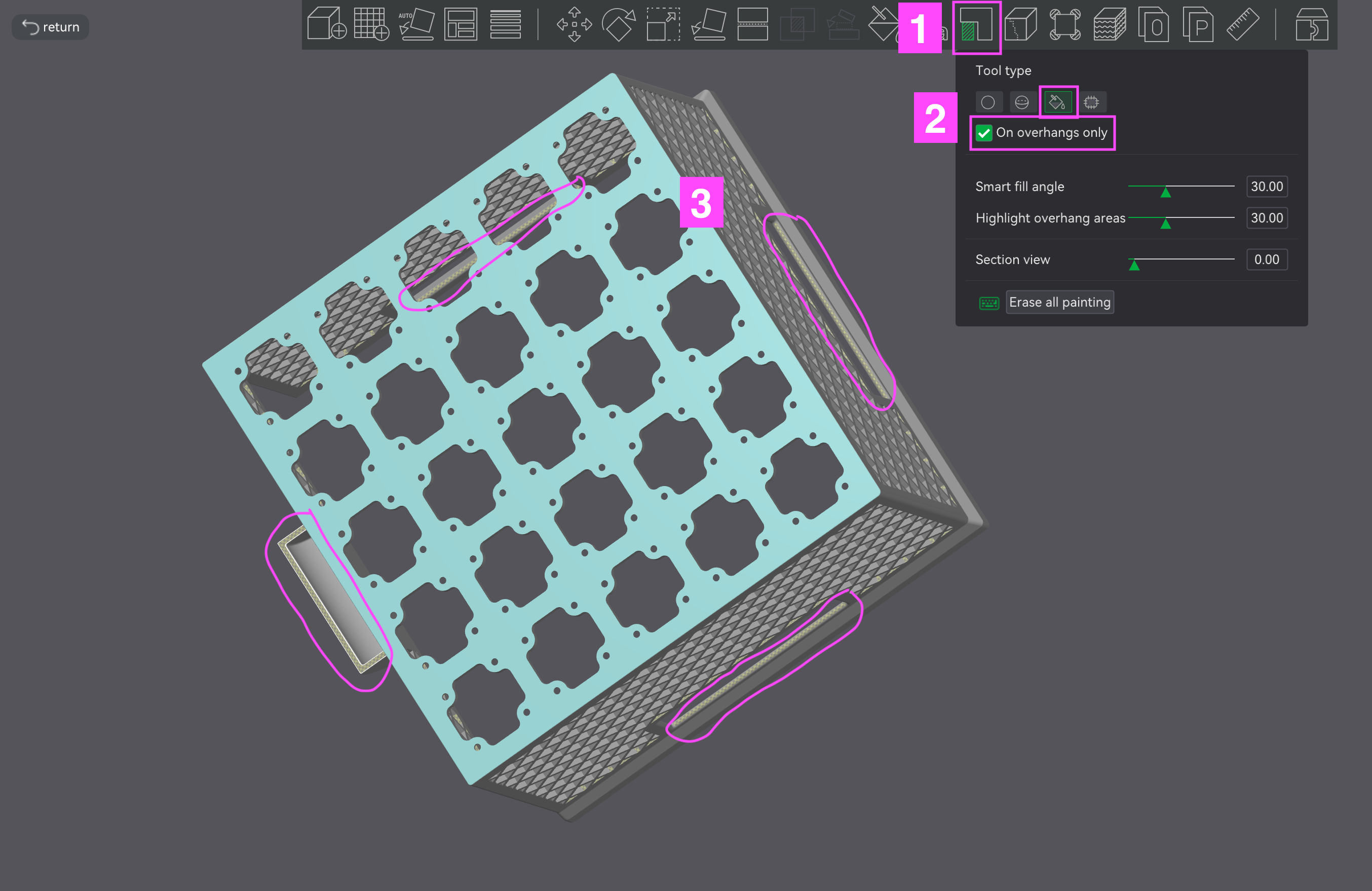
- Step 1: Click the Paint Supports icon
- Step 2: Click the paint bucket tool icon and enable “On overhangs only”
- Step 3: Rotate model to view the bottom. Click on the highlighted areas shown below (underside of each of the four handles). They should fill with a blue overlay to show that supports are enabled for that spot.
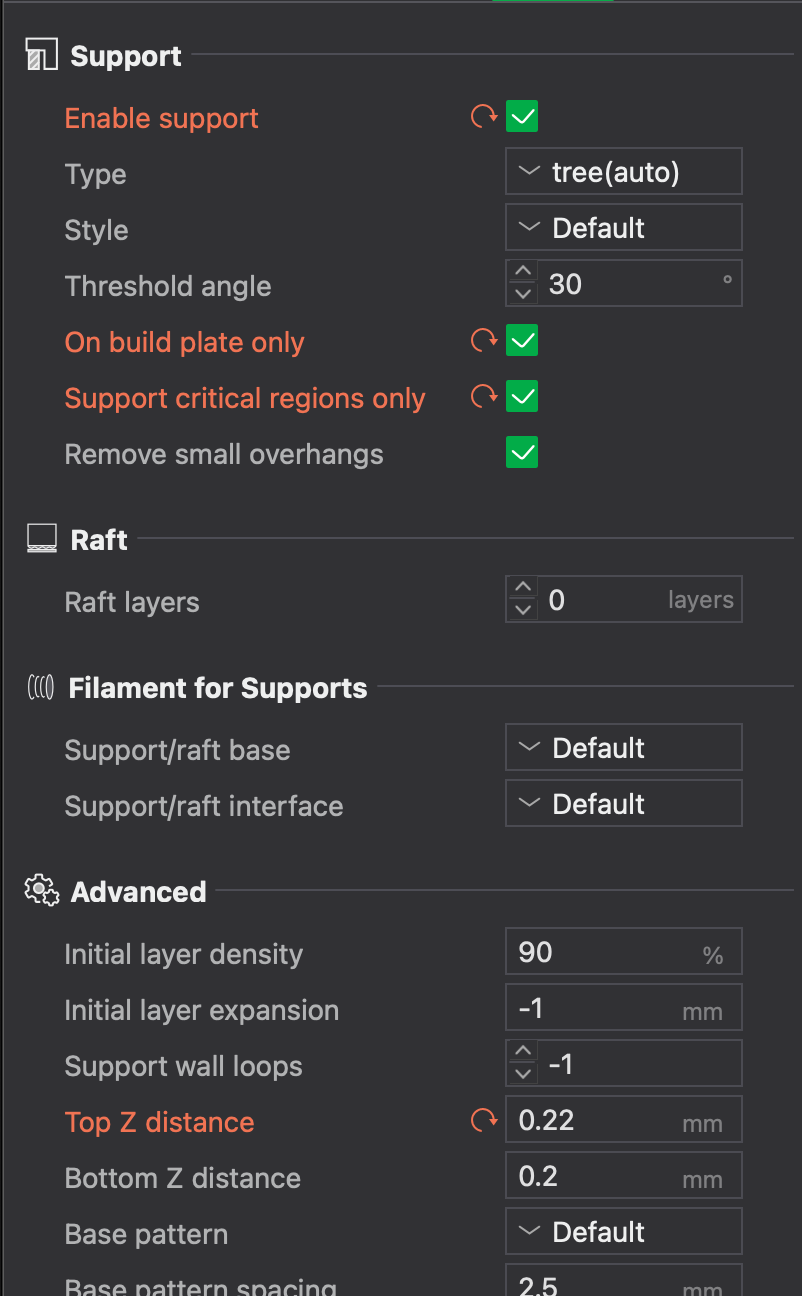
- Step 4: Enable supports in the left panel and copy the settings in the screenshot below
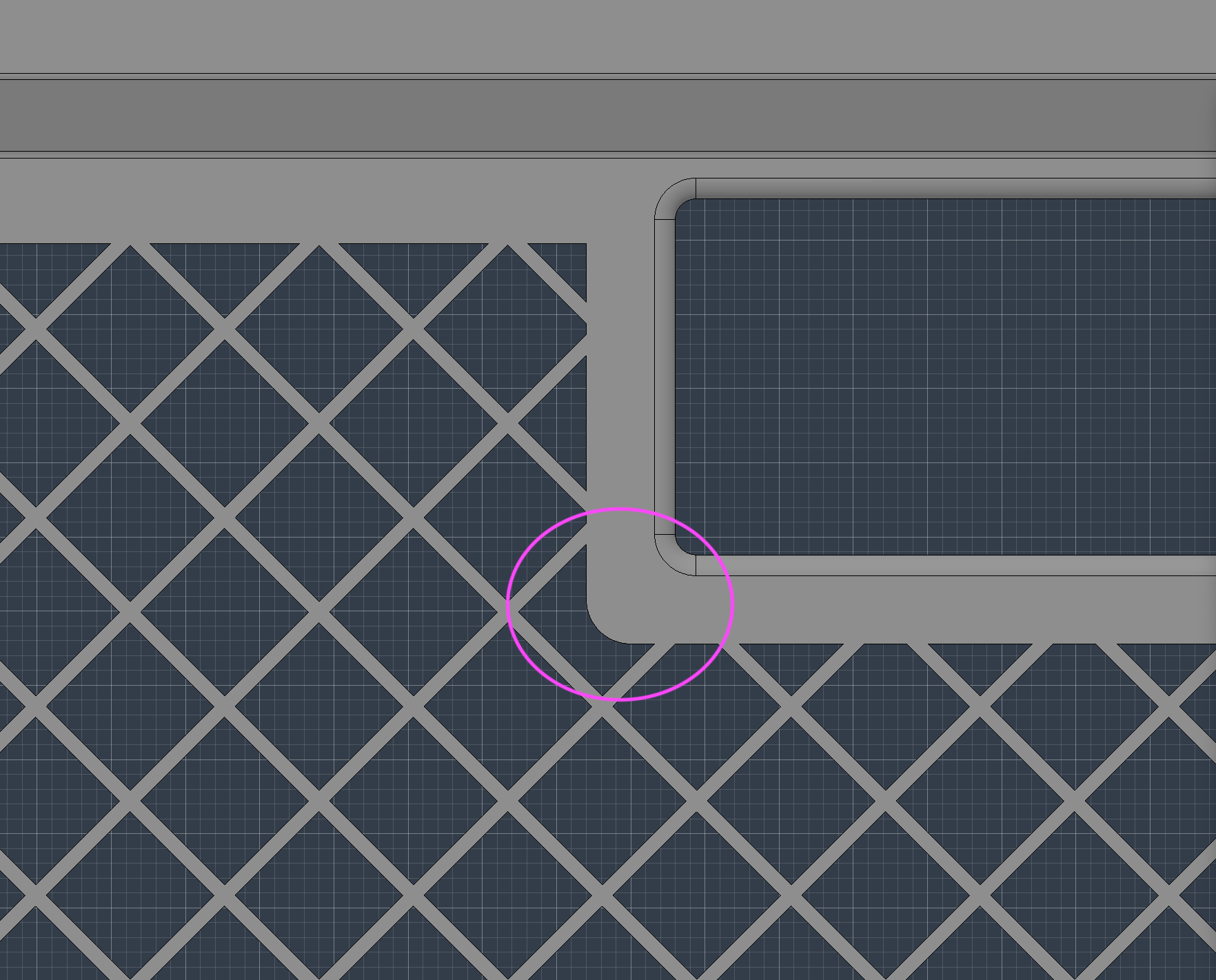
- Certain combinations of WallThickness and pattern sizing might cause the bottom corners of the handle cutouts to overhang, which can be problematic for some printers. Either paint supports here as well or adjust HandleCutoutHeight and/or pattern size and spacing until they go away.
CUSTOMIZED TOP TRAY/BASEPLATE NOTE: Ensure you enter the same BaseplateWidth, BaseplatePadding, and WallThickness values you used for your crate to ensure you get a tray/baseplate that properly fits
- TOP BASEPLATES NOTES: Be mindful of how much weight you put on these as they are prone to flexing (or worse) if overloaded.
Printing Tips
- Aside from the support tips above when printing crates, this just uses the standard print profile
- Using a 0.6mm nozzle will significantly speed up print time
- With some parameter combinations (eg. big crate size, tall WallHeight, lower FrontWallHeight), some printers might cause the front of the side walls to bow out a bit, causing issues with stacking or using the Top Tray. Quick fix is to either use a lower WallHeight, increase WallThickness, and/or raise FrontWallHeight to better support the side walls.
Changelog
- 2026-05-05: Added two new GridCrate Versions - Front Handle Only and Full Crate to the Customizer. Also added a new Top Baseplate option.
- 2026-05-01: Added two new GridCrate versions - Side Handles Only and No Handles. Unfortunately I couldn't build this functionality into the standard GridCrate model so just pick which version you want after clicking the “Customize” button
- 2026-04-29: Added “RoundFrontHandle” parameter to flatten the front of the handle to create space to apply an adhesive label
- 2026-04-28: Added min/max settings for parameters in Customizer
- 2026-04-27: Initial upload
MakerWorld
GridCrate - Parametric Gridfinity Basket

Publicado em 25 de abr de 2026
452
Curtidas
378
Downloads
1,938
Coleções
58
Impressões
Categoria
Organizers
Tags
GRIDFINITY
Gridfinity
GridFinity
basket
crate
storage
baseplate
magnet
stack
stackable
tray
storage basket
storage box
stackable basket
organization
handles
bin
parametric
customizer
parametric organizer
gridfinity base
Licença
MakerWorld Exclusive License