Você está no 3DFinder
Buscamos em Thingiverse, MakerWorld e Printables ao mesmo tempo para te dar o melhor de cada uma.
Descrição
This is a top layer/surface quality test made to specifically help with improving your print quality on flat surfaces. This print includes 2 plates that will quickly walk you through how to improve the quality of your top layers. In this description ill explain how and why these sort of settings work and why they matter. I would like to note that this test is meant to be done AFTER you've already got most of your other settings in order. This wont help your over or under extrusion or incorrect filament temp settings at all.
So lets begin. What does this do?
This does two things, In allows you to test multiple layer widths, and it also gives you multiple speeds. Both of these greatly effect the quality of you surface. So this print gives you pre-made templates to be able to quickly and efficiently print out a couple small discs and see the significant quality increase.
How does Layer Width effect the surface quality?
A majority of the time when people have issues with their top layers looking really ‘gridded’ or feeling rough is due to the defaulted line width their system is using. By using a reduced line width, you can close out those gaps in the layer line and create a much smoother and more aesthetically pleasing print. Think of it similar to pixels in a photo or any still image. If you stretch and pull the image bigger than its intended to be, then you end up with with a really blurry image and vice-versa if you squeeze the picture to small you lose definition and quality as well. So this print helps fine tune that value. To give you a rough visual, I quickly made it in paint. Same amount of layers. much smaller gap between the layer lines with room to add more. Its these gaps between the layers that you are seeing and feeling. But due to physical limitations of the 0.4mm nozzle, you can get too small and it can ruin the quality.
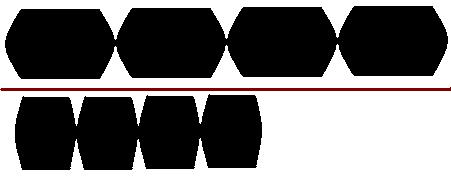
Here is an image of the test being ran.
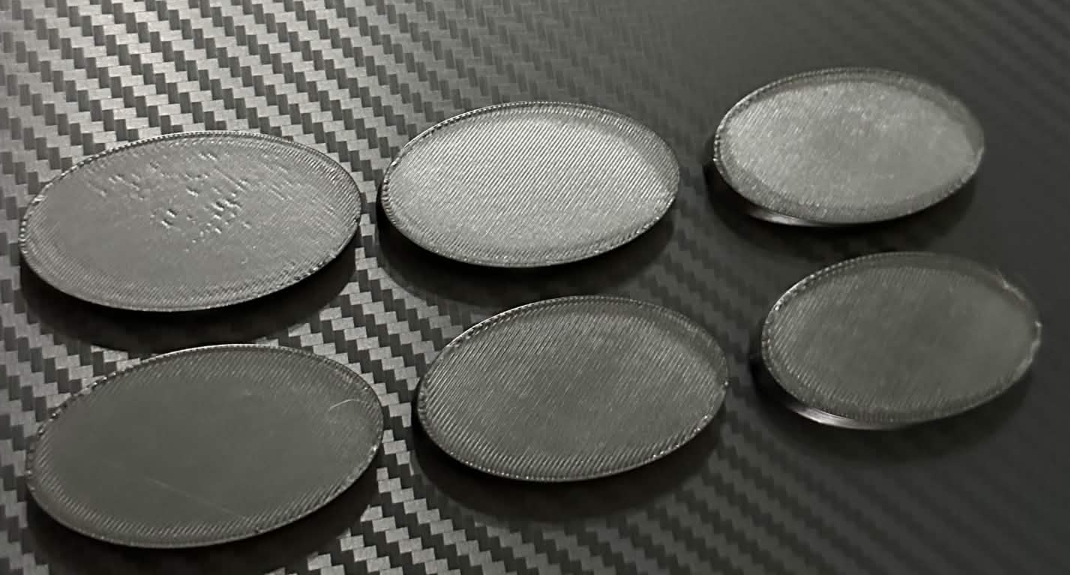
As you can see the first disc is looking a bit mangled This is due to the size being a bit too small for the 0.4mm nozzle to print cleanly so it ends up not smooshing the lines together evenly. Second looks clean, honestly cleaner than a lot of prints i see people doing. But we can probably get it even better. So then we're in the 3rd (top right corner disc) this looks quite good as well. Feels better to the touch and is starting to get that smoothness that top layers should have. Then in 4th (bottom left corner) we have our winner. This is nearly perfectly smooth. It did string a tiny bit but thats likely unrelated. You cant see the infill below it, the edges are all properly aligned. The rest remaining still look great but in person the 4th one is by far the best option by the touch and by sight. For me, this is the 0.32mm width disc. So from here, we adjust the width to my best performing disc, which is 0.32mm on all 4 of the discs currently on plate 2. Then we begin the speed test.
How does slowing down the Top Layer actually improve the quality?
Primarily this increases the time the hot nozzle tip is in contact with the filament, While also increasing smoosh time. Both of these things decrease the gaps between the print layers creating a smoother surface. This functions very similar to things like Ironing, which are ran very very slow. So in this test, I've given 4 separate speeds ranging from 30mm/s which is similar to ironing up to 120mm/s which is still about half speed for most modern printers. If you have 2 that look really good. You can either try adding another disc and adjusting the speed between those two values. or you can simply select the higher of the speeds to keep your print times lower. BambuLab constantly makes these decisions for us, and in honesty they're not bad. Sometimes though the emphasize speed over quality.
For me, the 120mm/s came out best. But on my A1 the 30mm/s came out best. So everyones will be different! Try out what works best for you.
If you feel like helping in other ways, I also offer some additional ways below!
I accept Paypal Donations. Please remember this is in no way required and is non-refundable.
Top layer/Surface Quality Test

Publicado em 17 de abr de 2026
Gostou deste modelo? Crie uma conta grátis para salvar seus favoritos e voltar a eles depois.
Criar conta