Você está no 3DFinder
Buscamos em Thingiverse, MakerWorld e Printables ao mesmo tempo para te dar o melhor de cada uma.
Descrição
🎨 Multicolor Printing – WITHOUT AMS Guide
Don't have an AMS (Automatic Material System) but still want to print cool, multicolor models?
No problem! This model is optimized so you can easily perform color changes manually. It's
perfect for beginners and anyone who wants to save filament.
🛠 Here's how it works (quick
guide):
This model uses the "Pause at Height" function in your slicer (e.g., Bambu Studio or
OrcaSlicer).
Load the model: Open the STL file in Bambu Studio.
Select the layer: After slicing,
move the vertical slider on the right side to the layer where you want the color to change.
Add a
pause: Right-click the plus symbol on the slider and select "Add Pause."
Print: Start the print.
The printer will automatically pause at the selected point and move the print head to the side.
Changing Filament: Unload the old filament, load the new color, and click "Resume" on the
printer.
💡 Why this model?
No AMS required: Works on any 3D printer (A1 mini, P1P, P1S, X1C,
etc.).
Clean separation: The layer pause ensures a razor-sharp color edge.
Material saving: Since
no purge tower is needed, you'll waste almost no filament.
⚙️ Recommended print settings:
Layer height: 0.2 mm (default)
Infill: 15% (Grid or Gyroid)
Supports: Not required
Material: PLA (in
two contrasting colors for the best effect)
Do you like the model? I would be thrilled if you gave
it a like ❤️ and shared a photo of your print in the comments! Happy printing!
#3DPriority
#Multicolor #NoAMS #BambuStudio #Tutorial #FidgetToy
HOW TO ADD A PRINT BREAK
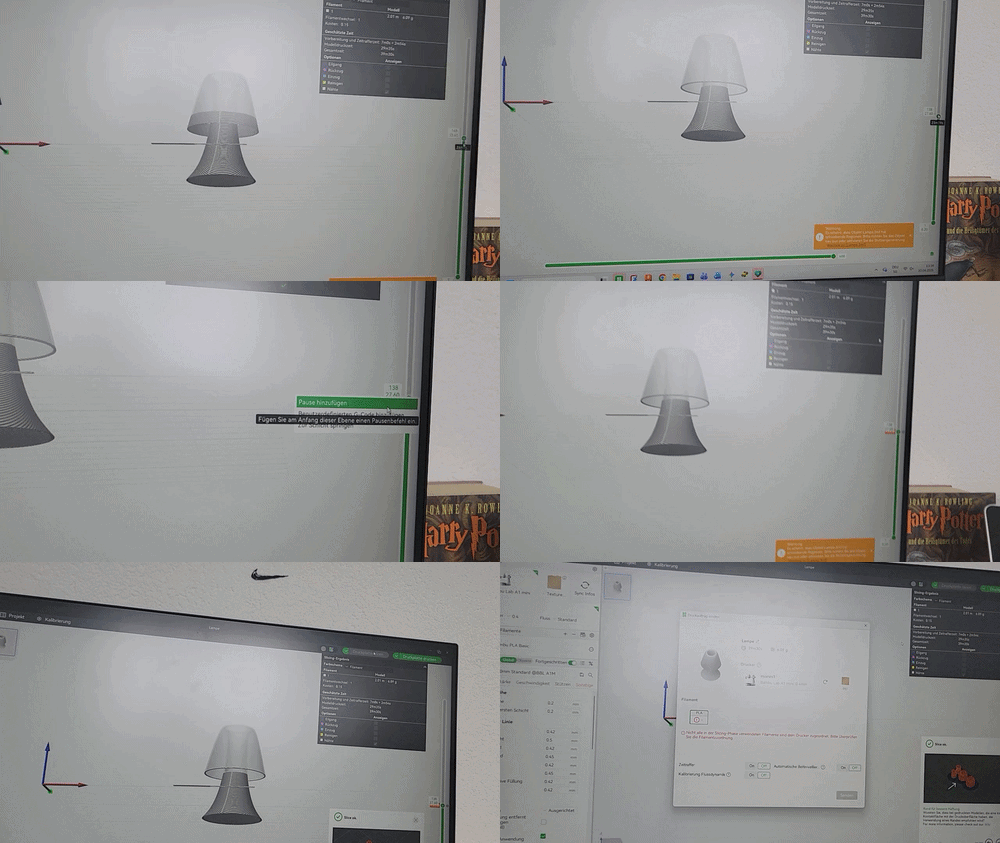
MULTICOLOR PRINTING GUIDE: WITHOUT AMS
Publicado em 7 de abr de 2026
Gostou deste modelo? Crie uma conta grátis para salvar seus favoritos e voltar a eles depois.
Criar conta