Você está no 3DFinder
Buscamos em Thingiverse, MakerWorld e Printables ao mesmo tempo para te dar o melhor de cada uma.
Descrição
Welcome to my Parametric Keycap Customizer! This tool allows you to easily design and generate your own fully customizable mechanical keyboard keycaps (DSA style profile). It’s optimized for flat face-down printing, ensuring a perfectly smooth and clean top surface.
Whether you need a standard 1U key, a multi-colored , or a full 6.25U spacebar, this model has you covered. It automatically adjusts the width and adds the necessary Cherry MX stabilizer stems for larger keys.
Although a 0.4mm nozzle will work, I highly recommend using a 0.2mm nozzle for crisp, high-resolution text and fine details.
Important Tip: If the text on your printed keycap isn't coming out completely sharp, make sure to enable the "Arachne" wall generator! For even better results, I also recommend checking the "One wall on first layer" box under Quality > Advanced
How to use it?
Using it should be pretty straightforward, but here is a step-by-step guide if you feel lost:
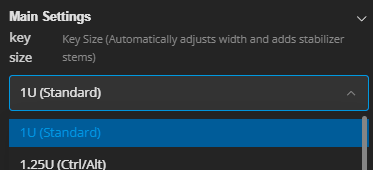
Key Size Choose the exact size for your keycap. It ranges from 1U (Standard letters) all the way up to 6.25U (Spacebar). The model will automatically add stabilizer stems for keys that are 2U and larger.
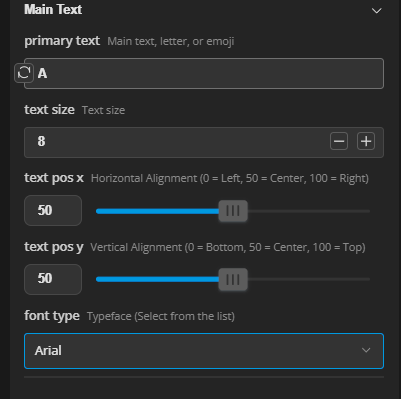
- Main Text- Primary Text: Type your letter, word, or emoji here. Text Size: Adjust it to perfectly fit the face of the keycap. A size of 8 is generally a good starting point, but scale it to your liking! Alignment (X & Y): Use the sliders from 0 to 100 to position your text exactly where you want it
Font Type: Select your preferred font from the drop-down menu.
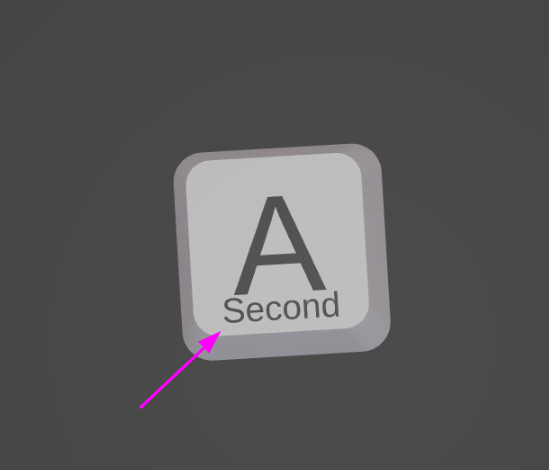
Secondary Text (Optional) Perfect for creating sub-legends or adding a second smaller symbol to your keycap. You can independently adjust its size and alignment just like the main text.

- Colors You can define the Body Color and the Text Color to get an accurate preview of your multi-color print directly in the customizer.
- Advanced Adjustments Stem Tolerance: If you print the keycap and find it fits too tight or too loose on your Cherry MX switch, you can fine-tune the clearance here (Default is 0.0). Text Depth: Set to 0.4mm by default, which perfectly matches two standard 0.2mm print layers, but you can adjust it if you prefer a different thickness!
Fully Customizable Mechanical Keycaps|Parametric
Publicado em 23 de mar de 2026