Você está no 3DFinder
Buscamos em Thingiverse, MakerWorld e Printables ao mesmo tempo para te dar o melhor de cada uma.
Descrição
Printing and customizing a QR Code for Your Build Plate
You can print and assemble your own QR code if your original build plate is worn out or if you’re using a third-party plate.
Customizing in the slicer
When you open the print profile, you’ll see the QR code is built from a 4×4 grid of squares plus a surrounding edge.
- Select each tile and set it to black or white* as needed.
- The safest way to do this is by selecting the individual parts in the assembly list on the left.
- Keep the outer edge black.
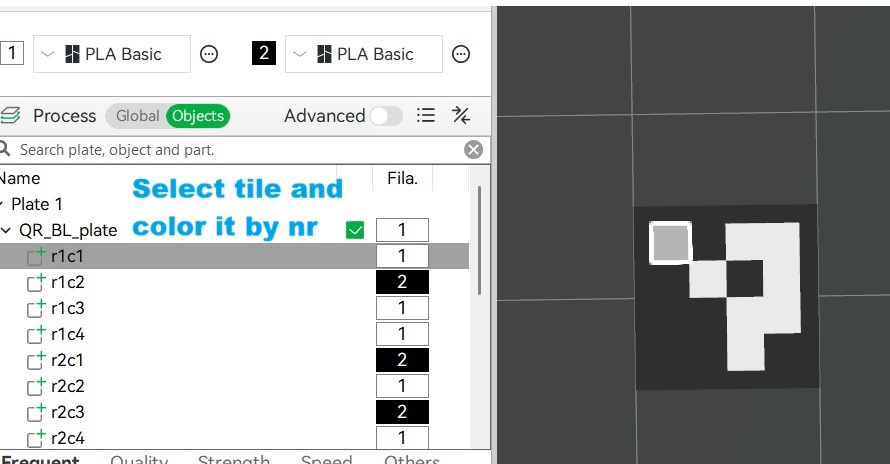
*About colors
Black and white work best, of course, but other bright colors can work as well. I used green instead of white simply out of laziness 🙂
For reliable scanning, the key factor is good contrast between the code and the background.
The printer likely doesn’t detect a specific color — it mainly detects differences in brightness (light vs. dark). So you can usually use any color, as long as it’s clearly lighter or darker than the background.
White on black is the safest choice. Other light colors should also work, but keep in mind that some colors — like red — can appear darker to the camera and may not scan as reliably.
Rule of thumb: if the code still looks clear when viewed in grayscale, it will probably scan just fine.
Disclaimer: This works on my H2D with up to date firmware (feb 2026).
QR code for buildplate (customizable)
Publicado em 21 de fev de 2026
Gostou deste modelo? Crie uma conta grátis para salvar seus favoritos e voltar a eles depois.
Criar conta