Você está no 3DFinder
Buscamos em Thingiverse, MakerWorld e Printables ao mesmo tempo para te dar o melhor de cada uma.
Descrição
🏷️ Parametric Multi Labeling Swatch Generator
Tired of labeling your filament swatches by hand or in Bambu Studio Lab and Single by Single? Then this Parametric Labeling Generator for Filament Swatches is what your are looking for. Generate all your Swatches at once with a lot of options.
What you are waiting for, start your filament swatch library with this fully parametric swatch labeling generator or improve your exisiting one!
🚀 Key Features
- 📏 Different Body Styles: Choose between original Bambu Lab Swatch Body with standard dimensions, including the signature hole or use the keychain body or just a solid blank swatch for maximum surfe area.
- 🗒️ Predefined Styles: Make it even more easier to generate Swatches, by choosing predefined Styles, defining your own style or just a blank swatch.
- 📦 Multi Labeling-Feature: The Batch Feature allows you to create an entire library of swatches in a single go. Instead of generating one by one, you can use the custom input or event better just use on of Bambu Lab Filament Sets.
- 📋 Bambu Lab Filements Sets: Use a Bambu Lab Filament Swatch Set for each type of filament to generate all current swatches add once e.g PLA Basic, Matte, Wood or PETG CF,HF color coded with the original hex color
- Custom Input: You just want to create your own bunch of swatches, use the custom input, to generate more swatches at once. (See Mastering Multilabling down below)
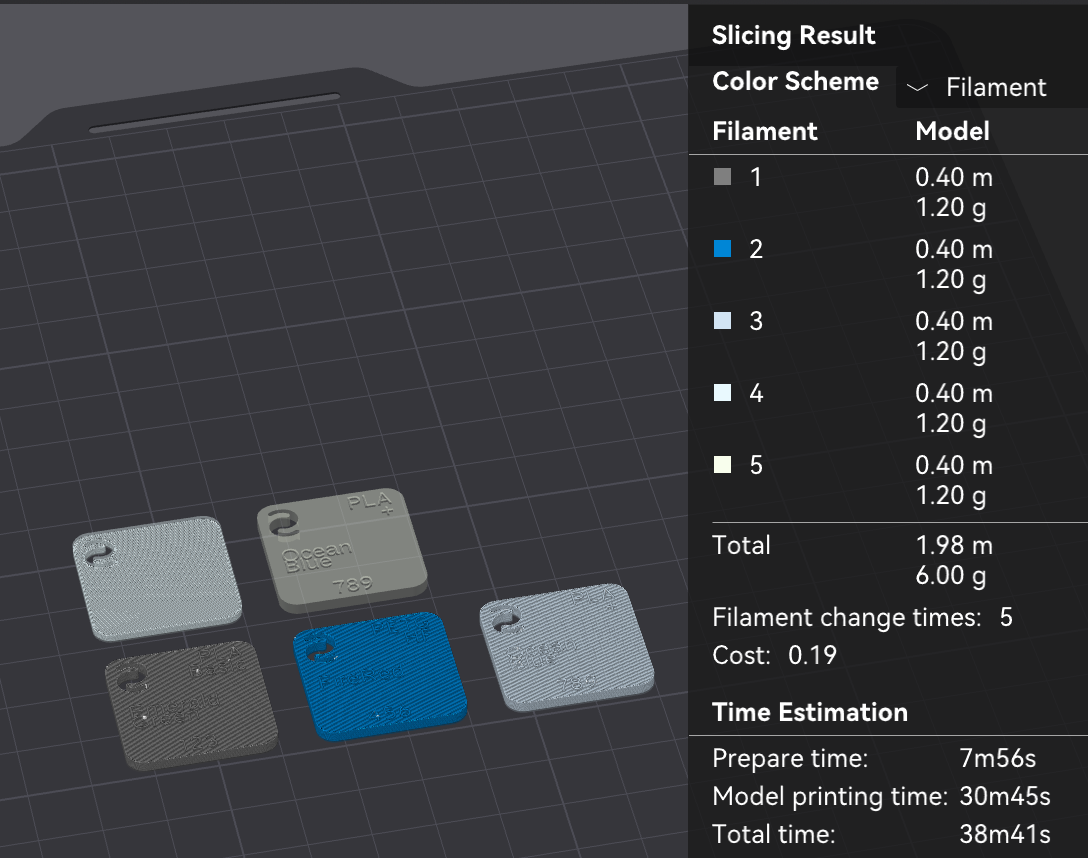
- 🎨 Multi-Color Support with no Filament Wasting: Every Swatch ist loaded with own color coding for easy adjustment, if you follow the instruction each swatch is printed one by one, with one filament change per swatch, also a good AMS Test :-)
- 📐 Fully Parametric & Simplified Labeling : Add all filament details directly via the MakerWorld Customizer and use precision sliders to fine-tune font thickness, sizing, and positioning for a perfectly tailored result.
- 🔤 Full Font Support: Choose from all fonts available in the online Parametric Model Maker.
⚙️ 0.4mm Nozzle Optimized: This model is optimized with a 0.4mm nozzle in mind, to make it possible to print a swatch for almost every filament
- Generating your collection just got even faster:
- Predefined Styles: Choose a look and start instantly.
- Bambu Lab Sets: All official filaments now available as ready-to-print sets.
- UI Overhaul: Completely redesigned settings for a smoother, intuitive experience.
- Everything is now more user-friendly so you can focus on printing, not tweaking.
🛠️ How to Use
- Open Customizer: Click the "Customize" button on the model page.
- Basic Setup and Fine Tuning:
- Choose your postions, text size, and decide e.g if you want the original hole or a solid swatch.
- Enter your filament details (Brand, Material, Color, etc.).
- If you looking for the Bambu Lab Code or HEX-Color, i can recommend the site 3dfilamentprofiles.com
- Choose the right Font:
With great power, comes great responsibility, Not every font is suitable to be printed with a 0.4 Nozzle .Choose a font for every text part, but try to use bold fonts and non serif fonts, for better printing results. You can easily filter them:
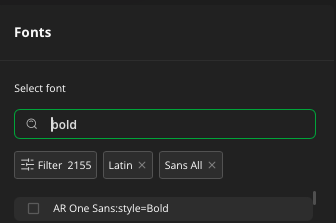
- Recommend Fonts:
- Alexandria:style=Bold
- Noto Sans Adlam Unjoined:style=Bold
- tbc.
- Activate Multilabeling: If you are happy with the look of your swatch und want to generate Multiple Swatches with the same look, just activate “Batch Mode”. The Batch Feature allows you to create an entire library of swatches in a single go. Instead of generating one by one, you can input a list of data. Just active the toggle for the batch function.
The Syntax
To separate different swatches, use the Pipe symbol ;. Inside each swatch, use a Semicolon , to separate swatch information. The Syntax for on swatch is: filamentName1,filamentName2,Type,AdditionalType,Code,HexColorCode. If HexColorCode is missing, random color is be set.
Example Input: Clay,Brown,PLA,Wood,13801,995F11;Charcoal,,PLA,Matte,11101,000000;
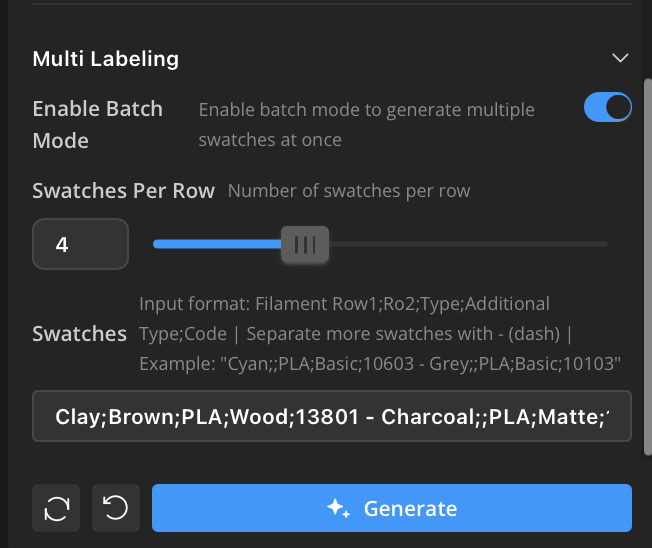
- Generate & Download 3MF File: Hit "Generate", wait a few seconds, and download your customized 3MF-File.
- Download Print Profile: Load the first Print Profile from this page and open it in Bambu Studio
Import/Add Customized 3MF-File:
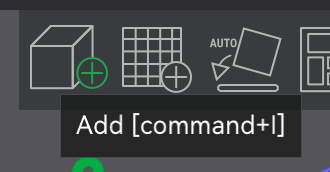
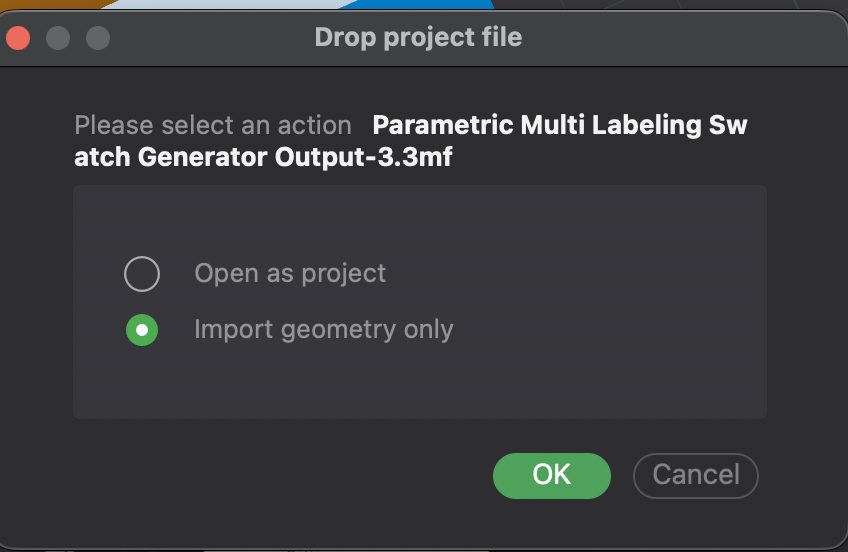
- Use the Add-Tool to add the downloaded customized 3MF-File
- Choose “Import geometry only”
Remove Placeholder Object
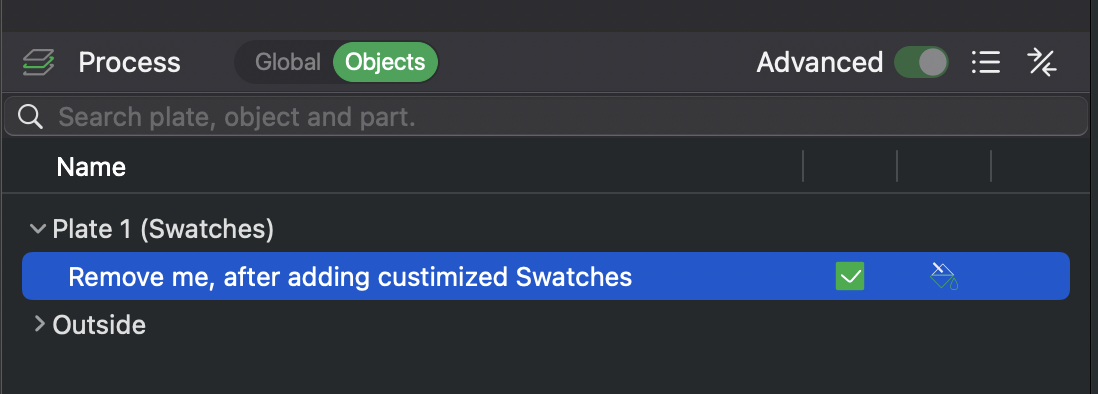
- Rdy? Do you have Multiple Swatches?. Follow “Master the Multi-Labeling (Batch-Function)” down below
📦 Master the Multi-Labeling (Batch-Function)
How to handle it in Bambu Studio:
- Split to Objects: If the swatches are combined, right-click and select "Split to Objects".
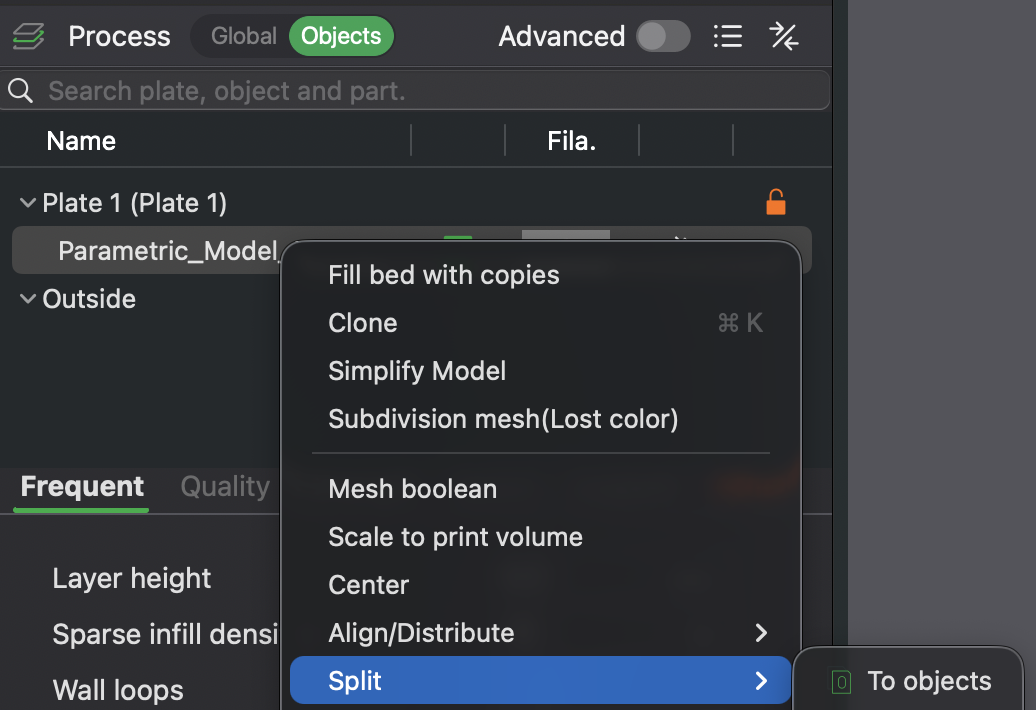
- Assign Colors: Simply click each swatch and assign the matching filament color from your AMS or manual list.
- Note thier is one bug related to the Parametric Model Maker from BambuLab, you only can switch colors from ProjectFilaments for now. Help me to get rid of this issue, by comment or voting my post at the bambu lab forum.
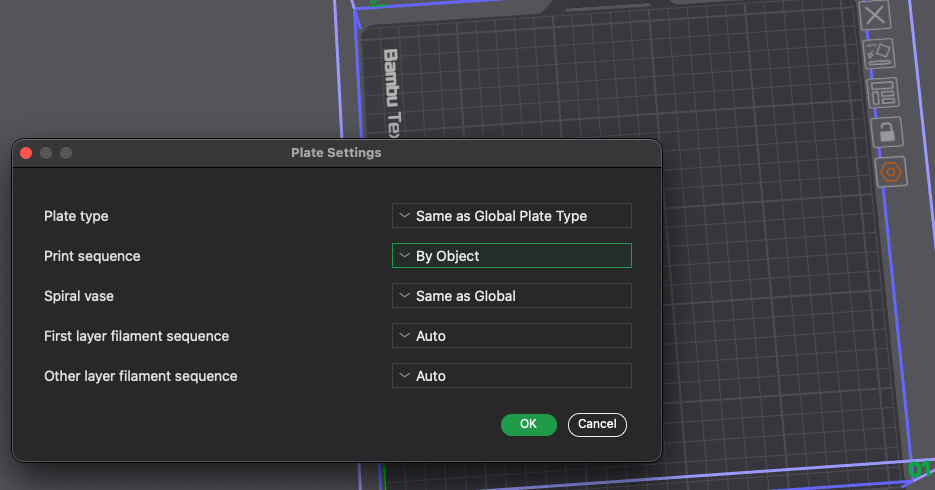
!Important! Check Print Sequence: Click the last button right next your plate, choose “By Object” for Print Sequence, so you not wasting filament. You swatch got printed one by one. Save you time and only changes filament once per swatch, it shoud look like the right picture afterwards in the slicer (Example with 5 Swatches)
Happy Printing
🧪 Feedback is King!
That's my first parametric model. Your feedback is highly appreciated!
- Test it out: Use the "Customize" button and let me know if everything works as expected.
- Show your prints: Please upload your makes so I can see the results on different printers!
⚡ Support Development – Upcoming Features
⚡ Upcoming Features (V1.x & Beyond)
The roadmap is full! If you like the project, a Rating or a Boost 🚀 helps keep development moving:
- 🖼️ Translucency Steps: Lithophane-style thickness sections to test filament opacity.
- ↔️ Variable Sizes: Adjust dimensions to fit third-party storage systems.
- 🏙️ Brand Logos: Integrated logos for major filament brands.
- 🔄 Dynamic Positioning: More freedom to rotate and place text
⚡ Updates:
V 1.3 (23.3.26):
Maybe my biggest update yet, but generate alle your swatches for your loved filament, get even easier. New Features:
- Predefined Styles: Make it even more easier to generate Swatches, by choosing predefined Styles.
- Bambu Lab Sets: All official filaments now available as ready-to-print sets.
- UI Reworked: Completely redesigned settings for a smoother, intuitive experience.
V 1.2 (18.3.26):
- Add more Bambu Lab Swatches Sets with Original HexColorCode
- Add ColorOption for MultiLabling/BatchFunction. Now each color of a filament swatch is set by thier hex color code, so it's easier to find them
- Remove User Options “Swatches Per Row” for BatchFunction, it's now try to find the best amount of rows and columns automatically
V 1.1 (14.3.26):
- Added first Bambu Lab Swatches Sets, so less writing for you ;-)
V 1.0
- Initial Downloads with first feature sets
Parametric Multi Labeling Swatch Generator

Publicado em 21 de fev de 2026
Gostou deste modelo? Crie uma conta grátis para salvar seus favoritos e voltar a eles depois.
Criar conta