Você está no 3DFinder
Buscamos em Thingiverse, MakerWorld e Printables ao mesmo tempo para te dar o melhor de cada uma.
Descrição
The most customizable QR code generator available exclusively on MakerWorld.
Consider following me if you enjoy this model ❤️
UPDATE (2026-03-26)
- Not sure if there was an issue with the MakerWorld Parametric Model Maker, as the generation was timing out. It appears to be working now, but I also simplified the geometry a little bit to hopefully help. Please let me know if you have any issues generating your model with the customize button.
UPDATE (2026-03-21)
- MakerWorld Font Cheat Sheet ([https://github.com/dvester/makerworld-fonts-examples](https://github.com/dvester/makerworld-fonts-examples))
8,267 fonts, 166 pages, 96.7% coverage
UPDATE (2026-03-17)
Decorative Snap-In Frame 🖼️
You can now include a decorative snap-in frame (no-glue, no supports).
- Includes nail hole for hanging on the wall
- Customizable width, lip, chamfer
- Customizable corners for rounded or square
Embed NFC Tags Mid-Print 🏷️
Pause your print at the perfect layer and insert an NFC tag directly into your model.
- Create smart objects that trigger actions with a tap
- Share WiFi credentials, links, or automation commands
- Build interactive products with zero visible hardware
Follow the guide below for how to pause and embed NFC or magnets into your print.
Embed Magnets for Functional Parts 🧲
You can also embed magnets during a print using the same workflow.
- Snap-fit assemblies without screws
- Hidden mounting systems
- Modular components that click together cleanly
Design and print your own fully personalized QR code sign directly from MakerWorld’s parametric tools. No fixed templates. No limitations. Total control.
Whether you are creating a WiFi display for your home, a wedding QR for sharing photos, or a professional business sign, this model allows you to customize every detail before printing it yourself.
Supported QR Code Types
Generate fully functional QR codes for:
- WiFi
Automatically encodes network name and password for instant connection - URL
Websites, social media, online shops, portfolios, and more - Phone Number
Tap-to-call functionality - vCard
Digital contact card with name, phone, email, and business details
QR Code Style Options
Customize the appearance of the QR itself:
- Square module style for a classic look
- Dot module style for a modern aesthetic
- Upload your own custom SVG for the center of the QR code
- Or choose a clean center layout without a logo
Full Color Customization
Make it match your brand, décor, or event theme:
- Custom QR code color
- Custom background color
- Custom text color
- Single or multi-color printing
- Optimized for multi-material printers
Text and Font Control
You are not limited to a handful of fonts.
- Choose from over 8200 different fonts
- Customize top text
- Customize bottom text
- Toggle text on or off for a minimalist design
- Fully editable wording
From bold business branding to elegant script styling, everything is adjustable.
Mounting and Print Configuration
Adapt the design to how you want to display it:
- Optional magnet holes
- Custom hole sizing for different magnet diameters
- Solid back if magnets are not needed
- Single-sided printing
- Dual-sided printing
- Automatically sized stand for vertical display if desired
The stand scales to your sign dimensions for proper balance and stability.
Ideal For
- Weddings and events
- Guest WiFi displays
- Airbnb hosts
- Small businesses
- Trade shows
- Restaurants and cafés
- Offices
- Real estate listings
- Home décor
Why This Model
This is by far the most customizable QR code generator exclusive to MakerWorld. You control the QR type, styling, colors, text, font selection, mounting options, and display format directly inside the customization tool.
Design it your way. Print it yourself. Create something completely unique.
(Optional) How to Add a Pause for NFC Tag Insertion in Bambu Studio
This guide explains how to pause a print at a specific layer so you can insert an NFC tag before the print continues.
Step 1: Prepare Your Model
Load your model and configure your print settings.
- Select your printer
- Assign filaments if using AMS
- Choose your print profile (for example, 0.20mm Standard, Gyroid Infill)
- Ensure the model is oriented correctly
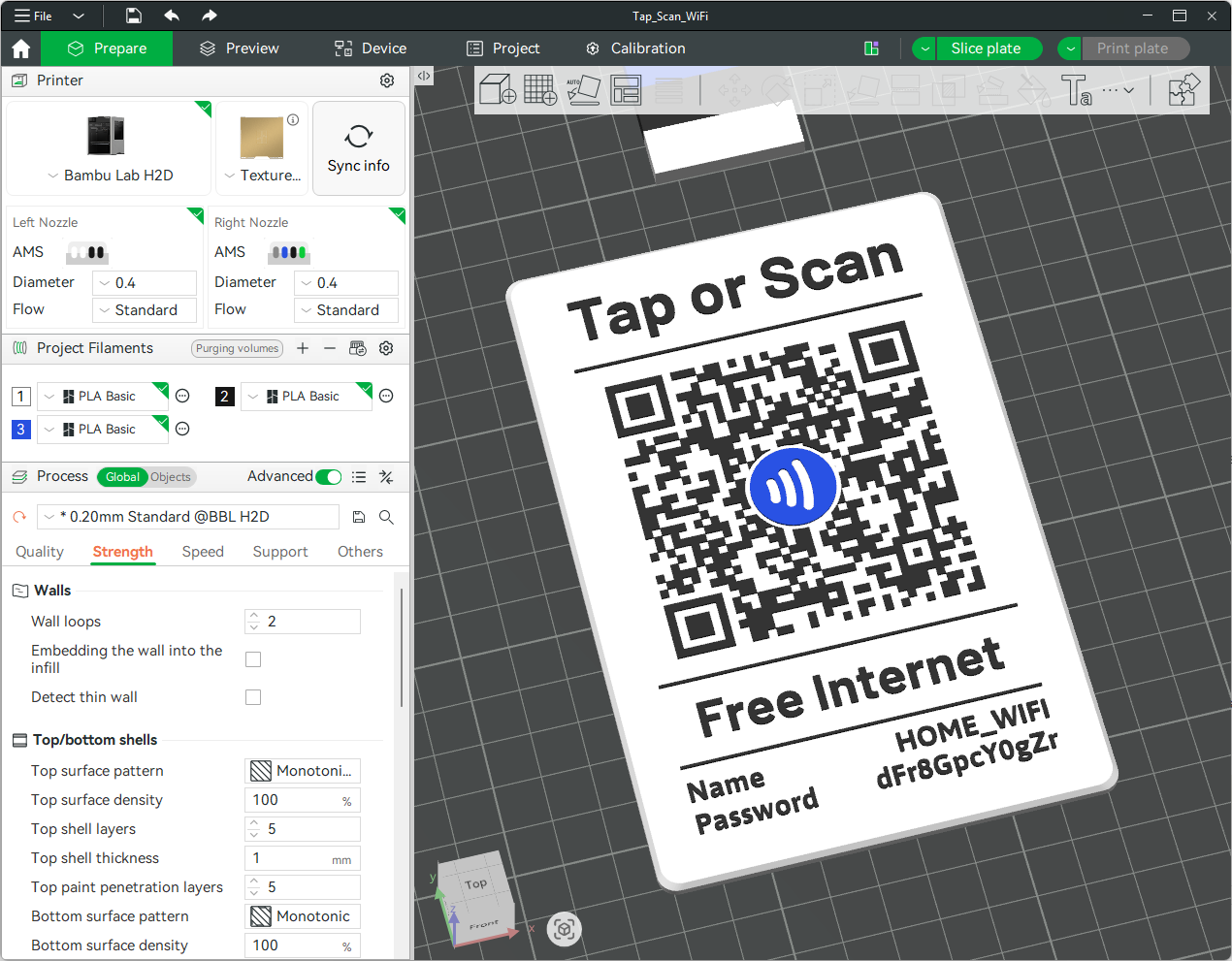
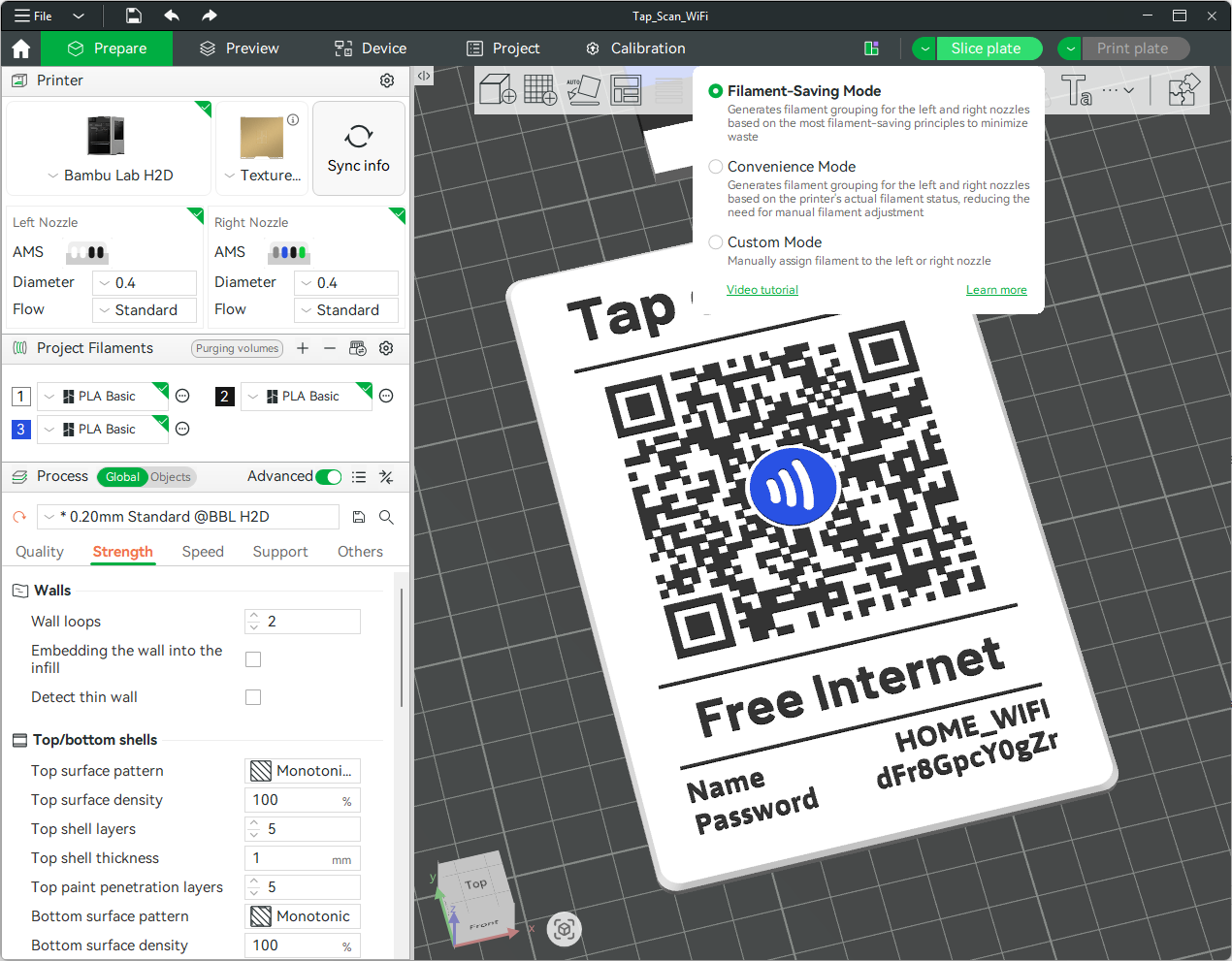
Step 2: Slice the Model
Click Slice plate to generate the toolpath.
- This creates the layer preview needed to place the pause
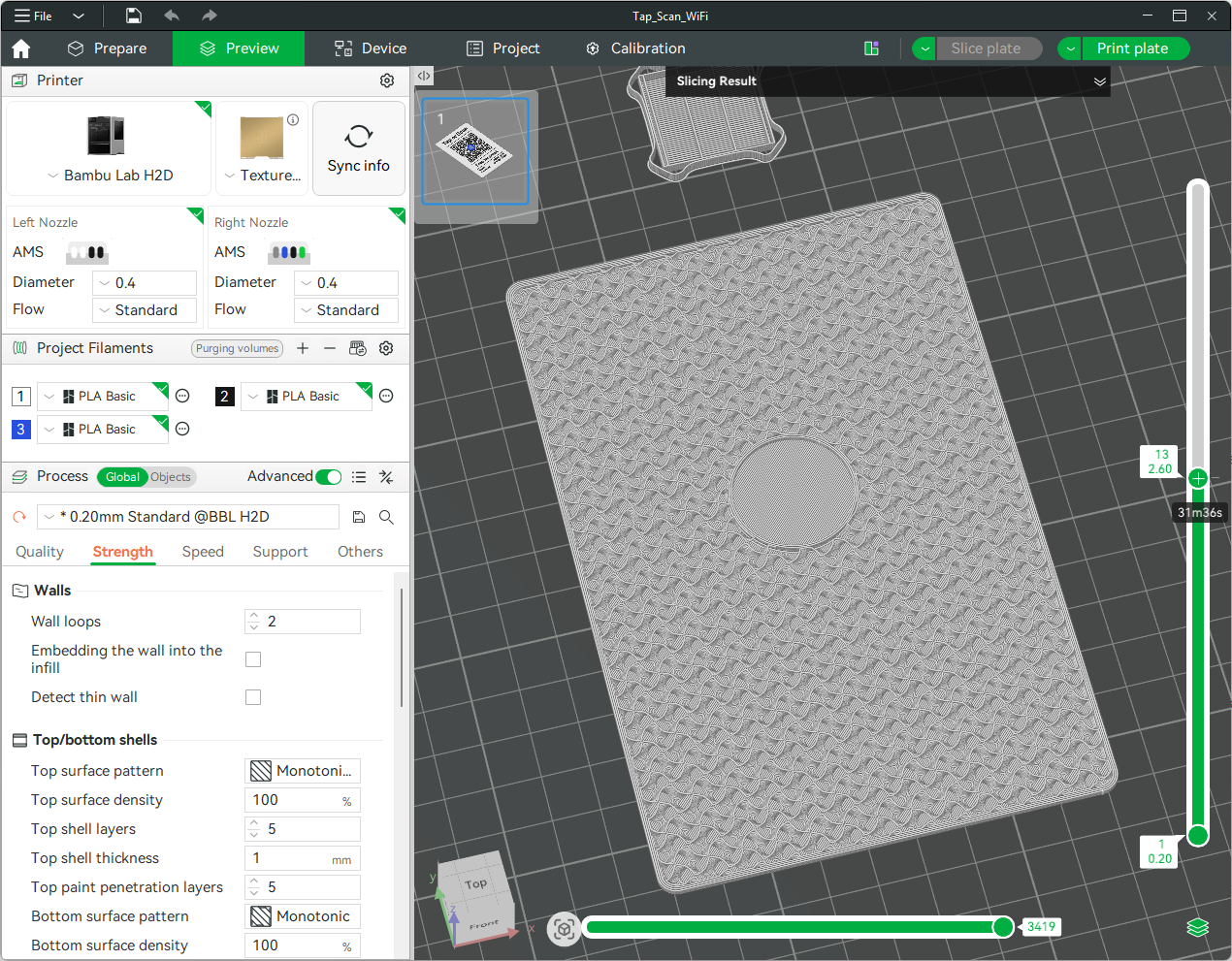
Step 3: Open the Preview Tab
Switch to the Preview tab to inspect layers.
- Use the vertical slider on the right to move through layers
- Look for the point where the NFC pocket is fully formed
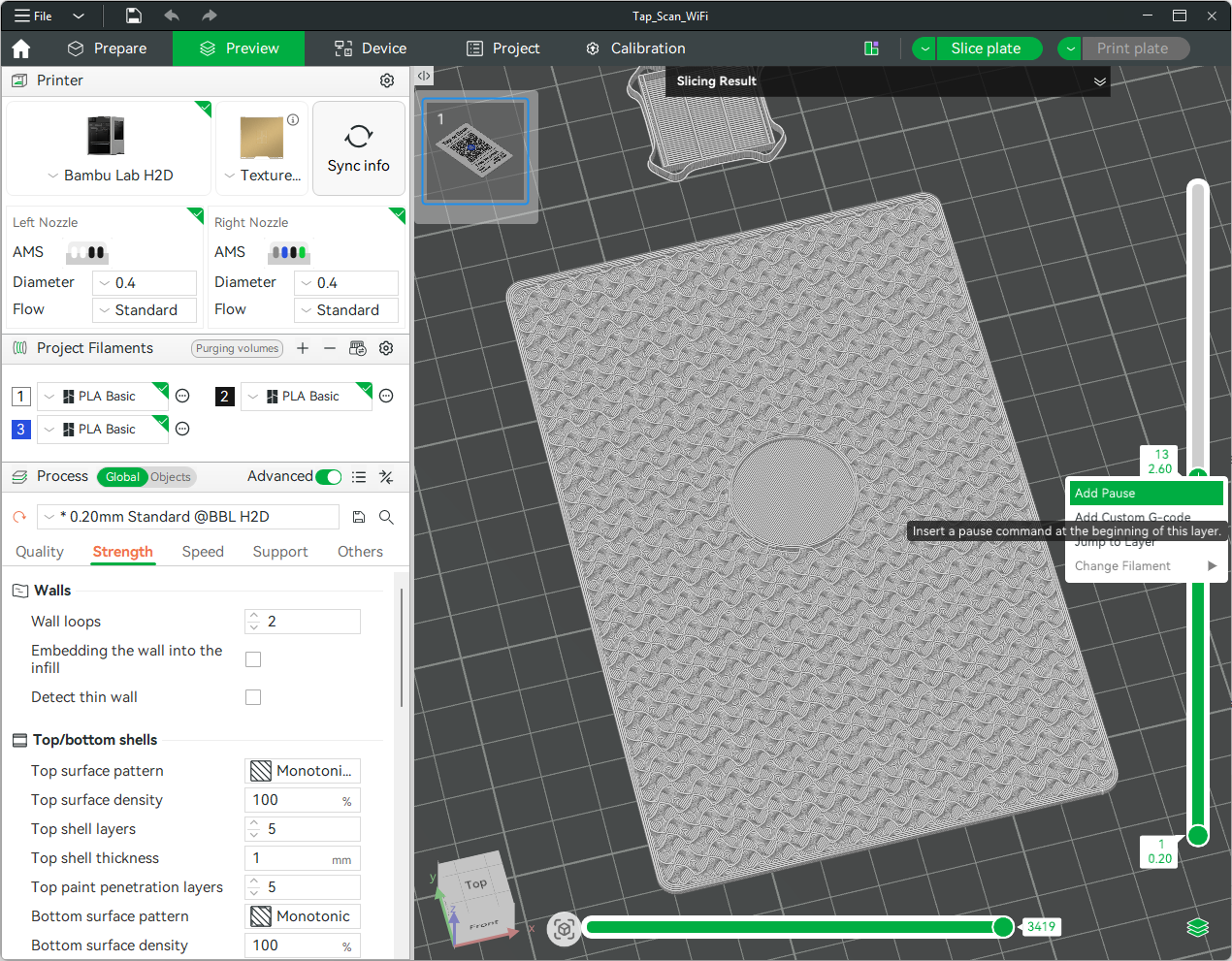
Step 4: Find the Correct Layer
Move the slider carefully to identify the correct insertion point.
- Stop at the layer just before the cavity is covered
- This is where the pause should be inserted
- Right click the + button on the layer slider and select Add Pause
- This inserts a pause command at the start of that layer
- A marker will appear on the timeline
Step 5: Slice the Model Again (Required)
After adding the pause, you must re-slice the model.
- Click Slice plate again
- If you skip this step, the pause will not be included in the print file
- This is required before sending the job to the printer
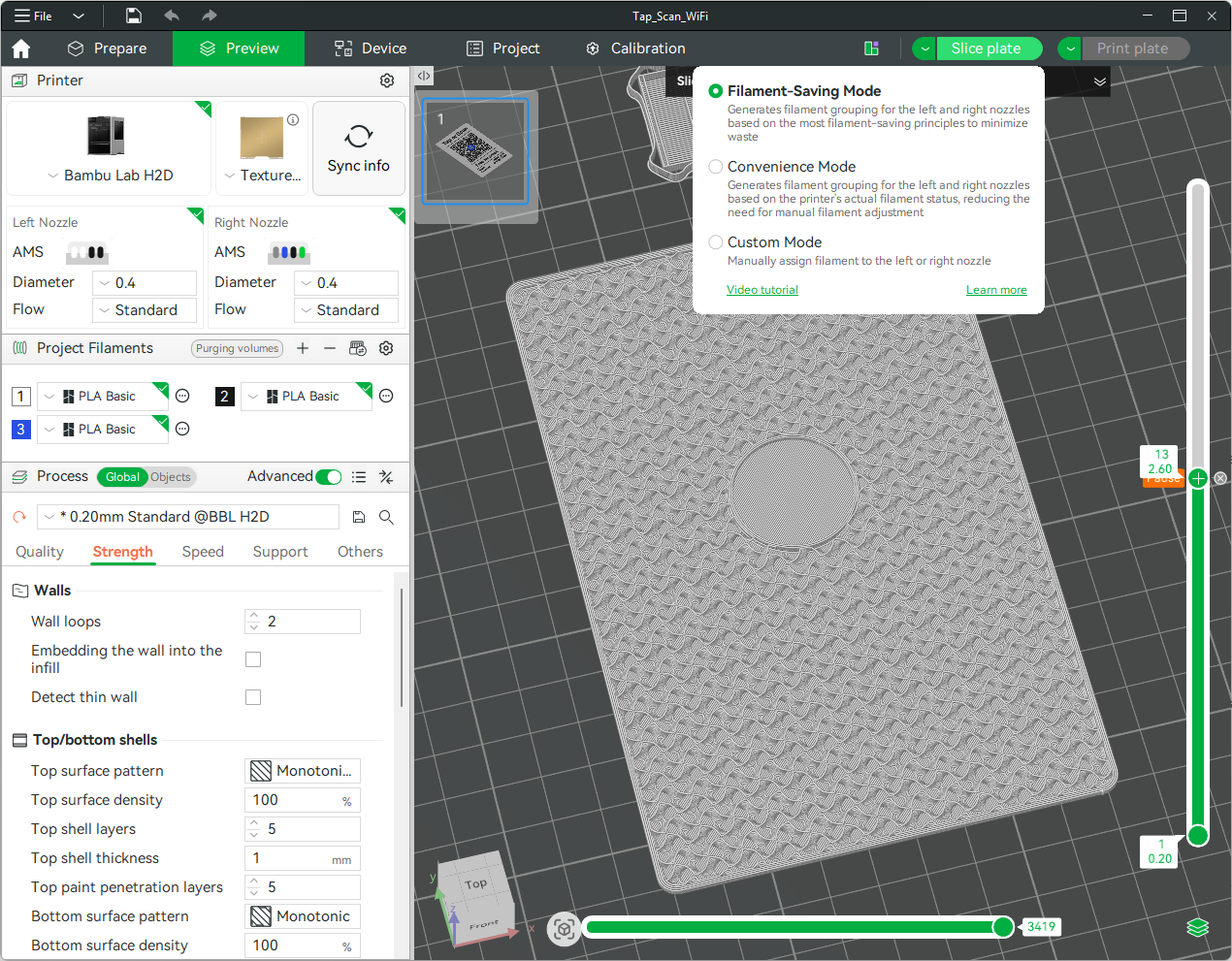
Step 6: Verify the Pause
Confirm the pause is correctly placed.
- Check the marker on the slider
- Confirm it occurs before the layer that seals the NFC tag
- Review the preview to ensure correct timing
- You will see a while line on the layer where the pause was placed.
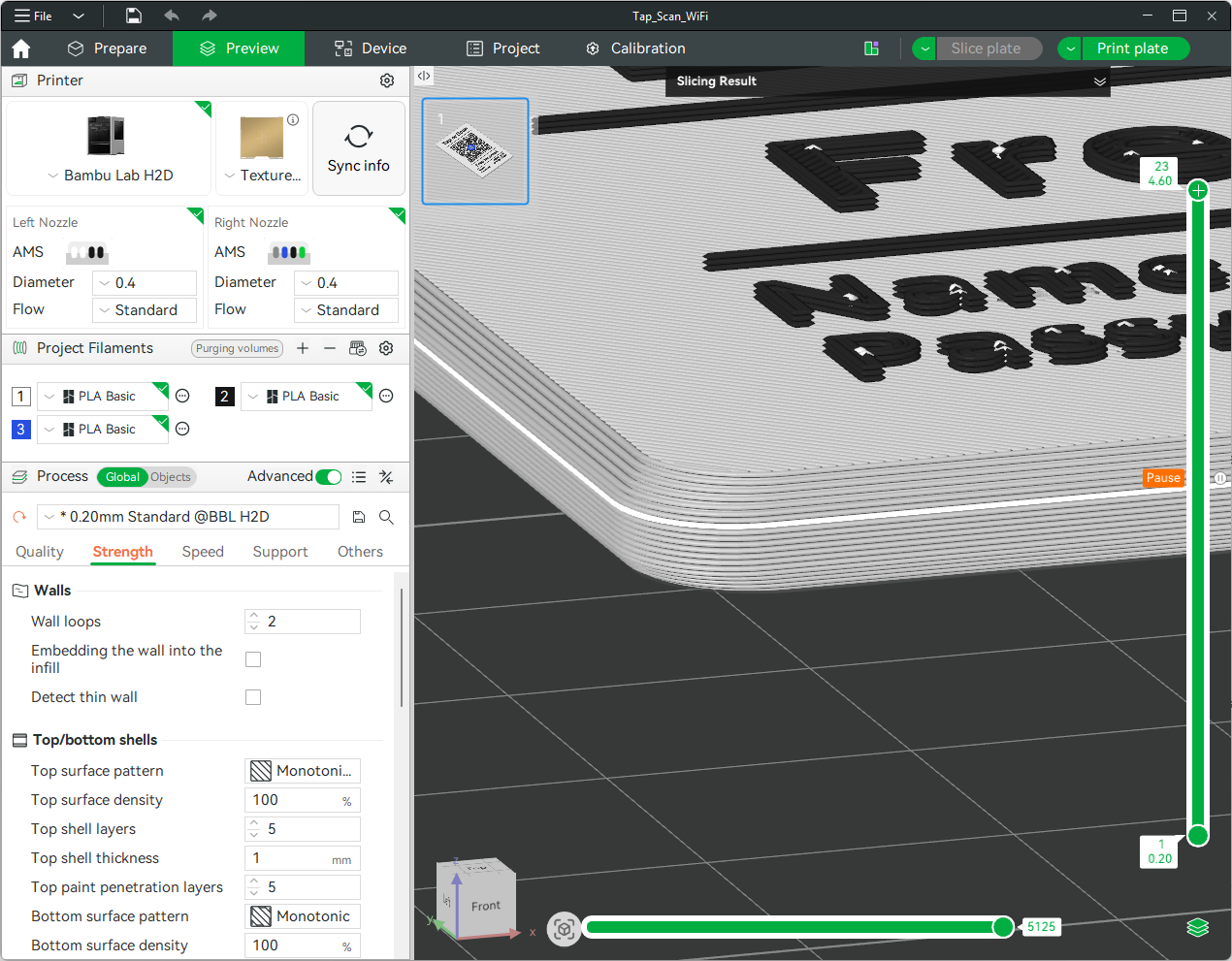
What Happens During Printing
- The printer pauses automatically at the specified layer
- The toolhead moves away to give access
- Insert the NFC tag into the cavity
- Resume the print
- The next layers will seal the tag inside
Tips
- Keep the tag flat to avoid collisions with the nozzle
- If needed, secure the tag lightly so it does not shift when printing resumes
Writing to NFC Tags
Android: One of the easiest ways to write to MakerWorld NFC tags is by using apps like NFC Tools or NFC TagWriter. These apps let you quickly encode common data such as URLs, WiFi credentials, contact information, or custom text. The interface is straightforward, making it simple to write to a tag in just a few taps, while still offering more advanced options if needed.
iOS: Apps like NFC Tools or Smart NFC provide a similar experience. You can scan, edit, and write data directly to your NFC tags with minimal setup. These apps are especially useful for creating interactive prints, allowing you to program your embedded tags to trigger actions like opening a link, connecting to WiFi, or launching a shortcut when tapped.
Changelog
2026-03-17
- Embedded NFC Tag - New section to embed an NFC tag inside the print; supports circle or square shape with configurable dimensions and tolerance (default 0.3mm)
- Embedded magnets - new toggle to place magnets inside the print (with pause) instead of open from the bottom; added 10mm and 12mm magnet sizes
- Default tweaks - NFC tolerance → 0.3mm
- Optional picture frame - Prints on its own plate, auto-sized to fit the sign. Snaps onto the sign from the back with 4 retaining tabs. Hangs on a nail via a self-centering triangular hole in the top rail. Outside corners can be square or rounded, with a decorative chamfer on the front edge.
2026-02-20
- Independent line sections - each line (Top, Bottom, Credential) has its own show toggle, thickness, color, and rounded ends toggle
- Sections reordered to match visual layout of the sign
- Margins moved to text sections; line sections only control QR-side gap
- New "Rick Roll" QR type - encodes a URL while showing WiFi credentials
- Rounded line ends option - pill-shaped ends via toggle per line
Customizable QR Code Sign (NFC & Frame Optional)

Publicado em 15 de fev de 2026
Gostou deste modelo? Crie uma conta grátis para salvar seus favoritos e voltar a eles depois.
Criar conta