Você está no 3DFinder
Buscamos em Thingiverse, MakerWorld e Printables ao mesmo tempo para te dar o melhor de cada uma.
Descrição
Welcome to the Enigma Puzzle – a game as difficult as the Rubik’s cube.
This puzzle was invented by Douglas A. Engel.
The puzzle consists of two intersecting, rotating discs. Each disc has six stones alternating with six bones. The stones look like overweight triangles, the bones like malnourished rectangles. Because the discs intersect each other, they share two stones and one bone. If one disc is rotated by 60 degrees, the shared parts are swapped.
In its initial state, the puzzle is divided into ten hexagonally arranged zones and sorted by color so that the colors on the discs match the colors on the frame. When the discs are rotated at random, a bewildering mosaic of colors emerges. What previously appeared neatly ordered now looks chaotically colorful.
Can you turn the discs to get the original state again?
Printing
No AMS with some gluing (Print Profile 1)
This profile has six plates for the different colors that you can print one after the other.
Once all the parts are printed, the thin colored pieces must be glued onto the frame, the stones, and the bones according to the template. Special attention must be paid to the color order of the stones.
With two AMS or without AMS for manually coloring (Print Profile 2)
The profile contains all parts ready colored on one plate to print it with two AMSs.
You can print all parts in a light color and then color them according to the template. It is also possible to use less colors to reduce the difficulty of the puzzle. especially if you use just one color per stone and accordingly for the bones.
In-Place variant with two AMS (Print Profile 3)
This was my first attempt to print the puzzle. It works but it is bit wobbly, so I decided to redesign the model and print separate parts.
There are two plates: One contains a fully colored puzzle to print with two AMSs. The second plate contains a single-color version that can be colored after printing.
All parts as .step-files
You can also print the single elements using the .step-files.
Assembling
After printing, gluing or coloring, you can insert the stones and bones into the left and right halves of the frame. Then add the elements in the overlapping area. Finally, click the center pieces of the two discs into place. The four pictures at the end of the list show the process.
Background
I once saw a schematic picture of the game in a publication (“Computerkurzweil” in “Spektrum der Wissenschaft”, 1988) and searched for the puzzle but couldn’t find it. I am not sure if it was ever produced.
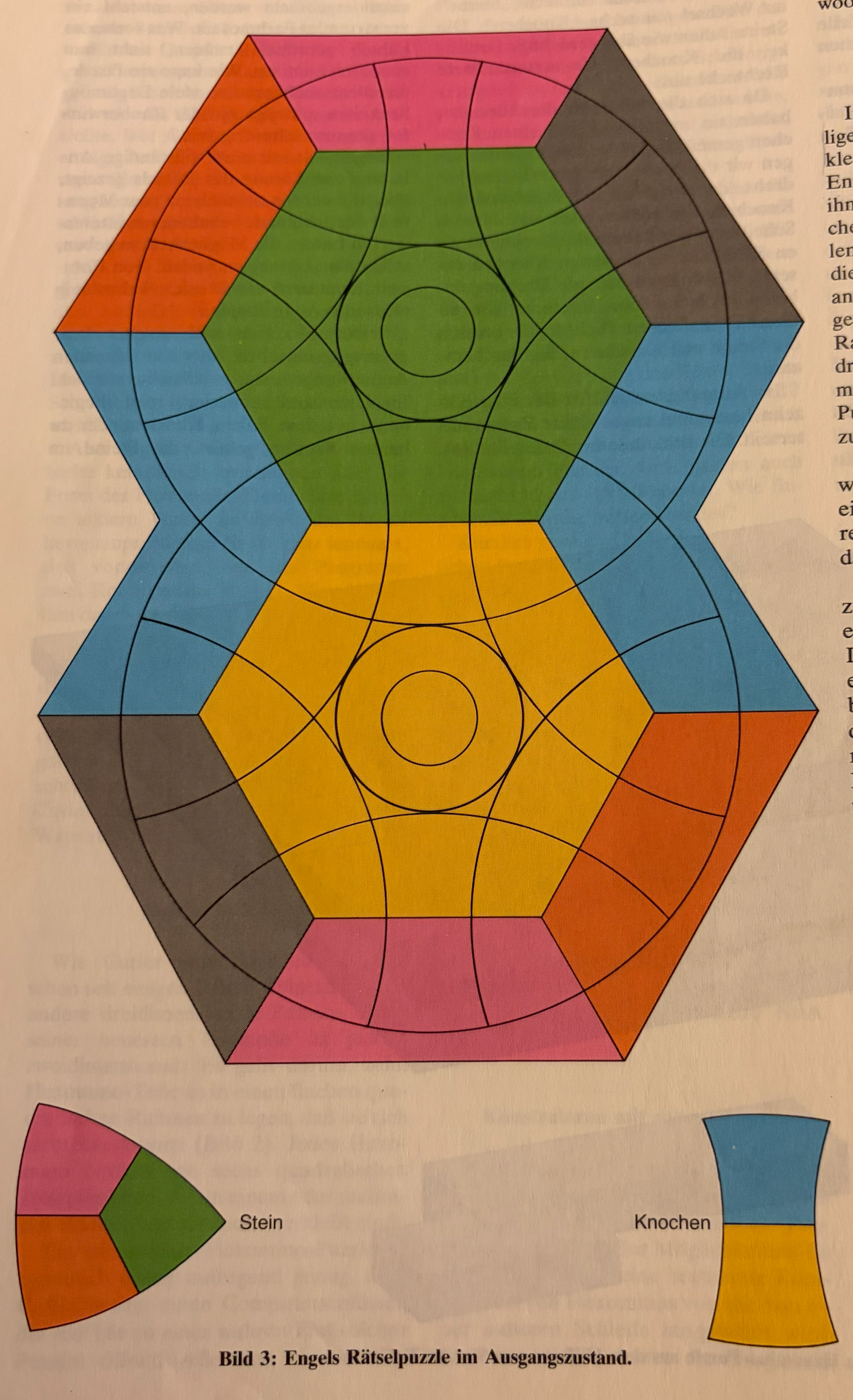
So, long time ago I wrote a computer program to simulate the puzzle. You can find a C#-Version on github [https://github.com/adiuvaris/enigmapuzzle](https://github.com/adiuvaris/enigmapuzzle)
There is also a newer version written in Python on github [https://github.com/adiuvaris/enigmagame](https://github.com/adiuvaris/enigmagame)
In these programs you can also find some coloring ideas for different levels of the game.
