Você está no 3DFinder
Buscamos em Thingiverse, MakerWorld e Printables ao mesmo tempo para te dar o melhor de cada uma.
Descrição
Parametric Magnetic Label Generator
Fully parametric magnetic label, optimized for two-color multi-material printing. Create individual labels for shelves, boxes, tool walls, or filament storage – each label is generated exactly to your specifications.
What Makes This Model Special?
This is not a static, pre-made label. It is a parametric generator that lets you create any number of different labels using the OpenSCAD Customizer – with your own text, your desired size, and matched to your magnets. All parameters can be adjusted conveniently via sliders and input fields, without changing a single line of code.
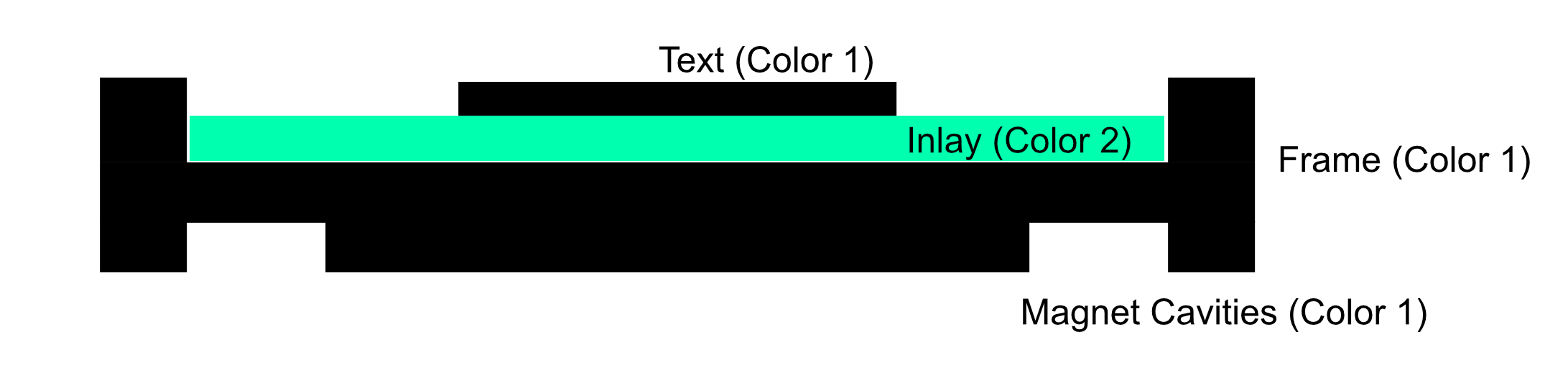
The label consists of two color components:
• Color 1 (e.g. Black): Base plate with magnet cavities, frame, and raised text
• Color 2 (e.g. White): Inlay/background surface inside the frame
The contrast between raised text and background creates a high-quality, professional look. Thanks to embedded neodymium magnets, the labels stick to any metallic surface and can be easily repositioned at any time.
Customizable Parameters
Text
| Parameter | Default | Range | Description |
| label_text | "PLA+" | any string | The text displayed on the label |
| font_name | "Arial:style=Bold" | any system font | Font and style (e.g. "Helvetica:style=Regular") |
| font_size | 12 | 4 – 30 mm | Font size in mm |
Label Dimensions
| Parameter | Default | Range | Description |
| label_width | 60 | 20 – 150 mm | Total width of the label |
| label_height | 25 | 15 – 80 mm | Total height of the label |
| corner_radius | 8 | 0 – 20 mm | Corner radius (0 = sharp corners) |
| border_width | 2 | 1 – 10 mm | Width of the frame around the inlay |
Magnets
| Parameter | Default | Range | Description |
| magnet_diameter | 6 | 4 – 15 mm | Diameter of the magnets |
| magnet_height | 3 | 1 – 5 mm | Height of the magnets |
| magnet_tolerance | 0.2 | 0 – 0.5 mm | Additional clearance for press fit |
| magnet_count | 2 | 2 or 4 | Number of magnets (2 = left/right, 4 = corners) |
| magnet_inset | 10 | 5 – 30 mm | Distance from edge to magnet center |
Layer Thickness
| Parameter | Default | Range | Description |
| min_base_under_magnet | 0.6 | 0.4 – 1.2 mm | Min. material thickness above the magnet cavity |
| inlay_thickness | 0.8 | 0.4 – 1.6 mm | Thickness of the inlay layer (Color 2) |
| text_thickness | 0.6 | 0.4 – 1.2 mm | Height of the raised text (Color 1) |
The base thickness is calculated automatically: magnet_height + min_base_under_magnet. The total thickness is base + inlay + text. With default values (6x3mm magnets), the total thickness is 5.0 mm.
Icon (Optional)
Labels can include an icon in addition to text:
| Parameter | Default | Description |
| use_icon | false | Enables icon display |
| icon_type | "text" | Icon source: Unicode character or SVG file |
| icon_text | "☀" | Unicode character (e.g. ☀ ★ ♥ ⚡ ♻) |
| icon_font | "Noto Emoji" | Font for the Unicode icon |
| icon_size | 10 | Icon size in mm (4 – 25) |
| icon_position_x / y | -18 / 0 | Position relative to center (-50 to +50 mm) |
Fine Tuning
| Parameter | Default | Description |
| $fn | 64 | Resolution for curves (higher = smoother but slower) |
| text_offset_x / y | 0 / 0 | Horizontal and vertical text offset in mm |
Preview Colors
| Parameter | Default | Options |
| preview_color1 | Black | Black, DimGray, Gray, Navy, DarkRed, DarkGreen, SaddleBrown, Purple |
| preview_color2 | White | White, Yellow, LightGray, Cyan, Lime, Orange, Pink, LightBlue |
Preview colors are for visualization in OpenSCAD only. The actual color assignment is done in your slicer.
Layer Structure
The label consists of four layers, built from bottom to top:
Export for Two-Color Printing
For multi-material printing, two separate STL files are exported:
Step 1 – Export Color 1 (Base, Frame, Text)
1. Set render_mode to "color1"
2. Render (F6) and export as STL
Step 2 – Export Color 2 (Inlay/Background)
1. Set render_mode to "color2"
2. Render (F6) and export as STL
Step 3 – Combine in Slicer
1. Import both STL files
2. The parts align automatically (same origin)
3. Assign different colors/extruders to each part
Common Magnet Sizes
| Size | Use Case |
| 6x3 mm | Standard, good holding force, compact |
| 10x2 mm | Larger surface area, thinner label |
Print Recommendations
| Setting | Recommendation |
| Layer height | 0.16 – 0.2 mm (for extra sharp text edges: 0.12 mm) |
| Infill | 20 – 40% |
| Walls | 2 – 3 perimeters |
| Support material | Not required |
| Print orientation | Bottom side on the print bed (magnet cavities face down) |
Material Recommendations
• PLA: Best suited for indoor use. Wide range of colors available.
• PETG: More robust than PLA, slightly more flexible. Great for labels that are moved frequently.
• ASA/ABS: UV-resistant, suitable for outdoor use.
Testing Magnet Tolerance
Before producing a full batch of labels, print a small test label first:
• Default tolerance of 0.2 mm is a good starting point for most printers
• Magnet too tight? Increase tolerance to 0.3 – 0.4 mm
• Magnet falls out? Reduce tolerance to 0.1 – 0.15 mm
Use Cases
• Filament storage: Labels for boxes with filament type and color (PLA, PETG, ASA...)
• Tool wall: Labels for tool holders and storage areas
• Shelf organization: Freely repositionable labels for shelves and bins
• Kitchen & household: Labels for storage containers on magnetic surfaces
• Workshop: Labels for drawers and sorting bins
• Office: Flexible labeling for whiteboards and metal shelving

Gostou deste modelo? Crie uma conta grátis para salvar seus favoritos e voltar a eles depois.
Criar conta