Você está no 3DFinder
Buscamos em Thingiverse, MakerWorld e Printables ao mesmo tempo para te dar o melhor de cada uma.
Descrição
Vor einiger Zeit habe ich den ersten QR-Code-Ring entwickelt. Nun präsentiere ich stolz die Version 2 (V2), die mit einigen spannenden neuen Funktionen und Verbesserungen ausgestattet ist.
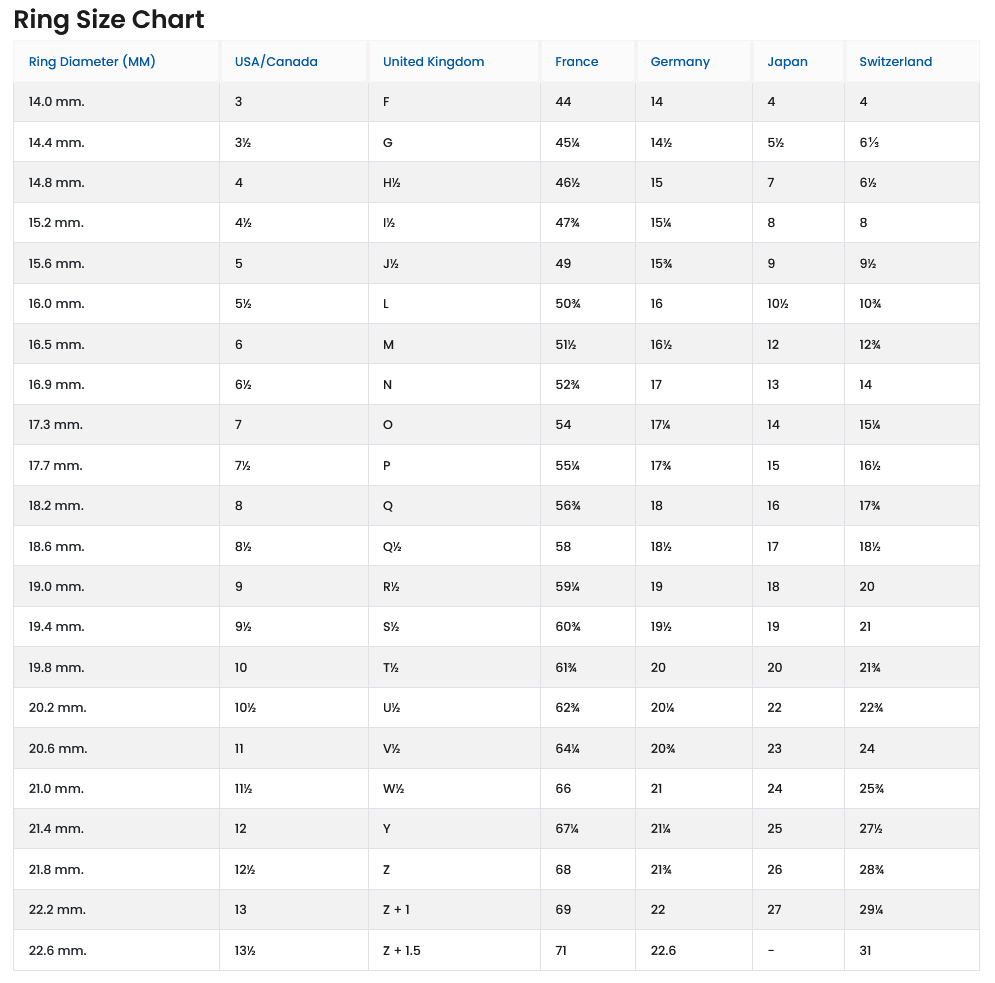
Das Grundmodell des Rings hat einen Standard-Innendurchmesser von 20 mm. Mithilfe der beigefügten Fusion 360-Datei kann der Ringdurchmesser jedoch ganz einfach an individuelle Bedürfnisse angepasst werden.
🖨️ Druckempfehlung
Für optimale Ergebnisse empfehle ich folgende Einstellungen:
- Drucker: Bambu Lab A1 Mini mit AMS
- Düse: 0,2 mm Nozzle
- Geschätzte Druckzeit: ca. 2 Stunden
🛠️ Anleitung zur Personalisierung des QR-Codes
Da das Ringmodell in Fusion 360 erstellt wurde, ist die folgende Methode der einfachste Weg, den QR-Code zu personalisieren und einzufügen:
- QR-Code generieren:
- Besuche die Webseite [https://genqrcode.com/](https://genqrcode.com/).
- Generiere deinen gewünschten QR-Code (z.B. für eine URL oder deine Kontaktdaten).
- Lade den QR-Code als .3mf-Datei herunter.
- Modell in Bambu Studio öffnen:
- Öffne das Ringmodell in Bambu Studio.
- QR-Code importieren und anpassen:
- Füge die heruntergeladene QR-Code-Datei (.3mf) in Bambu Studio hinzu.
- Skaliere den QR-Code auf die passende Größe.
- Beispiel: Wenn der Ringeinsatz für den QR-Code 14 mm breit ist, sollte der QR-Code selbst ca. 12 mm breit sein.
- Die Höhe (Dicke) des QR-Codes sollte 0,5 mm betragen.
- Zentrieren: Klicke mit der rechten Maustaste auf den QR-Code und wähle die Funktion zum zentrierten Positionieren.
- Farbe zuweisen:
- Wähle zum Schluss den QR-Code aus und weise ihm über das AMS eine andere Farbe zu, um einen schönen Kontrast zum Ring zu erzielen.
Cheat Sheet für die Ring Größe:
EN
Some time ago, I developed the first QR Code Ring. Now, I am proud to present Version 2 (V2), which comes equipped with some exciting new features and improvements.
The basic ring model has a standard inner diameter of 20 mm. However, using the enclosed Fusion 360 file, the ring diameter can be easily adjusted to individual needs.
🖨️ Printing Recommendation
For optimal results, I recommend the following settings:
- Printer: Bambu Lab A1 Mini with AMS
- Nozzle: 0.2 mm Nozzle
- Estimated Print Time: approx. 2 hours
🛠️ Instructions for Personalizing the QR Code
Since the ring model was created in Fusion 360, the following method is the easiest way to personalize and insert the QR code:
- Generate QR Code:
- Visit the website [https://genqrcode.com/](https://genqrcode.com/).
- Generate your desired QR code (e.g., for a URL or your contact details).
- Download the QR code as a .3mf file.
- Open Model in Bambu Studio:
- Open the ring model in Bambu Studio.
- Import and Adjust QR Code:
- Add the downloaded QR code file (.3mf) to Bambu Studio.
- Scale the QR code to the appropriate size.
- Example: If the ring insert for the QR code is 14 mm wide, the QR code itself should be approx. 12 mm wide.
- The height (thickness) of the QR code should be 0.5 mm.
- Center: Right-click on the QR code and select the function to position it centrally (or "center" function).
- Assign Color:
- Finally, select the QR code and use the AMS to assign a different color to achieve a nice contrast with the ring.
Customizable QR and Text Ring
Publicado em 9 de nov de 2025
Gostou deste modelo? Crie uma conta grátis para salvar seus favoritos e voltar a eles depois.
Criar conta