Você está no 3DFinder
Buscamos em Thingiverse, MakerWorld e Printables ao mesmo tempo para te dar o melhor de cada uma.
Descrição
Space Invaders LED lightbox for all fellow retro gamers. My profile also has a cutout for the light I used, but this can be easily modified since I added it to the slicer. You can also change the color of the rim, which can easily be changed with the paint modifier. Enjoy!
Filaments used:
- Overture Matte Black
- Numakers Fluorescent Green
WARNING!
- Remove the purge line at the beginning of the print if you resize the plates!
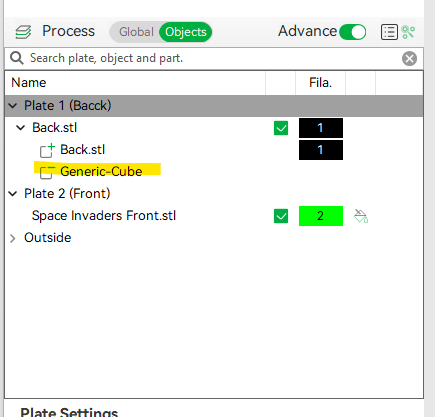
- Don't forget to adjust the size of the part modifier if you will be using a different light or if you are printing from the still:
Materials and tools:
- Glue gun
- aluminum tape
- led strip (This is a link to the one I used)
- soldering iron (optional)
Recommendations:
- Use a textured PEI sheet
- Use the print profile, it has quite a few setting changes that help achieve the best results make a hole for the USB strip wherever you like it best with a soldering iron, drill, or in the slicer. My profile has one made to fit the strip I used.
- Use the aluminum tape on the inside of the backplate to help with light diffusion glue the LEDs at the back edge (bottom) of the "back box"; placing them too close ruins the diffusion and the individual LEDs become visible.
Bambu Studio Settings:
I always recommend using the print profile I provided since it has settings with which I've gotten the best results.
Here are the main slicer settings I recommend:
- preferences (ctrl + P) → activate developer settings → Quality →Advanced → First Layer Flow Ratio: 1.04
- Quality → Wall generator → Arachne
- Strength → Advanced → Infill/wall overlap → 20%
- Quality → Advanced → Avoid crossing walls
- Increasing retraction / reducing temperature can help reduce wisps
- ***If you have issues with color bleeds, change the order of colors, printing from lightest to darkest color

Gostou deste modelo? Crie uma conta grátis para salvar seus favoritos e voltar a eles depois.
Criar conta