Você está no 3DFinder
Buscamos em Thingiverse, MakerWorld e Printables ao mesmo tempo para te dar o melhor de cada uma.
Descrição
This is a fully customizable Jack O' Lantern. You can select one of the faces I have included, or make your own. Instructions to make your own are below.
No glue or AMS is required. The stem is printed separately and easily screws into the lid.
Easy to add a battery tea light.
How to Customize your Jack O' Lantern
Create a picture in paint or upload one and edit in paint. If you are using a handmade drawing, you may have to trace over the drawing in paint to make it darker. The goal is to have all black and white. Select Control+W to resize. Make the vertical pixels 200.
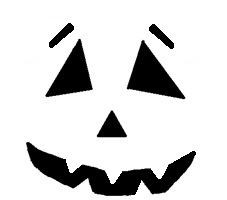
Convert your picture to an SVG by going to [https://picsvg.com/](https://picsvg.com/) and uploading a picture. Select Internal 1 as the filter. You want all the cutouts to be fully black. Download SVG.
The SVG will be in your download folder. Rename it and move it where you want it.
In Bambu studio, download this project as a 3mf. Go to the Objects tab. On Plate 7 (drawing), right click on the drawing and select Edit SVG.
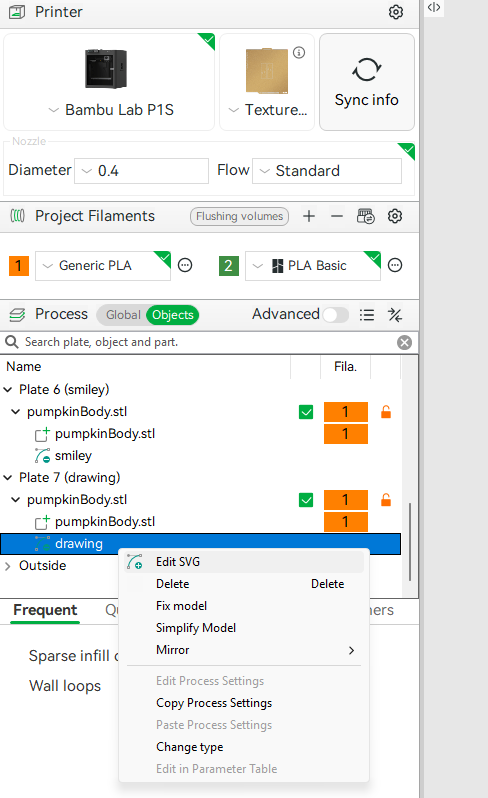
Select the Triangle and Change File. Select your file from where you saved it. Once you open your file, you will want to adjust the size using the slider bar that is highlighted below.
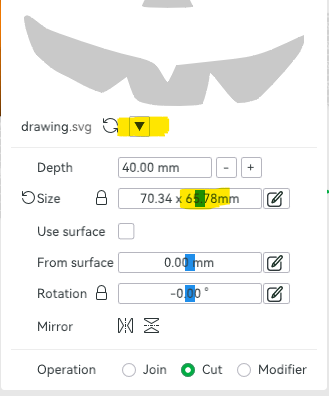
Hit Return in the upper left corner and you are ready to print. For supports, it is currently set to Support Critical Regions Only. I have found this to be sufficient for my prints, but depending on your printer and your design, you may need to uncheck this and have more supports. Make sure to review the supports before you print.

Gostou deste modelo? Crie uma conta grátis para salvar seus favoritos e voltar a eles depois.
Criar conta