Você está no 3DFinder
Buscamos em Thingiverse, MakerWorld e Printables ao mesmo tempo para te dar o melhor de cada uma.
Descrição
The newly revealed spear that was announced at Minecraft LIVE for the item frame I designed. This item uses two of the neodymium magnets (check the bottom of the description for the link). The profile will have the pause necessary to insert the magnets at the right time. The magnets should fit snug, so no super glue is required to hold them in place. Just be sure to insert the magnets in the right direction so they attach to the item frame correctly!
This model is support free and does not require the AMS. If you are not using the AMS, just be sure to add color switch pauses at the same layers as in the print profile.
You can use this spear profile to make a diamond, gold, iron, etc. variant.
This model has two pauses within the profile. For the first pause, this is where you will insert the two magnets. The second pause is for people who have one AMS (like me) and need to add the light blue, mint, and white filament, in order to print the spear blade. You will insert the light blue filament into slot one, the mint filament into slot two, and the white filament in slot three. You should also map the light blue filament to use AMS slot A1, the mint filament to AMS slot A2, and the white filament to AMS slot A3. I have attached an image of what the AMS slots should look like when you go to send the file to your printer.
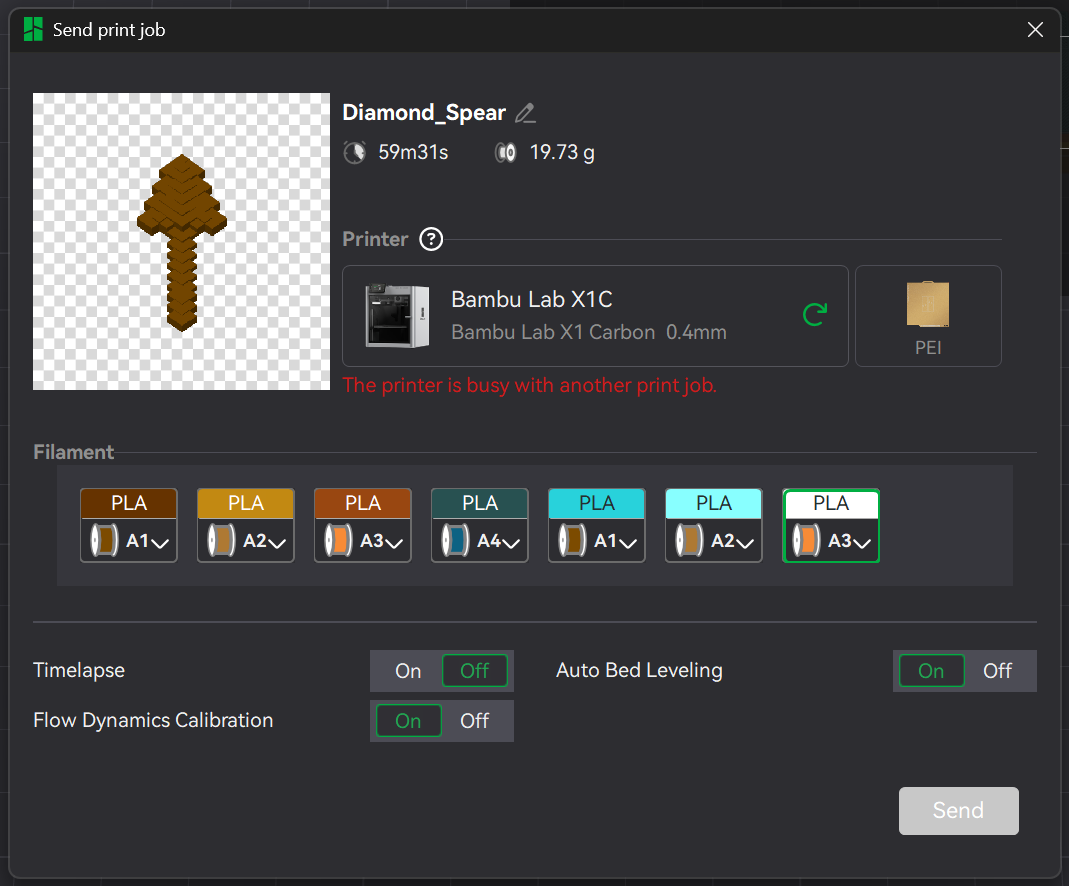
The seven filament colors/brands I used in sequence are:
CCTREE Dark Brown PLA
Overture Sedimentary Rock PLA
Pangda Yellow Brown PLA
LOCYFENS Green-Blue PLA Shiny Silk
Inland Light Blue PLA+
3DSolutech Mint PLA
El3goo White Rapid PLA+
The link for the magnets is included in the item frame model on my page:
Spear - Minecraft Item Frame

Publicado em 29 de set de 2025
Gostou deste modelo? Crie uma conta grátis para salvar seus favoritos e voltar a eles depois.
Criar conta