Você está no 3DFinder
Buscamos em Thingiverse, MakerWorld e Printables ao mesmo tempo para te dar o melhor de cada uma.
Descrição
The PopTop Buddy
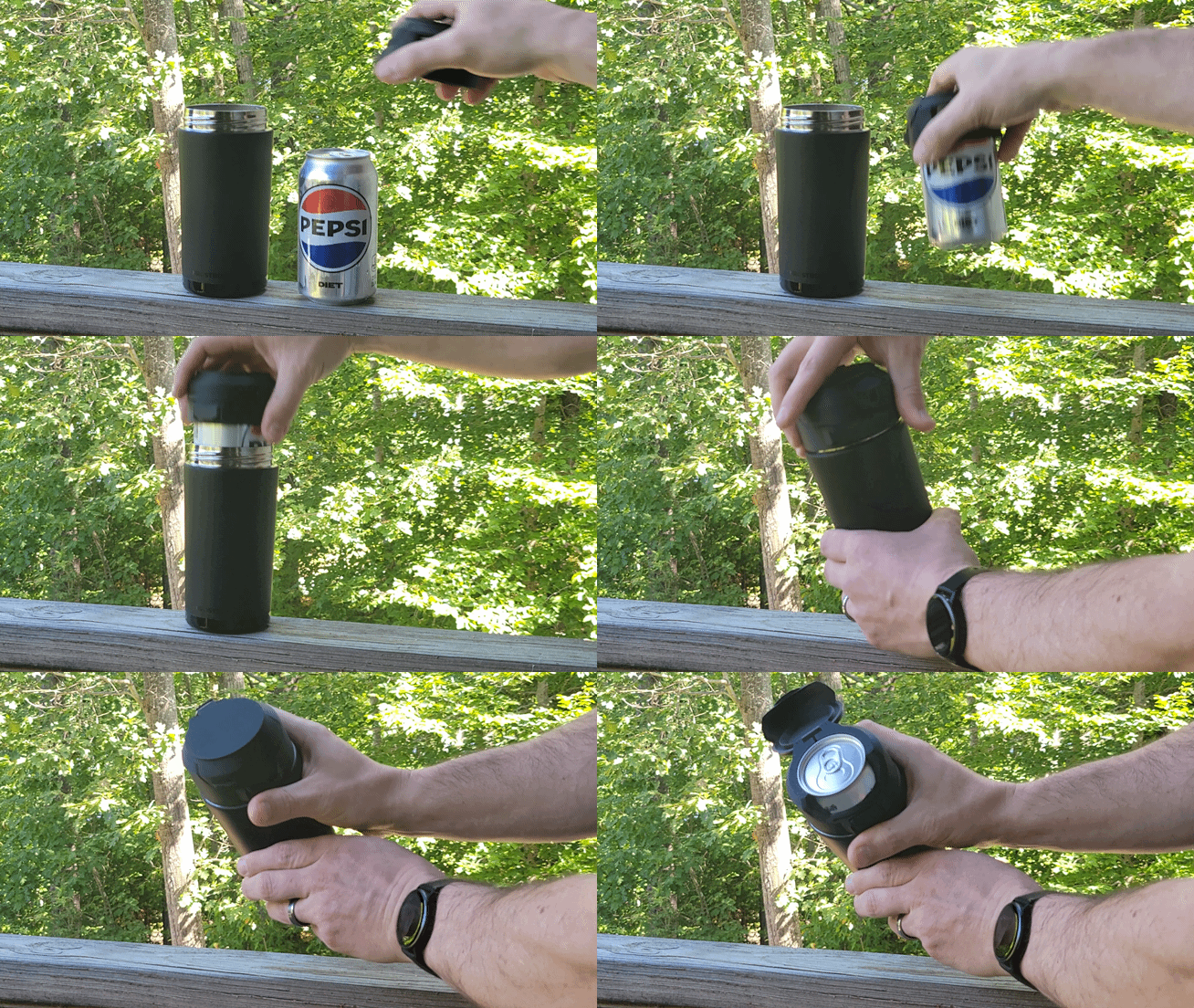
The PopTop Buddy is a lightweight, spring-loaded cap that works in tandem with standard-width aluminum cans and Frost Buddy Universal Buddy can coolers. Once assembled, the lid of the PopTop opens with a press of a button! It quickly snaps into place and is ready to go in seconds.
Confirmed to fit standard-width cans in the following sizes:
- 12oz (355mL) such as Coca-Cola
- 14.9oz (440mL such as Guinness
- 16oz (473mL) such as Monster Energy
Other PopTop Sizes
- PopTop Lite for standard-width cans
- PopTop Slim for slim-width cans
- PopTop Mini for original Red Bull (250mL / 8.4oz) cans
- PopTop Yeti Slim for slim-width cans with a Yeti Colster
- PopTop Yeti for standard-width cans with a Yeti Colster
- PopTop Max for Arizona (22oz / 650mL) cans
Features
- Close fitting lid keeps bugs, rain, and debris from getting into your drink.
- Lid springs open at the push of a button.
- Threads onto the popular Frost Buddy Universal Buddy can cooler.
- Compatible with multiple sizes of rubber bands, which keeps the collar squeezed tight to the can and acts as the lid's spring. The recommended rubber band size is #30 (2" long by 1/8" wide).
- Custom text and logos can easily be added to the large flat surface of the lid.
- Spill-resistant when you add the printed TPU gasket to the lid. See “Download Files” for STL.
Purchased Items
The Frost Buddy Universal Buddy can cooler is a stainless steel, double-walled insulated can cooler. See Frost Buddy's website for more information.
Usage Tips
- Install the PopTop onto your can prior to threading onto the Frost Buddy Universal Buddy can cooler.
- After snapping the lid into place on your can - squeeze the rear of the collar at the hinge. This insures a snug fit of the collar to the can.
- When your beverage is finished and you wish to remove the PopTop:
- Unthread the PopTop from the Frost Buddy Universal Buddy can cooler.
- Open the PopTop's lid.
- Use two hands to gently pry open the hinge at the rear of the collar.
- Lift the PopTop off of the can.
Printing Tips
- Due to natural variation in filaments and printers, the paddle's press fit into the collar can vary. The print profile includes two sizes of the paddle. The smaller is marked with a “-” and the larger with a “+”.
- Always clean your build plate with water and mild soap.
- Supports must be enabled - The collar and lid designed to be printed with supports.
- Layer Heights - The collar and lid are printed at 0.2mm layer heights, while the paddle/button must be printed at 0.12mm.
- No Brims - Brims are not required for any components.
- Recommended Material - PLA Basic, PLA Matte, Silk PLA, and PETG filaments have all been tested successfully.
Assembly
- Remove supports from the collar and lid.
- Press fit the smaller paddle/button (marked with a “-”) into the front of the collar. Gently rock the paddle/button back and forth. It should have slight resistance. If the fit is too loose, swap it out for the larger paddle/button (marked with a “+”).
- Gently pry open the rear of the collar and insert the lid's pivot to complete the hinge. Cycle the lid back and forth to insure the lid moves smoothly over the entire range of motion. If needed, shave material with a sharp blade from the pivot pins where there is interference.
- Wrap a rubber band around the two horns on either side of the collar. Stretch one of the lengths of rubber band up over the hook at the rear of the lid. Test the opening force of the rubber band when the PopTop is installed on a can. If more force is required, try a shorter rubber band or double up the rubber band before installing on the horns.
Revision History
2025-8-23 v1.0 Released.

Gostou deste modelo? Crie uma conta grátis para salvar seus favoritos e voltar a eles depois.
Criar conta