Você está no 3DFinder
Buscamos em Thingiverse, MakerWorld e Printables ao mesmo tempo para te dar o melhor de cada uma.
Descrição
Parametric Modular Miniature Tray
🎲 Custom miniature display for wargames, D&D, Lancer RPG and more!
This is a fully parametric and filament-efficient modular display & tray system for displaying and organizing miniatures (with custom size bases). Designed with modularity, customization, and printing efficiency in mind, this tray supports advanced features like Multiconnect, OpenGrid, and magnet slots, and offers eco-friendly honeycomb walls to save filament without sacrificing stability.
Inspired by great creators in the community like @BlackjackDuck and @david.d, and built as a remix of their amazing parametric multiconnect systems.
Whether you're building a vertical wall for your miniatures or a clean tray for display or transport, this system adapts to your needs.
✨ Features
- 🛠 Parametric system: easily change number of rows, columns, spacings, slot diameter, and much more.
- 🧲 Magnet support: designed for magnets under each slot.
- 🧵 Filament-saving "Economic Mode":
- Replaces full block rows with minimalist supports
- Adds honeycomb-structured walls on the perimeter and sides
- Optional slot hole cutouts for even more savings!
- 🔌 Back connection support:
- Multiconnect with support for Multiboard and OpenGrid
- 🧱 Sturdy Step Layout: adjustable height between rows for clear miniature visibility.
- ♻️ Minimal support required: designed for clean bridging and verticality.
🛠 How to Use
➕ Basic Params:
slot_diameter → Set based on your miniature base. Add some more (0.2mm - 1mm) for more room to fit.
magnet_diameter → If you want more stability and a snap feel to the minis, set the diameter of your magnet of choice. Add 0.1mm to close fit or 0.2mm if you want to glue it. Set 0 to disable the magnet hole.
magnet_height → Same of the above but for the height of the magnet.
hole_depth → Increase this value if you want extra stability (example: tray mode without magnet usage).
Create a display wall:
- Set the number of rows and columns
- Adjust step_height for more visibility between rows.
- Choose bottom_fill_mode
- Use Connection_Type depending on your grid system
- Optionally set economicMode and holeCutoutWidth for filament saving
Create a transport tray:
- Use "None / Tray" fill for Connection_Type
- Set step_height to ‘0’
- Optionally set economicMode and holeCutoutWidth for filament saving
💡 Tips
- Adjust column_spacing and row_back_spacing, based on the models of your mini. Your minis have long cloaks? Increase the back spacing. Have open arms with large weapons? Space more the columns.
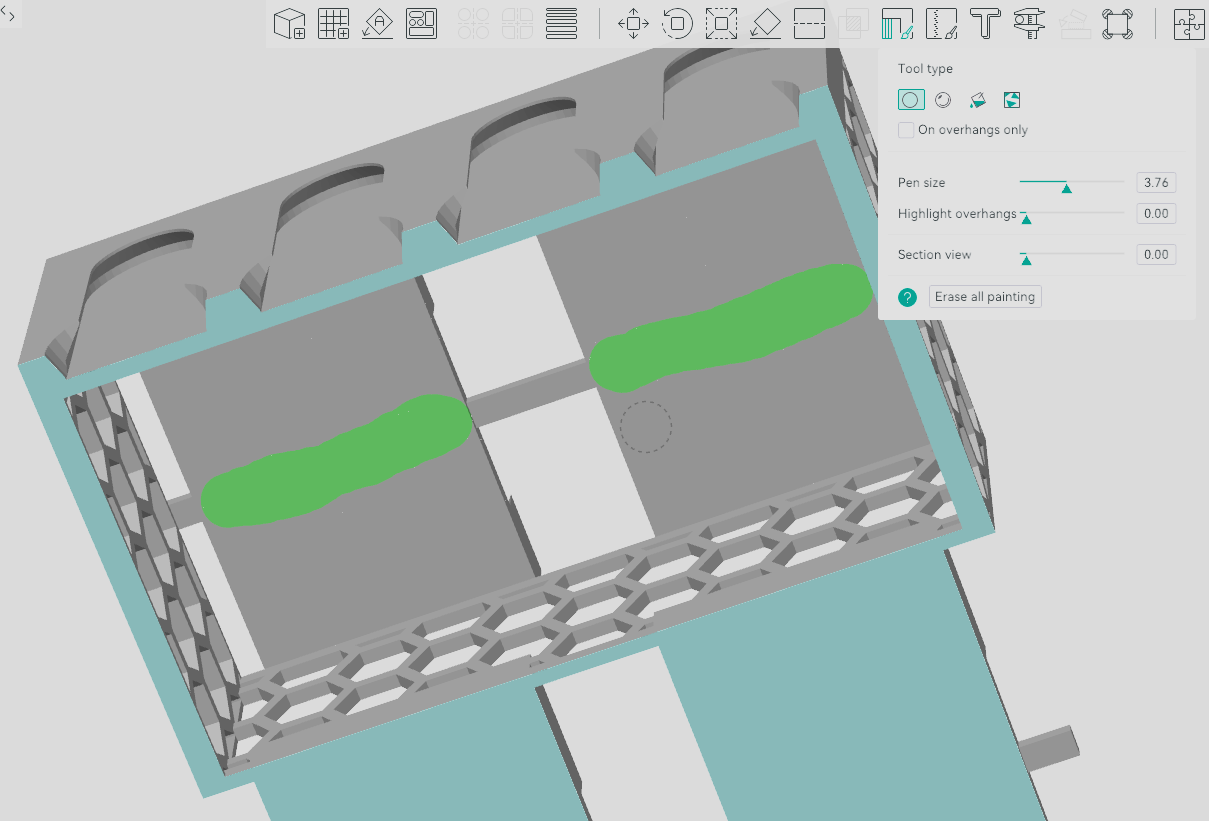
For large bases, you will want to add some tree supports, I manually paint the regions of the bottom of the magnet slot:
🧬 Licensing & Credits
This project is licensed under Creative Commons 4.0 - Attribution Non-Commercial Share Alike.
Remix / based on:
BlackjackDuck's Multiconnect Generator
I used his Round Row generator as base and the Connection code is his work.
Changelog:
19/09/25 - Updated the cad code to support new parameters:
- zigzagColumns;
- SameRowZigzag;
- SameRowZigzagOffset;
Tip: For now the two zigzag modes are not compatible with each other.
Happy printing and may your miniatures always stay organized! 🧙
Parametric Miniature Display with Multiconnect

Publicado em 19 de jul de 2025
Gostou deste modelo? Crie uma conta grátis para salvar seus favoritos e voltar a eles depois.
Criar conta