Você está no 3DFinder
Buscamos em Thingiverse, MakerWorld e Printables ao mesmo tempo para te dar o melhor de cada uma.
Descrição
[ SYSTEM: MULTI-TRAY // V2 ]
This started out as an FDM homage to Dieter Rams and Braun: a minimalist, two-part soap dish. What does Rams have to do with a soap dish? Absolutely nothing. So, after seeing people use it for other stuff (including myself lmao), and the model & print profile being unoptimized for printing (due to the original V1 being a very early model in my 3D printing career), I decided to do a full "V2" overhaul.
I’ve optimized the geometry for better printing, but more importantly, I made the label completely customizable directly in Bambu Studio. There are also two versions, one with a shorter and one with a longer text space.
The walls have been thickened a bit, and the tolerance and attachment points were adjusted, so the final product feels much more sturdy and doesn't rattle like V1.
There are also a set of optional feet, to be secured with a drop of glue if you decide to print them. There is a PLA and a TPU plate (TPU is set to bright pink in the file for clarity).
// TECHNICAL DETAILS
- Two Formats: the original short-label version (perfect for “SOAP”, "KEYS", etc.) and a new, extended-label version for longer text (like “PRINTER”, "SCREWS", etc)
- Dual-Color: The text is set up as the last, single layer second color, so only one color change required
- Specs: 140 × 101 × 21 mm overall, assembled with feet (should I make more sizes? lmk in comments)
- Ironing: ironing on the dotted surface, but not on the topmost surface
// HOW TO CUSTOMIZE THE TEXT
You don't need any CAD software to change the label; you can do it right in Bambu Studio before you print:
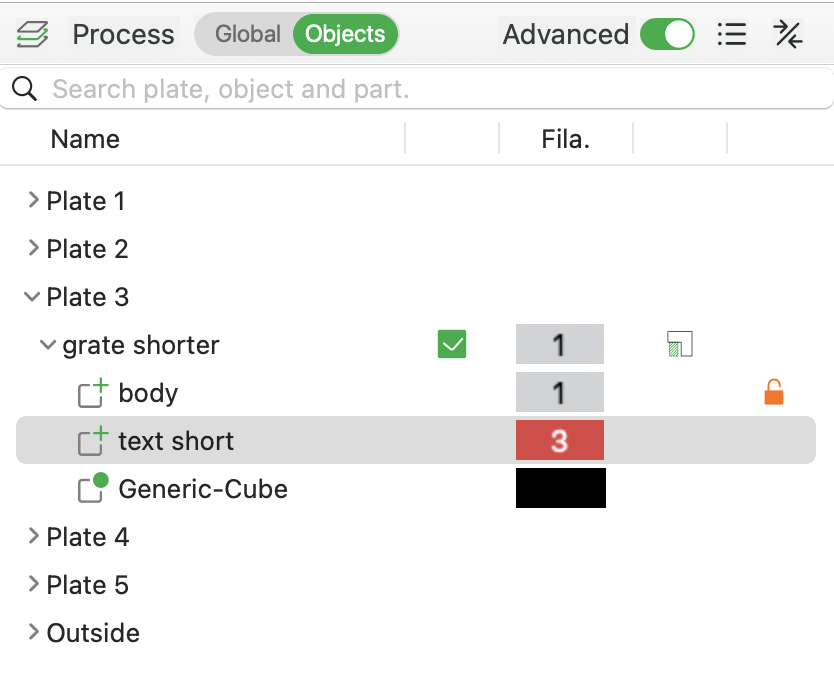
- click on the top grate model on the build plate
- in the left-hand panel, switch from 'Global' to the 'Objects' tab
- expand the model's dropdown by clicking the little arrow
- right-click the text modifier layer and select ‘Edit Text’
- type whatever you want, adjust the font size if needed, and change the color by selecting a different filament slot
- reposition the text to be centered by dragging the small yellow square at the center of the text, or by using the move gizmo
Organize stuff. Label the function.
PS.: that bar of soap i used in the photos is huuge, regular sized soap fits perfectly
© 2025/26 TAKACS --- personal prints only.

Gostou deste modelo? Crie uma conta grátis para salvar seus favoritos e voltar a eles depois.
Criar conta