Você está no 3DFinder
Buscamos em Thingiverse, MakerWorld e Printables ao mesmo tempo para te dar o melhor de cada uma.
Descrição
X-Wing
This is my rendition of the classic X-Wing, complete with moving wings and enshrouded in ornate detail. I have spent quite a bit of time trying to bring this classic fighter ship to life, so I hope you like it!
****************************************
☑ Moving wings
☑ Combines high detail with printability
☑ Prints mostly assembled
****************************************
This fun and addictive little toy is great for any Star Wars fan. Give it to a friend on Star Wars Day. (May the fourth be with you!) Print this nimble little fighter and help save the galaxy!
Printing with CFS or AMS:
This project was designed to use only 4 colors at a time, but if you have access to a second CFS or AMS you can always add more. I personally added black to the windshield for the model in the pictures.
Each plate in the included 3MF file uses 4 colors. There are 5 colors needed in total:
White, Red, Yellow, Grey, and Orange (for the engines). Black is an optional bonus if you have access to a second CFS/AMS.
This project was designed to use only 4 colors at a time, but if you have access to a second CFS or AMS you can always add more.
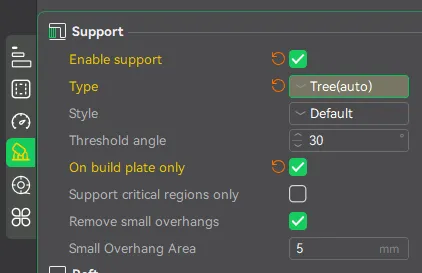
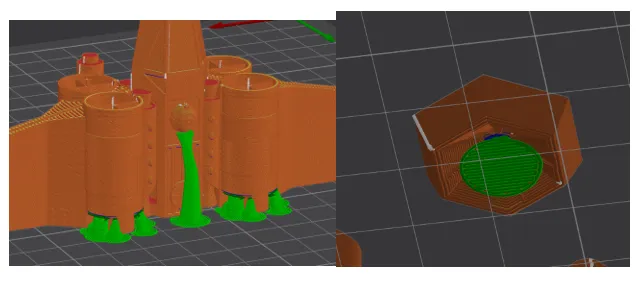
Support:
You will only need a little bit of support.
Assembly:
This project requires a small amount of glue for the rear engines. This was to allow the model to print with as little support as possible.
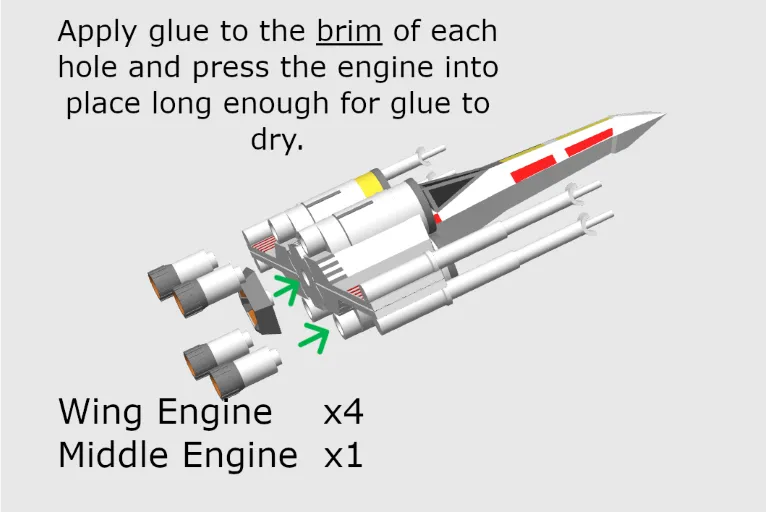
If you printed in only four colors, I recommend painting the cockpit windows black.
Troubleshooting:
The wings won’t unfold…
There could be a couple of reasons for this. Because the tolerances on the joints are tight, sometimes the Z-seams will cause parts to stick together, especially when printing in multiple colors. To get the wing moving, simply grab the wing near the stuck joint and use some force to mobilize it. The wing joints are sturdy, so they should stay intact even if you must break away some sticky plastic in the joint.
I did not have this issue when printing in a single color on my Creality K1C or K1 Max, but I did encounter some sticking on my Bambu X1-Carbon when I printed in multiple colors.
Also, ensure that you have supports enabled only from the build plate. If supports get generated up inside the joint there will almost certainly be problems.
Lastly, ensure your filament is properly dried and your settings are dialed in. Wet filament and improper temperatures/cooling can lead to defects.
Commercial Use:
This model is for PERSONAL USE ONLY.
💲💲💲
If you would like permission to SELL THIS MODEL please subscribe here:
OR
Join my Patreon here:
[https://patreon.com/davidsitgarage](https://patreon.com/davidsitgarage)
Happy Printing!
Gostou deste modelo? Crie uma conta grátis para salvar seus favoritos e voltar a eles depois.
Criar conta