Você está no 3DFinder
Buscamos em Thingiverse, MakerWorld e Printables ao mesmo tempo para te dar o melhor de cada uma.
Descrição
Summary
This is my idea of a case for the Raspberry Pi HQ Camera in combination with a Raspberry Pi Zero W for using the Raspi as WebCam.
There is a nice project called showmewebcam which turns your Raspberry Pi Zero/W into a webcam:
[https://github.com/showmewebcam/showmewebcam](https://github.com/showmewebcam/showmewebcam)
Design-Goals were:
1) Small front footprint
2) can stand on a flat surface without mount and don't tip over to the lens (depends of course on the lens)
3) should look nice
4) all screws from the camera module should be reachable
5) hidden camera cable
6) should be easy adaptable to other Raspberry Pis or useable without direct attached Raspberry
I hope you enjoy it!
Print Settings
Printer:
HEVO
Rafts:
Doesn't Matter
Supports:
Yes
Resolution:
0,2mm
Infill:
yes
Filament: Extrudr PLA
Notes:
The front lid should have a little bit of flex to get it easier around the camera.
I printed everything with white PLA which gives a nice contrast to the HQ Camera Modul.
The back case i printed with support for the USB Port. But if you tuned your printer well, it should also be fine without support.
The USB Port and the SD Card Port are designed with little cut-throu-walls.
Post-Printing
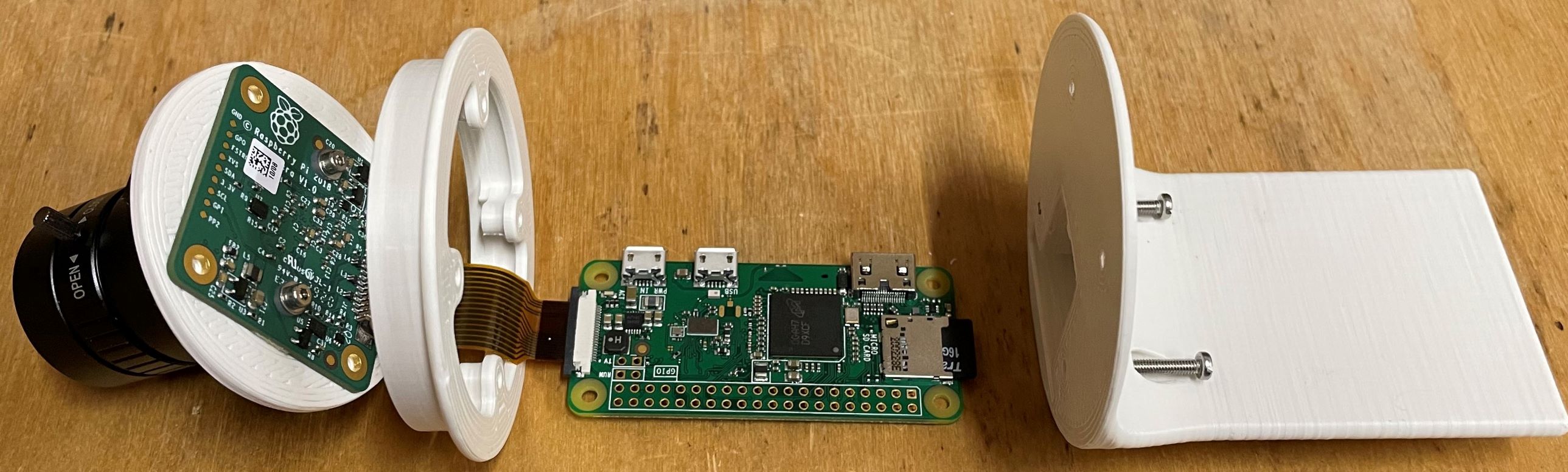
To assemble everything, you need
two M2.5 12mm screws
two M2.5 20mm screws.
The screws go from the very back to the front in the lid.
I first cut the threads in the back and the middle.
Then i pushed carefully the lid around the camera module. This should sit flush around the tube. Maybe some sanding is required because the tolerances are quite small. Depends on your printer.
Connect the camera module to the Raspberry Pi.
The USB Port and the SD Card Port are designed with a little wall. Cut them out.
Screw the 20mm screws in the lower holes until they are flush with the backcase.
Put the Camera-Module with the lid into the case. The holes should all be aligned.
Push the raspberry into the backcase, hold everything together and screw everything together.
Gostou deste modelo? Crie uma conta grátis para salvar seus favoritos e voltar a eles depois.
Criar conta