Você está no 3DFinder
Buscamos em Thingiverse, MakerWorld e Printables ao mesmo tempo para te dar o melhor de cada uma.
Descrição
Hasn't been printed with the new 2.0 Bambu Studio slicer update, recommend printing with a previous version and mapping colors in the slicer manually if needed to ensure quality. Other of my projects have had quality issues printing with the 2.0 slicer update.
Recommendations and explanations for the coaster settings.
- This print was designed so that a 0.4mm nozzle could be used for a significantly reduced print time while still achieving clear and readable fine details. A 0.2mm nozzle would likely allow for an improved final quality and greater flexibility in specific settings, albeit a slower print time.
- System preset: This design uses a modified version of the 0.16mm High Quality @BBL X1C layer height preset. I recommend using either 0.16mm or smaller as a preset. Adaptive layer height is not recommended.
- Painting was optimized for the lowest number of filament changes possible when printing these in bulk.
- Changes I made to the 0.16mm High Quality @BBL X1C layer height preset:
- Wall generator set to "Arachne"
- Sparse infill pattern set to "Adaptive Cubic"
- Infill direction changed to 90 degrees. I found this to give a more "PCA" feel to the green layer, but choose based on your preference
- Speed:
- Inner wall changed to 120mm/s
- Internal solid infill changed to 150mm/s
- Top surface changed to 110mm/s
- Surface patterns:
- Top surface pattern is "Monotonic line"
- Bottom surface pattern is "Monotonic"
- Internal solid infill pattern is "Monotonic line"
- Density and weight distribution
- Kept sparse infill density to 15%, but to give the coasters a bit more "heft" so their center of gravity was lower I adjusted the bottom shell thickness to 7. I recommend testing with half a coaster or so to dial in your preferences. There are more detailed changes to other settings in Top/bottom shells below for a different purpose.
- Changes made to directly impact the silk green surface quality:
- When printing any raised text or design that sits on top of a flat surface, the Bambu slicer will often begin modifying the layers too soon before the layer where the actual text/design begins. This makes sense in cases where there is sparse infill that extends up into the top layers of an STL, but it also occurs when the layers underneath the text/design are intentionally solid infill.
- Depending on the filament types and specific design being used, this may or may not result in negative aesthetic impacts to the print. But because this design relies on silk PLA filament, the defects are extremely noticeable. See below for examples of the undesired results vs the desired results.
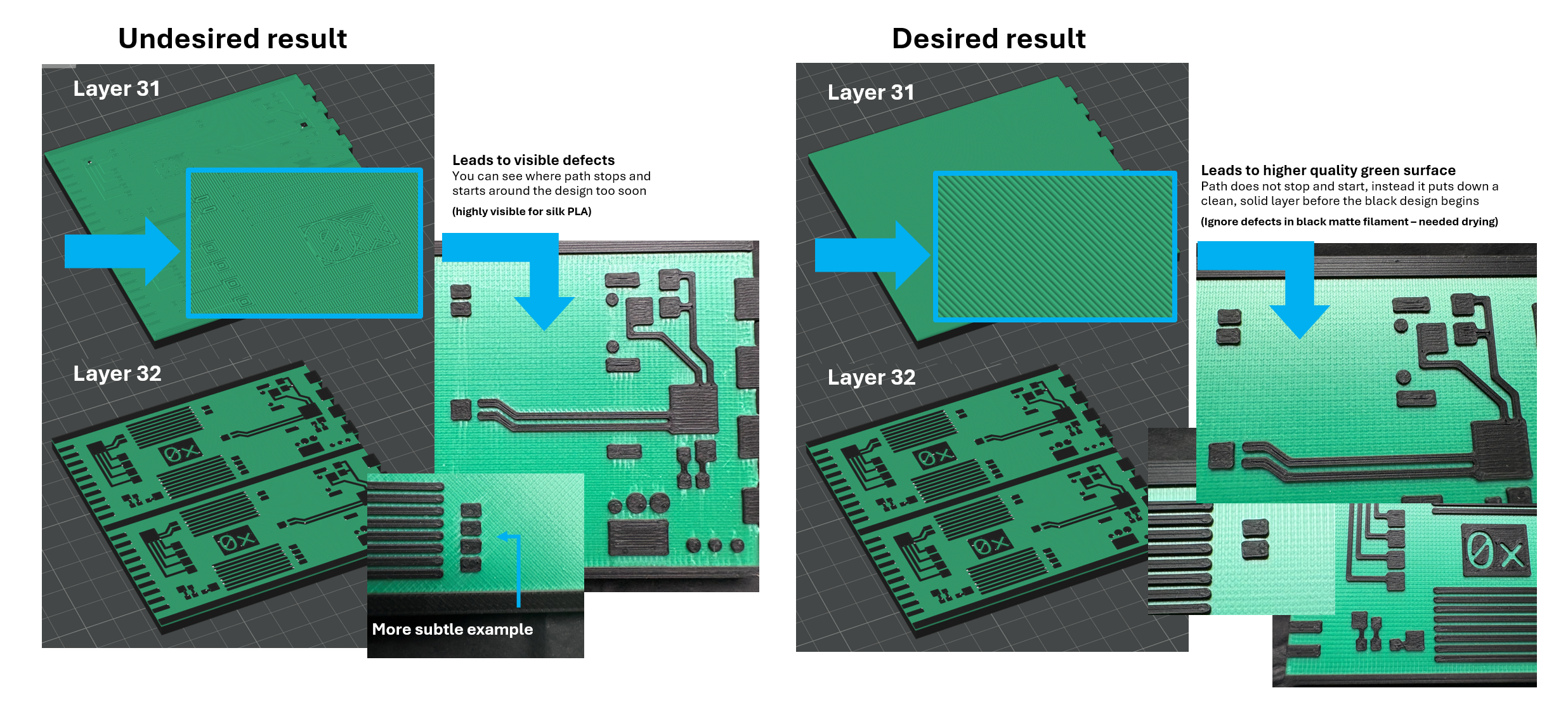
- You can find many reddit/Bambu posts requesting ways to solve this issue. What I have found through experimenting with many of the solutions others have suggested, is that there is a cluster of settings involved and the individual choices for these settings that prevent this from happening vary quite a bit by STL, meaning what works for one STL may vary slightly from another. So it can be challenging to get these just right so that the surface under the text/design is one solid, clean layer. I have not found a "one size fits all" solution, but there are some consistencies across this project and others that I will note alongside the settings for this specific print below.
- Changes required for this print:
- Ensure developer mode is enabled in the slicer
- Enable "Interface shells"
- Change wall loops to 1
- Under "Quality" settings, choose "not applied" for "Only one wall on top surfaces"
- Set top shell layers to "3" (one more or less resulted in the issues for me)
- As noted above, I changed Bottom shell layers to 7 - note changing this to certain values poses the risk of reintroducing the issues.
- For other STLs that have more sparse infill prior to the beginning of text or a design, you may find that making sure there are several layers of solid infill before the beginning of the text/design helps avoid these issues as well. Avoiding sparse infill below the solid green layer is generally best for avoiding noticeable defects in the silk filament.
- Potential solutions for other projects that others have recommended either on reddit or Bambu forums:
- Some people recommend having a 0.1 or so space between the top design and the flat surface it is intended to sit on. I have verified this works for extremely simple designs, but did not want to go this route for this coaster design.
- There are also people recommending specifics around using the "text" features directly in the slicer. I have not validated this as I do not build anything in the slicer.
- There is a post for people using Fusion that I have not validated, but wanted to share in case you find these routes work well for your other projects when dealing with the same issue. (Link to post)
- Links to other relevant Bambu/Reddit threads attempting to address this issue:
- Other notes
- You can use a pair of tweezers to easily remove any small wisps from the black surface design.
- Although often suggested, I do not recommend unchecking the "Reduce infill retraction" option, as I found that it tends to create random defects in the silk layer. You may have a way of avoiding this, but this has been my experience.
- I had the Bambu black matte filament available for this project, in the future I want to try printing this design with the basic black filament to see how it would turn out. For me the matte filaments tend to be hits or misses, and I found for this project the matte introduced a lot of headaches that I had to compensate for - either through increasing the flow or bumping up the temp to get better quality for the surface design. You can see many of these trials and tribulations showcased in the example photos above, unfortunately I do not have photos of the best end results as the coasters have already been distributed at an event.
MakerWorld
Oxide Computer Gimlet Coaster

Publicado em 2 de abr de 2025
1
Curtidas
6
Downloads
2
Coleções
4
Impressões
Categoria
Decor
Tags
oxide
computer
tech
server
coaster
Licença
Standard Digital File License
Gostou deste modelo? Crie uma conta grátis para salvar seus favoritos e voltar a eles depois.
Criar conta