Você está no 3DFinder
Buscamos em Thingiverse, MakerWorld e Printables ao mesmo tempo para te dar o melhor de cada uma.
Descrição
Check out my other models:
Bambu Logo no AMS: [https://makerworld.com/en/models/1128149](https://makerworld.com/en/models/1128149)
Bambu Logo: [https://makerworld.com/en/models/1128141](https://makerworld.com/en/models/1128141)
There are a lot of bed scrapers on maker world, but not a lot of them have solid handles. The ones I have downloaded and used are hard to grip because they do not have a solid handle.
On the solid handle I have added some bumps to help keep a grip on the handle without it slipping. There is also an added 6mm hole to hang the scraper from a small pegboard hook or small nail.
You can use PLA but it'll melt with higher bed temperatures, i'd suggest using PETG for higher bed temperatures.
To customize the text:
- Under the “Objects” process, right click “text_shape” click “edit text” (read further under photo instructions):
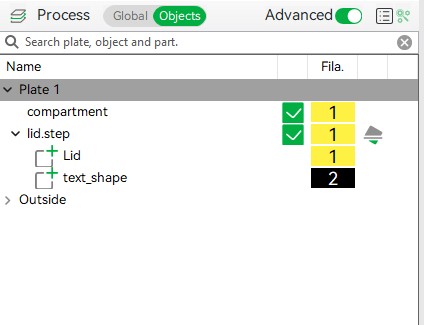
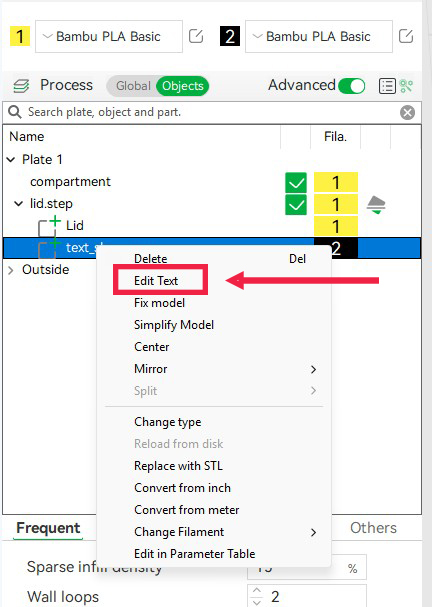
- Edit text menu should appear, if not hit “t” to bring the menu up
- Customize what your container says. Keep the thickness and embedded depth the same. You can change the other settings if you prefer.
To move the text simply drag the text to a new location by selecting only the text from the “text_shape”.