Você está no 3DFinder
Buscamos em Thingiverse, MakerWorld e Printables ao mesmo tempo para te dar o melhor de cada uma.
Descrição
I recently upgraded to the Micro Swiss FlowTech hotend with quick swap nozzles for my X1C and I love it! I use the AMS Riser V2 and needed some bins to store the nozzles, silcone socks, and torque tool. So I designed this modular system that allows for any configuration of 1x2, 1x3, 1x4 or 1xN. I put together a Print Profile with some common variations but the individual components are also included so you can build your own configuration. They all fit inside of the AMS Riser V2 Gridfinity drawers or will work standalone and are stackable.
Benefits
- Work with AMS Riser V2 Gridfinity Drawers
- Work as standalone bins
- Configurable to 1 x N lengths
- Holds Nozzles, Silicone Socks, or Torque Tools
- Endcap and Middle versions of each modular piece
- Left and Right Hand Nozzle components are staggered so if they're back to back, there is a slight gap between them
- Built-In Nozzle Size Labels from 0.2 - 1.0 (.2, .4, .6, .8, and 1)
Components
- Left-Hand Nozzle (holds 3 nozzles and reads with nozzles pointing to the left)
- Right-Hand Nozzle (holds 3 nozzles and reads with nozzles pointing to the right)
- Torque Wrench (comes with hotend from MicroSwiss)
Hotend Silcone Socks (holds 3 socks)
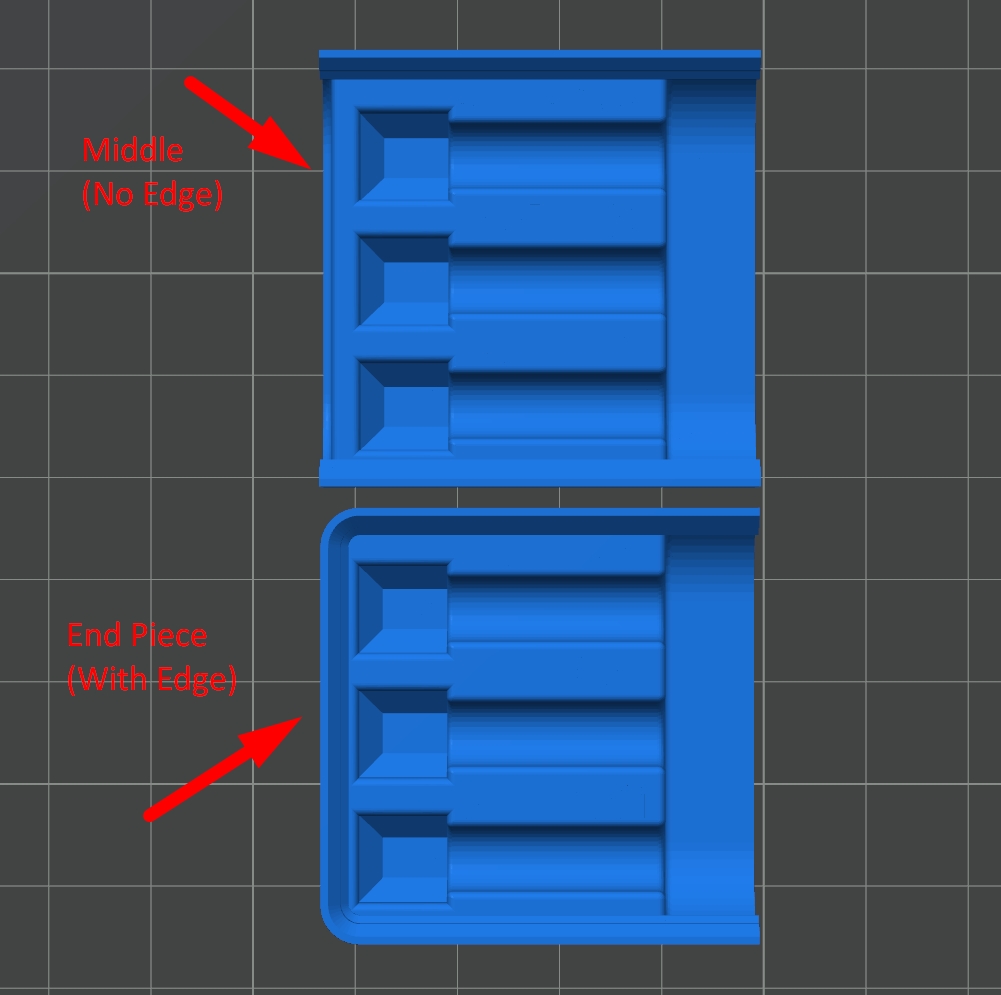
There are “endcap" and “middle” configurations of each parts. So you could put 2 end pieces together to form a 1 x 2
- End + End = 1 x 2
Or, add middles sections to create longer bins
- End + Middle + End = 1 x 3
- End + Middle + Middle + End = 1 x 4
Join Instructions
BambuLab has some tutorials online that explain how to use the Assemble mode in Bambu Studio to join the components. Basically, these are the general steps:
- Move 2 bodies into the general you want them to be in after joining, but leave a gap in between each so you can click the opposing faces.
- Select two pieces and Click the Assemble menu item in the top bar
- Select Face-and-Face mode (Point and Point works if you're having trouble but is slightly more complicated)
- Select the Face of the first body and then select the face of the second body
- Set all of the distances input values to 0 and click Center Coincidence
That should merge them into an Assembly in the Objects tab of the slicer. If you need to merge more than 2 parts, be sure to select the first Assembly as the first part and then click the next / 3rd part last. In that case, the last part you click will be moved into position with the other parts so you don't misalign the 1st and 2nd parts. Alternatively, you could go ahead and merge to create one Assembly and then merge that Assembly with the next part but I like it better when it's all in one Assembly.
Nozzle Size Labels
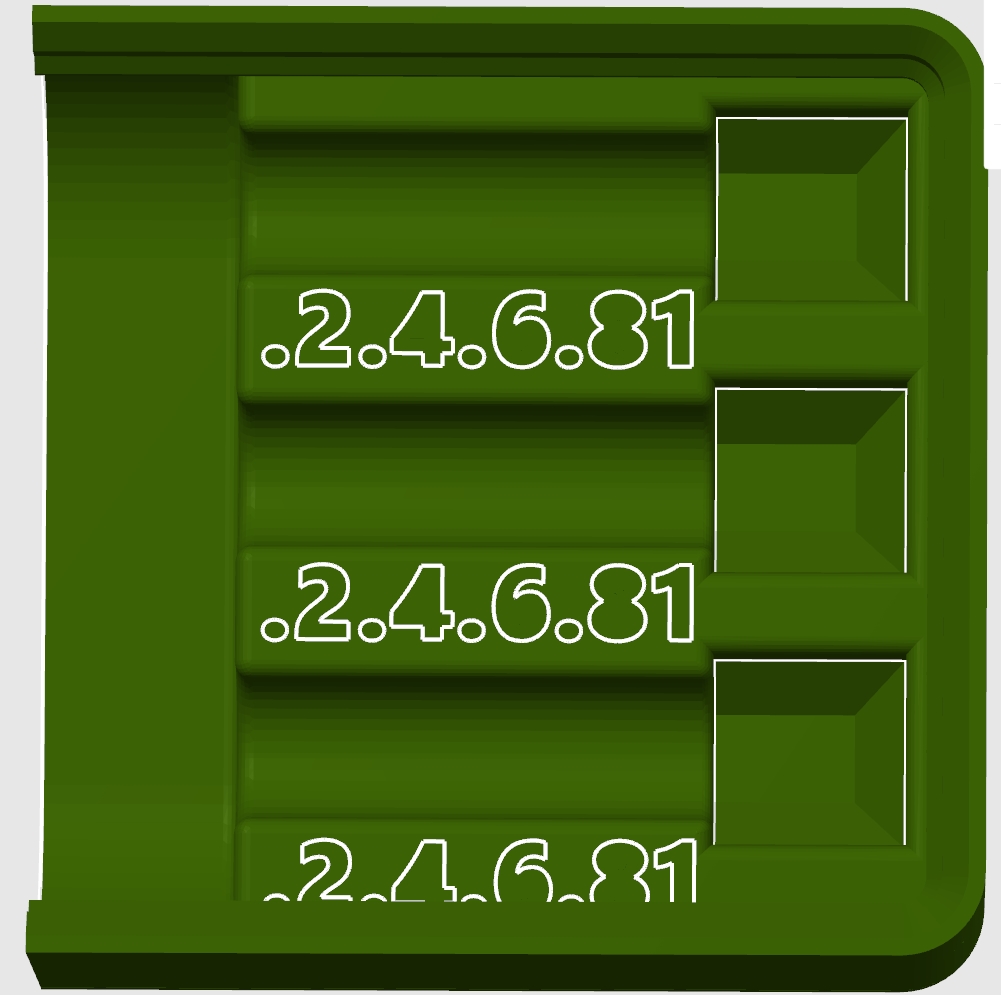
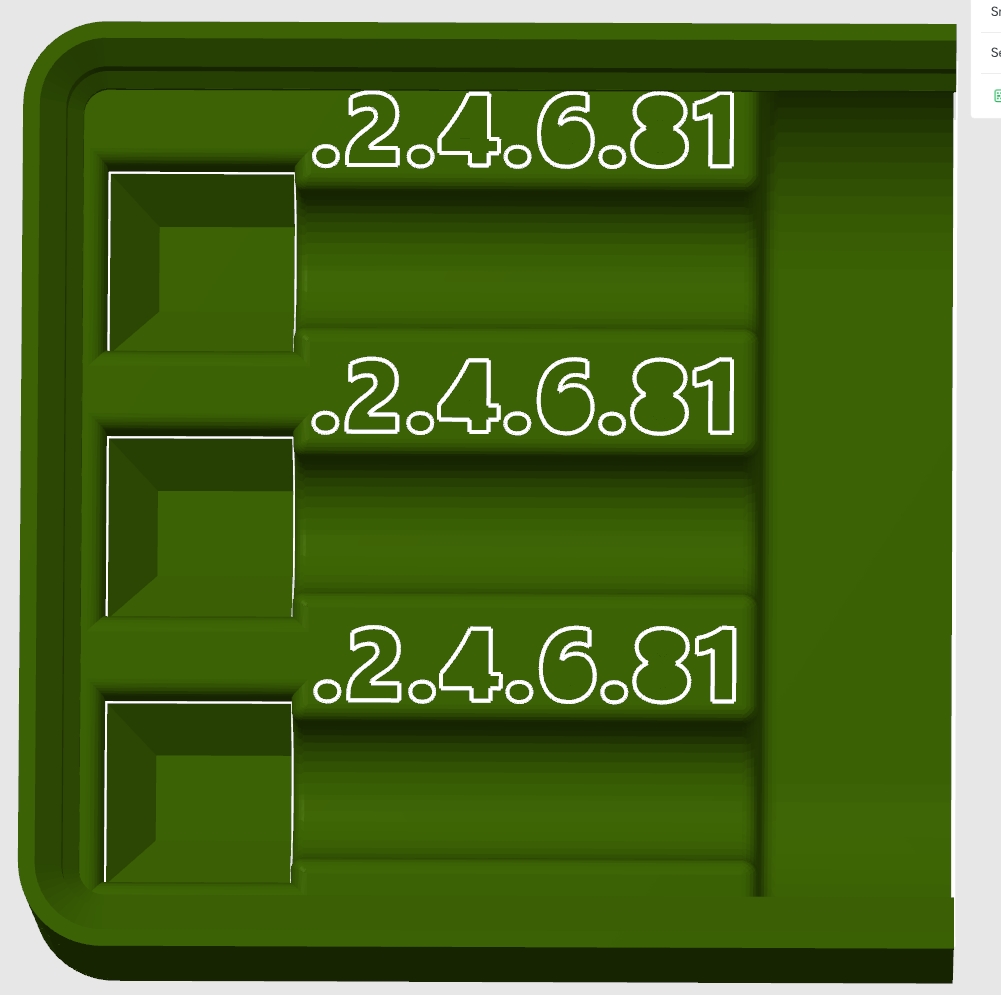
The Nozzle Components have a 0.02mm emboss of nozzle sizes that you can just paint to add multi-color labels. The beauty of this method makes it really easy to paint the items but the layer difference is too small for the slicer to recognize and do anything about. That means that anything you're not coloring, will print in the exact same layer height as the rest of the component. So labels you don't use, won't be recognizable.
The size labels are .2, .4, .6, .8, and 1 in order. The Left-Hand nozzle component has the rounded Endcap on the left side, and the Right-Hand component is on the right side. But if you switch to Paint mode in the slicer, you can easily paint the nozzle sizes in a different color depending on your needs. The inner openings of the 4, 6, and 8 are there but just don't show in the screenshot.
Micro Swiss FlowTech Hotend
I love this system so far and it makes for easy nozzle swaps (done cold) using the included Torque Wrench. I highly recommend that you check them out. I will be doing a quick YouTube video review as well but haven't published that yet. I'm able to achieve much higher flow rates (up to 35-50 vs the standard OEM hotend rates) which allows for faster printing.
[https://store.micro-swiss.com/collections/micro-swiss-flowtech/products/flowtech-hotend-for-bambu-lab-x1-and-p1-printers](https://store.micro-swiss.com/collections/micro-swiss-flowtech/products/flowtech-hotend-for-bambu-lab-x1-and-p1-printers)
Modular Gridfinity Micro Swiss FlowTech Hotend Bin

Publicado em 15 de fev de 2025
Gostou deste modelo? Crie uma conta grátis para salvar seus favoritos e voltar a eles depois.
Criar conta