Você está no 3DFinder
Buscamos em Thingiverse, MakerWorld e Printables ao mesmo tempo para te dar o melhor de cada uma.
Descrição
Eureka Dial Indicator – Precision Grind Control Made Easy!
Introducing the Eureka Dial Indicator, the ultimate upgrade for your Eureka Mignon Silenzio grinder and compatible with other grinders in the Eureka brand lineup. Designed to provide precise and repeatable grind adjustments, this 3D-printed dial makes switching between espresso and filter coffee effortless, so you can dial in your perfect grind every time. No longer to you need to remember complex combinations of rotations from zero for your coffee (like below), just use one scale 0~16!
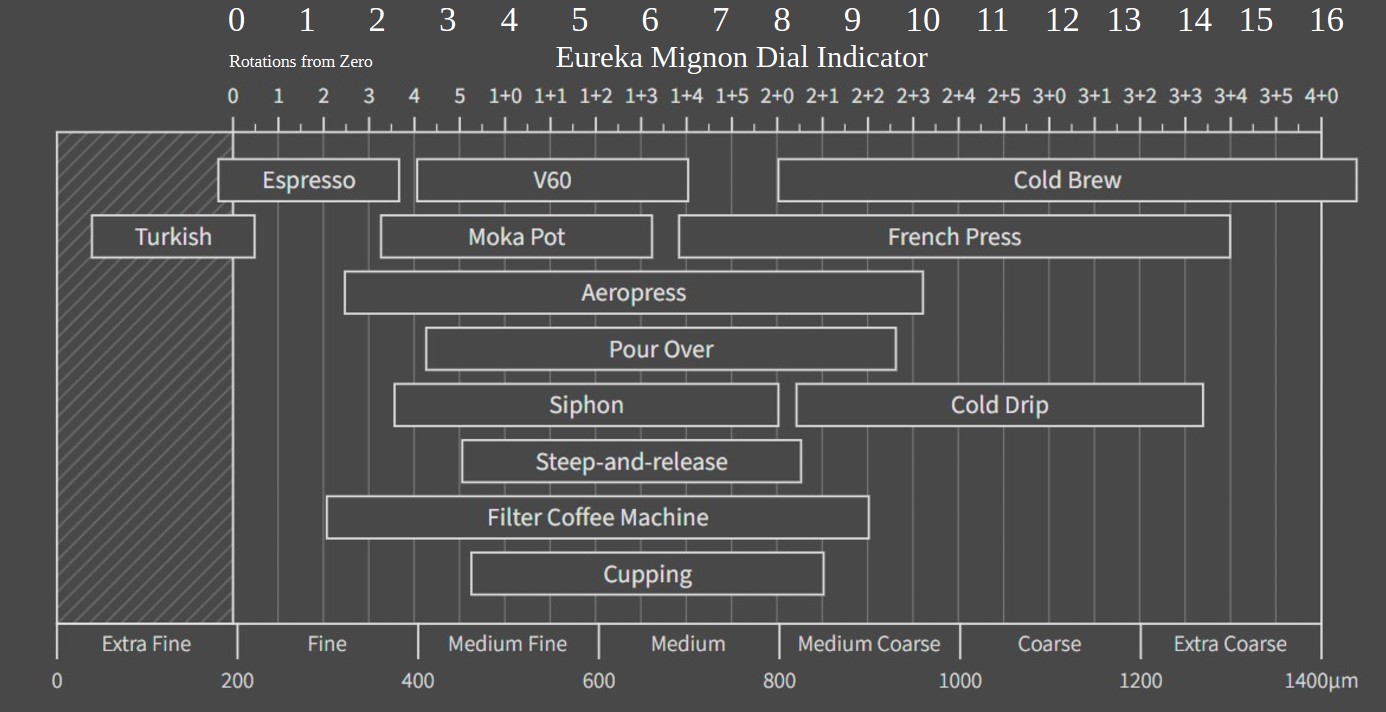
Key Features:
✅ Compatible with Eureka Grinders: Specifically designed for the Eureka Mignon Silenzio, this dial is also compatible with other Eureka grinders using the same control gear design.
✅ 4:1 Gear Ratio for Precision: 16 main increments and 80 minor increments give you unparalleled control over grind size—1 for espresso, 12-16 for cold brew.
✅ Lightweight & Efficient: Uses just 70g of PLA filament, making it an easy and economical print.
✅ Tight Drop-In Design for Stability: The dial gear is secured by a shell component that fits snugly over the grinder. This tight drop-in design, combined with the retaining screw for the hopper, ensures the indicator stays securely in place without unwanted movement or shifting.
✅ Eliminates the Hassle of Tracking Settings: No more guessing or remembering how many turns you’ve made! Espresso grind settings range between 0+0 and 0+4, while filter coffee sits between 0+2 and 2+1, which can overlap and make tracking confusing (as shown in the image). With the Eureka Dial Indicator, you can visually track your settings at a glance, ensuring a smooth and hassle-free experience.
✅ Easy Adjustment if Too Tight: If needed, loosen and retighten a few times or apply a small amount of food-safe grease to reduce friction while maintaining fine control.
Designed for Coffee Lovers
As self confessed coffee dependant (I'm not addicted there's a difference); I created this model to solve the hassle of keeping track of grind settings when switching between espresso on weekends and cold brew for grab-and-go coffee during the workweek. After multiple iterations, I found that a tighter fit improves precision, ensuring the dial stays put during use.
Installation Instructions:
Follow these simple steps to install your Eureka Dial Indicator:
- Remove the Bean Hopper: Unscrew and carefully set the hopper aside.
- Remove the Existing Control Knob: Unscrew the knob from the grinder and set it aside.
- Fit the Shell:
- Align the shell component with the grinder, ensuring the white arrow is facing forward.
- Place the shell over the grinder. The fit is snug, so take your time to ensure it seats correctly.
- Secure the Shell:
- Partially screw in the retaining screw for the bean hopper to hold the shell in place. This will help properly align and seat the shell.
- Place the Dial Gear: Place the dial gear in position but not all the way down. Now install the hopper and screw in the retaining screw, as this won't be accessible once the dial is in place.
- Mesh the Gears: Mesh the gears of the dial and control gear prior to screwing in the control gear. The dial gear will gradually lower into place as you screw in the control gear.
- Note: You may need to do this a few times to loosen the control gear and realign the dial gear. Personally, unscrewed the whole assembly three times to loosen things. In addition, I have aligned the '1' position with espresso (previously 0+3 ~ 0+4).
That’s it! Your Eureka Dial Indicator is now installed and ready to provide precise and repeatable grind adjustments.
The Bottom Line
The Eureka Dial Indicator is a simple yet effective way to upgrade your Eureka Silenzio or other compatible Eureka grinders for more precise, repeatable adjustments. Whether you're dialing in a perfect espresso shot or prepping for a smooth cold brew, this tool ensures your grind is just right, every time!
Eureka Dial Indicator – Precision Made Easy!

Publicado em 9 de fev de 2025
Gostou deste modelo? Crie uma conta grátis para salvar seus favoritos e voltar a eles depois.
Criar conta